EasyManua.ls Logo

HP f800g - The Recording Screen

HP f800g
40 pages
Print Icon
To Next Page IconTo Next Page
To Previous Page IconTo Previous Page
Loading...
23
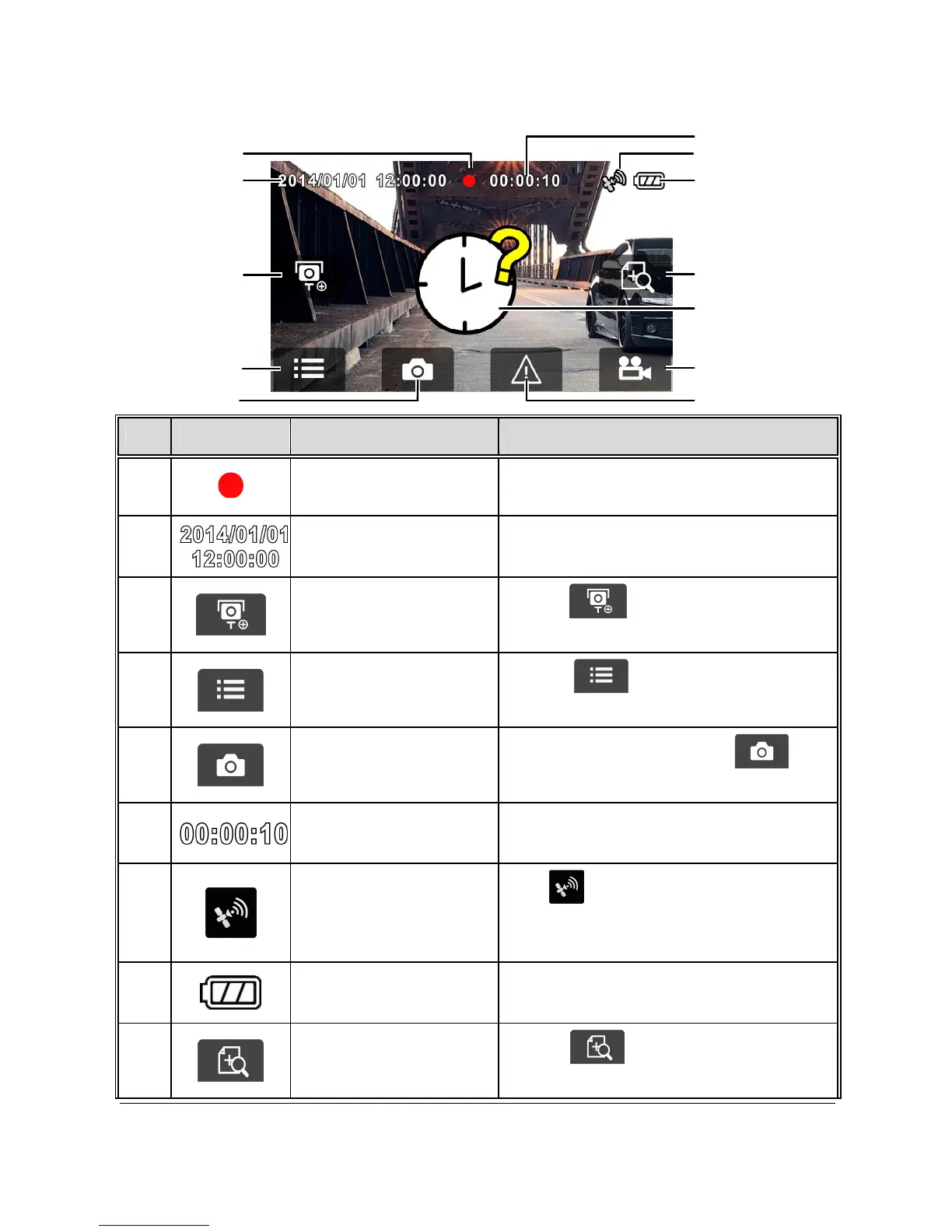
3.1.7 The Recording Screen
11
4
2
8
9
12
10
1
5
6
7
3
No.
Icon Item Description
1
Recording
Icon
Indicates the recording status.
2
Date / Time
Indicates the current recording date
and time.
3
Add speed point
Touch to add a speed cam
point.
4
Menu
Touch to enter the main
menu.
5
Taking Snapshot
While recording, touch to
take a photo.
6
Recording Duration
Indicates the video current
duration.
7
Satellite positioning
icon
The icon appears on the screen
when satellite positioning of the
camcorder is ready.
8
Battery
Indicates the remaining
battery power.
9
4 GRID FUNCTION
CHART in the LCD
Touch to enter the 4 GRID
FUNCTION CHART in the LCD screen.

Other manuals for HP f800g

Related product manuals