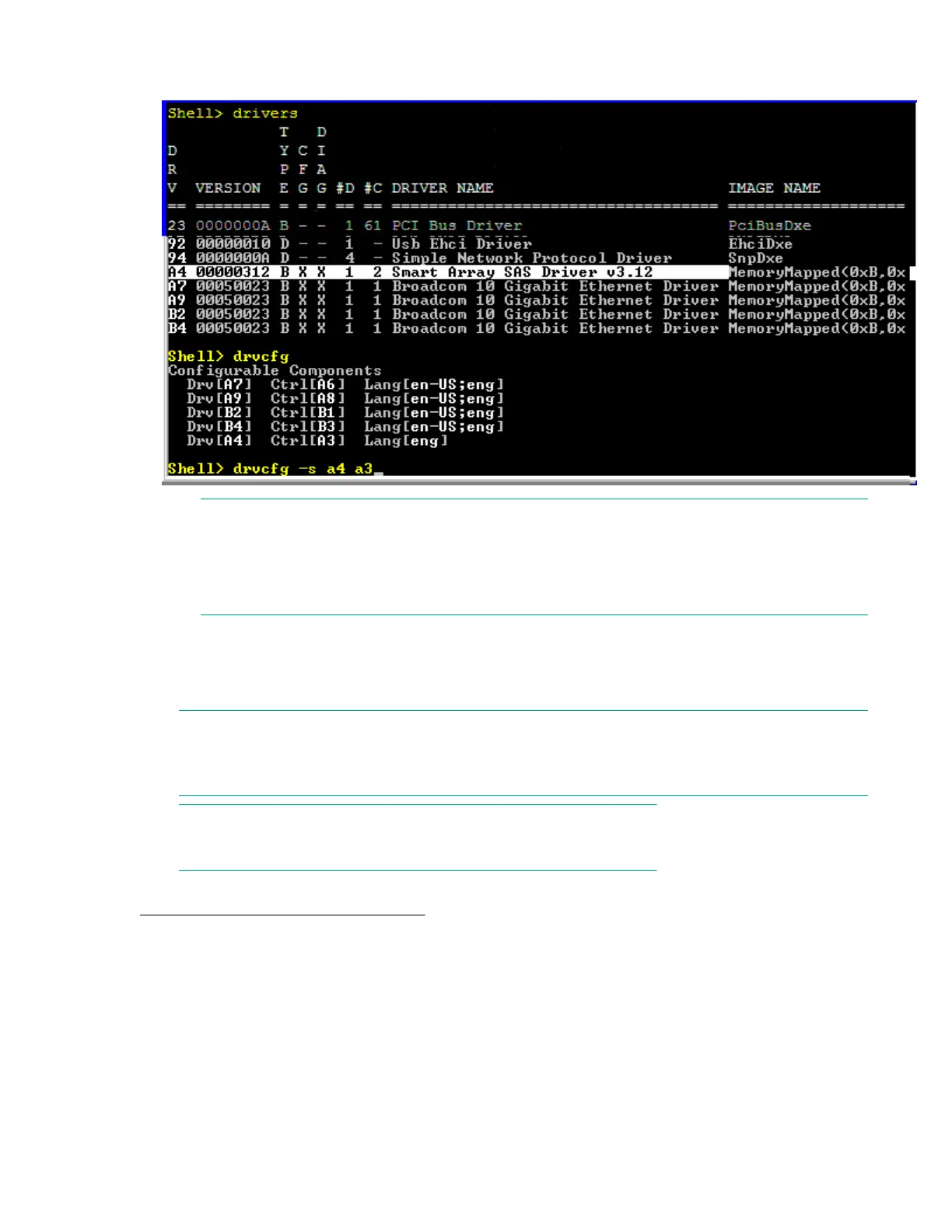
3. Use the drvcfg command.
4. Find the SAS Host Bus Adapter’s Driver ID in the list, and make a note of the corresponding Ctrl ID.
NOTE:
If the drivers listing shows X under CFG and DIAG, the drive is in RAID mode and you can run
drvcfg against it.
If the drivers listing shows - under CFG and DIAG, the drive is in HBA mode.
Configuring RAID volumes using the ORCA menu-driven
interface
NOTE:
The function keys cannot be used in ORCA if you are using a serial console. Substitute ESC
followed by the corresponding number key. For example, F3 would be Esc-3.
NOTE:
ORCA will not launch if there is no hard disk drive in the server blade.
From the UEFI Shell, enter drvcfg -s <Driver ID> <Ctrl ID>. To locate this information, see
Determining the Driver ID and CTRL ID on page 135.
136 Configuring RAID volumes using the ORCA menu-driven interface









 To Next Page