Component Description
(3) Vent Enables airflow to cool internal components.
NOTE: The computer fan starts up automatically to
cool internal components and prevent overheating. It
is normal for the internal fan to cycle on and off during
routine operation.
(4) Expansion port Connects an optional VGA cable, which allows you to
connect an external VGA monitor or projector.
(5) Audio-out (headphone) jack/Audio-in (microphone)
jack
Produces sound when connected to optional powered
stereo speakers, headphones, earbuds, a headset, or
television audio. Also connects an optional computer
headset microphone, stereo array microphone, or
monaural microphone.
WARNING! To reduce the risk of personal injury,
adjust the volume before putting on headphones,
earbuds, or a headset. For additional safety
information, refer to the Regulatory, Safety and
Environmental Notices.
NOTE: When a device is connected to the jack, the
computer speakers are disabled.
(6) RJ-45 (network) jack Connects a network cable.
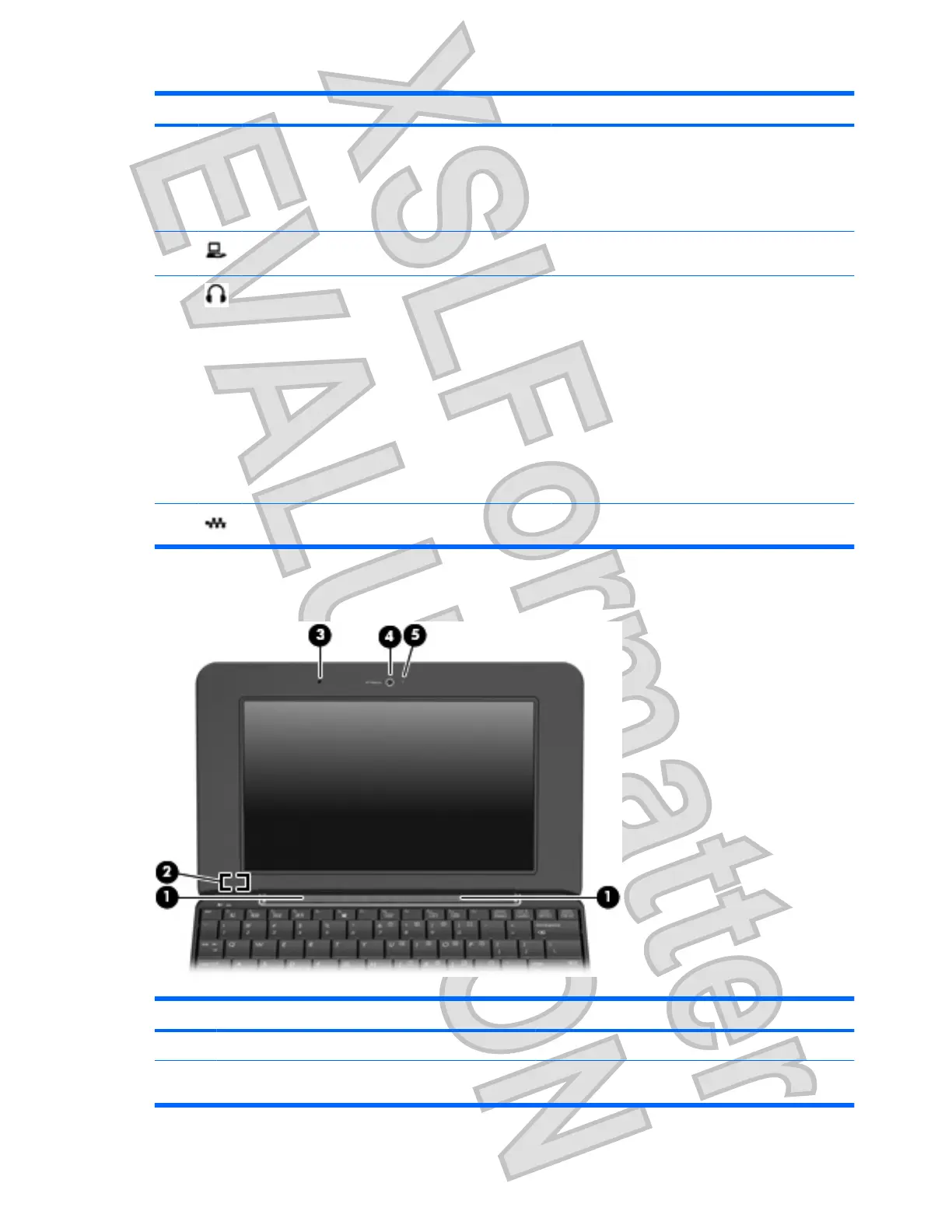
Display components
Component Description
(1) Speakers (2) Produce sound.
(2) Internal display switch Turns off the display if the display is closed while the
power is on.
6 Chapter 1 Features
Antenna House XSL Formatter (Evaluation) http://www.antennahouse.com/












 To Next Page