7 USB devices
Using a USB device
Universal Serial Bus (USB) is a hardware interface that can be used to connect an optional external
device, such as a USB keyboard, mouse, drive, printer, scanner, or hub. Devices can be connected to
the computer, an optional docking device, or an optional expansion product.
Some USB devices may require additional support software, which is usually included with the device.
For more information about device-specific software, refer to the manufacturer's instructions.
The computer has 2 USB ports, which support USB 1.0, USB 1.1, and USB 2.0 devices. Depending on
the model, the computer may also have a USB SmartDrive, which supports an optional HP Disk-On-
Key. An optional USB hub, optional docking device, or an optional expansion product provides additional
USB ports that can be used with the computer.
Connecting a USB device
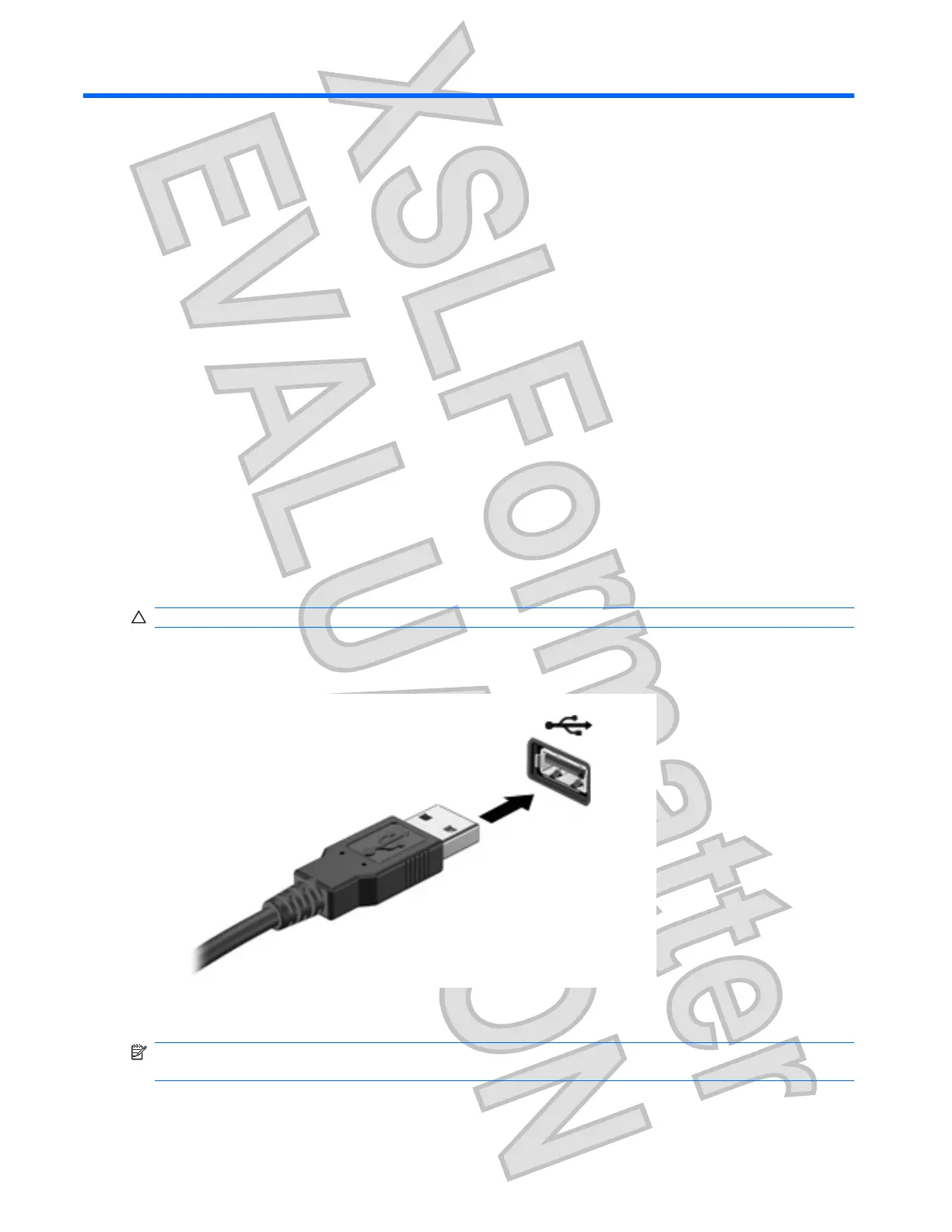
CAUTION: To prevent damage to a USB connector, use minimal force to connect a USB device.
To connect a USB device to the computer, connect the USB cable for the device to the USB
port.
You will hear a sound when the device has been detected.
NOTE: When you connect a USB device, you may see a message in the notification area to let you
know that the device is recognized by the computer.
46 Chapter 7 USB devices
Antenna House XSL Formatter (Evaluation) http://www.antennahouse.com/











 To Next Page