Muting speaker sound (fn+f8)
Press fn+f8 to mute speaker sound. Press the hotkey again to restore speaker sound.
Decreasing speaker sound (fn+f10)
Press fn+f10 to decrease speaker sound. Hold down the hotkey to decrease speaker sound
incrementally.
Increasing speaker sound (fn+f11)
Press fn+f11 to increase speaker sound. Hold down the hotkey to increase speaker sound
incrementally.
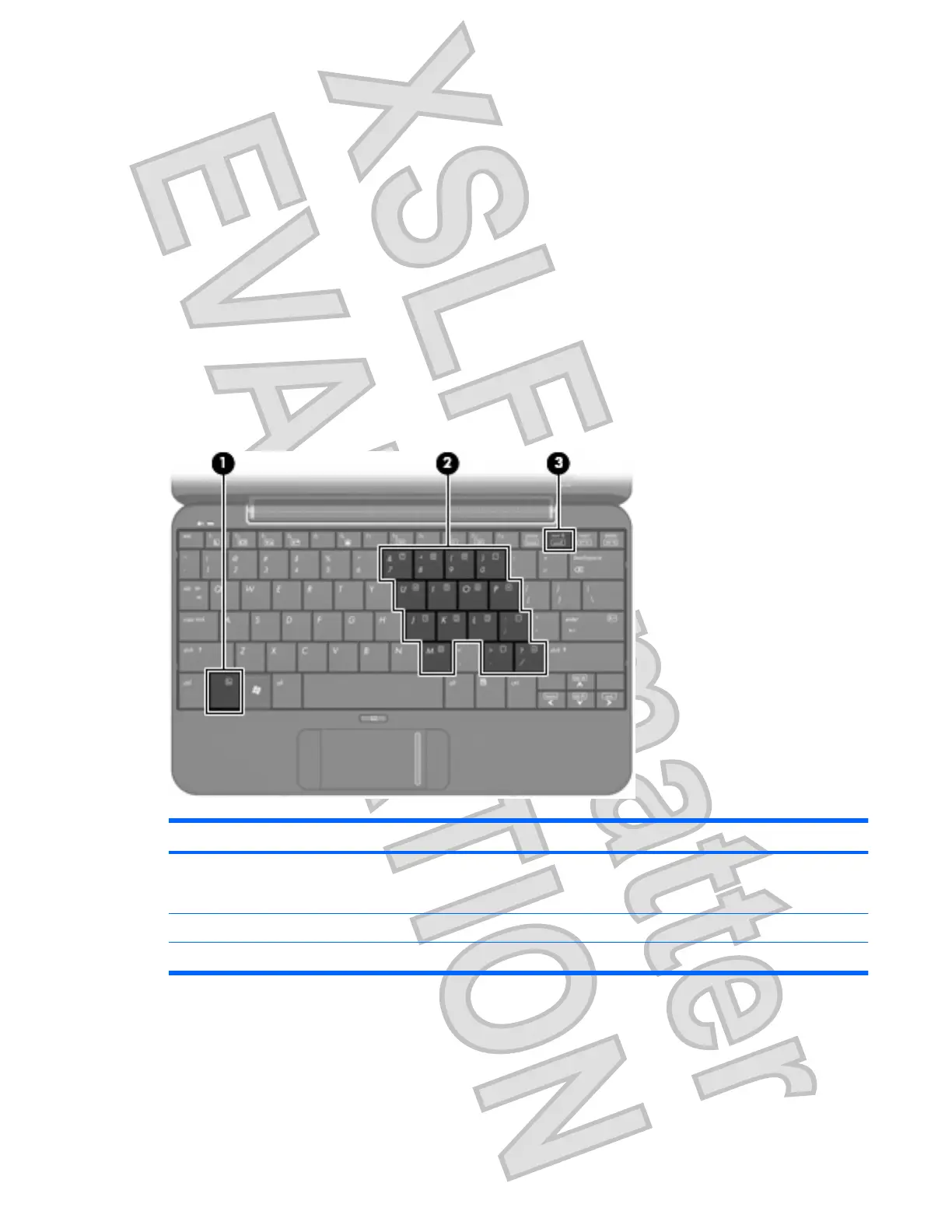
Using keypads
The computer has an embedded numeric keypad and also supports an optional external numeric keypad
or an optional external keyboard that includes a numeric keypad.
Component Description
(1) fn key Alternates the functions of the keys on the embedded numeric
keypad when pressed in combination with a keypad key or the
shift key.
(2) Embedded numeric keypad Can be used like the keys on an external numeric keypad.
(3) num lk key Enables the embedded numeric keypad.
Using the embedded numeric keypad
The 15 keys of the embedded numeric keypad can be used like the keys on an external keypad. When
the embedded numeric keypad is turned on, each key on the keypad performs the function indicated by
the icon in the upper-right corner of the key.
Using keypads 53
Antenna House XSL Formatter (Evaluation) http://www.antennahouse.com/













 To Next Page