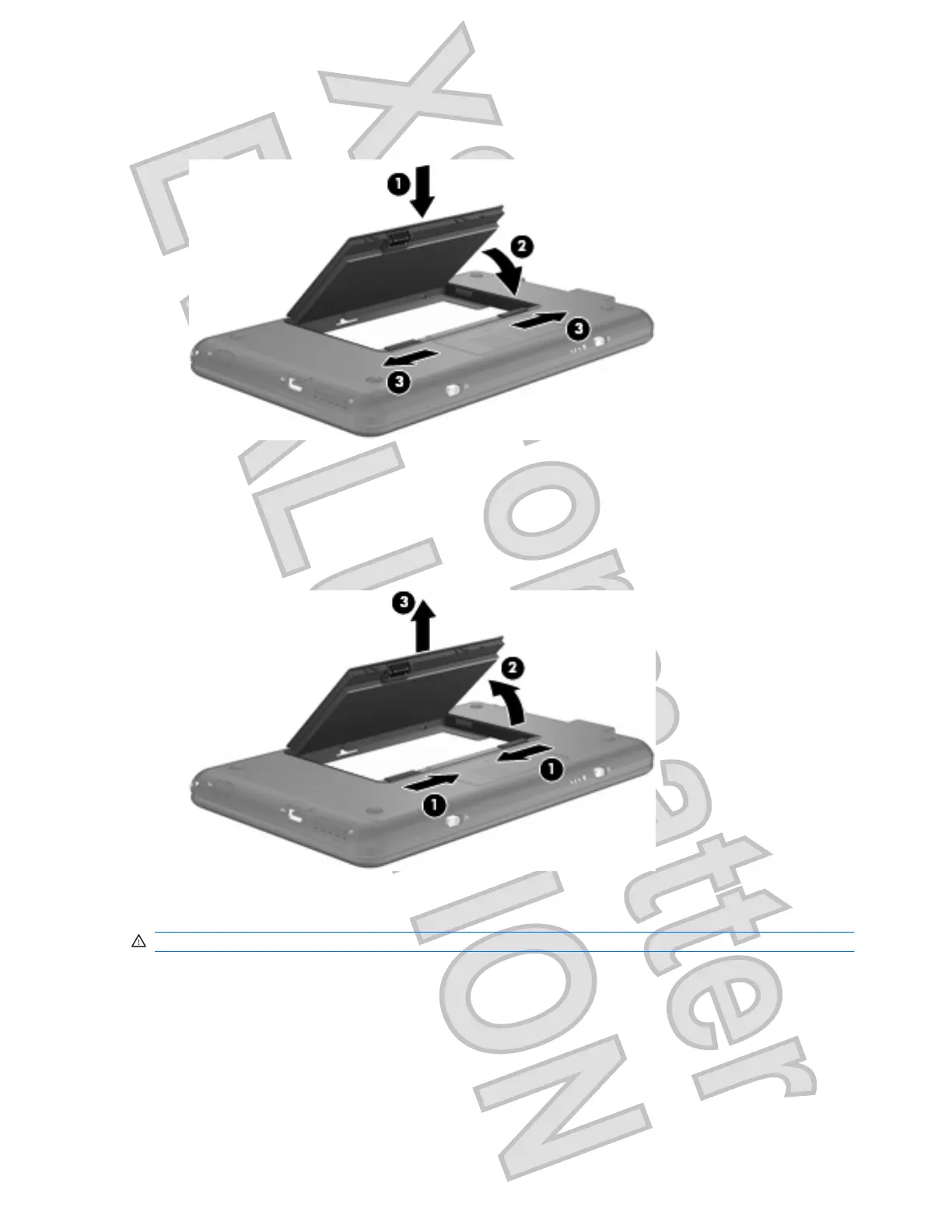
2. Insert the battery into the battery bay (1) and rotate it downward until it is seated (2).
The battery release latches (3) automatically lock the battery into place.
To remove the battery:
1. Turn the computer upside down on a flat surface.
2. Slide the battery release latches (1) to release the battery.
3. Pivot the battery (2) upward and remove the battery from the computer (3).
Charging a battery
WARNING! Do not charge the computer battery while you are onboard aircraft.
The battery charges whenever the computer is plugged into external power through an AC adapter, an
optional power adapter, an optional docking device, or an optional expansion product.
The battery charges whether the computer is off or in use, but it charges faster when the computer is
off.
Charging may take longer if a battery is new, has been unused for 2 weeks or more, or is much warmer
or cooler than room temperature.
16 Chapter 2 Power management
Antenna House XSL Formatter (Evaluation) http://www.antennahouse.com/











 To Next Page