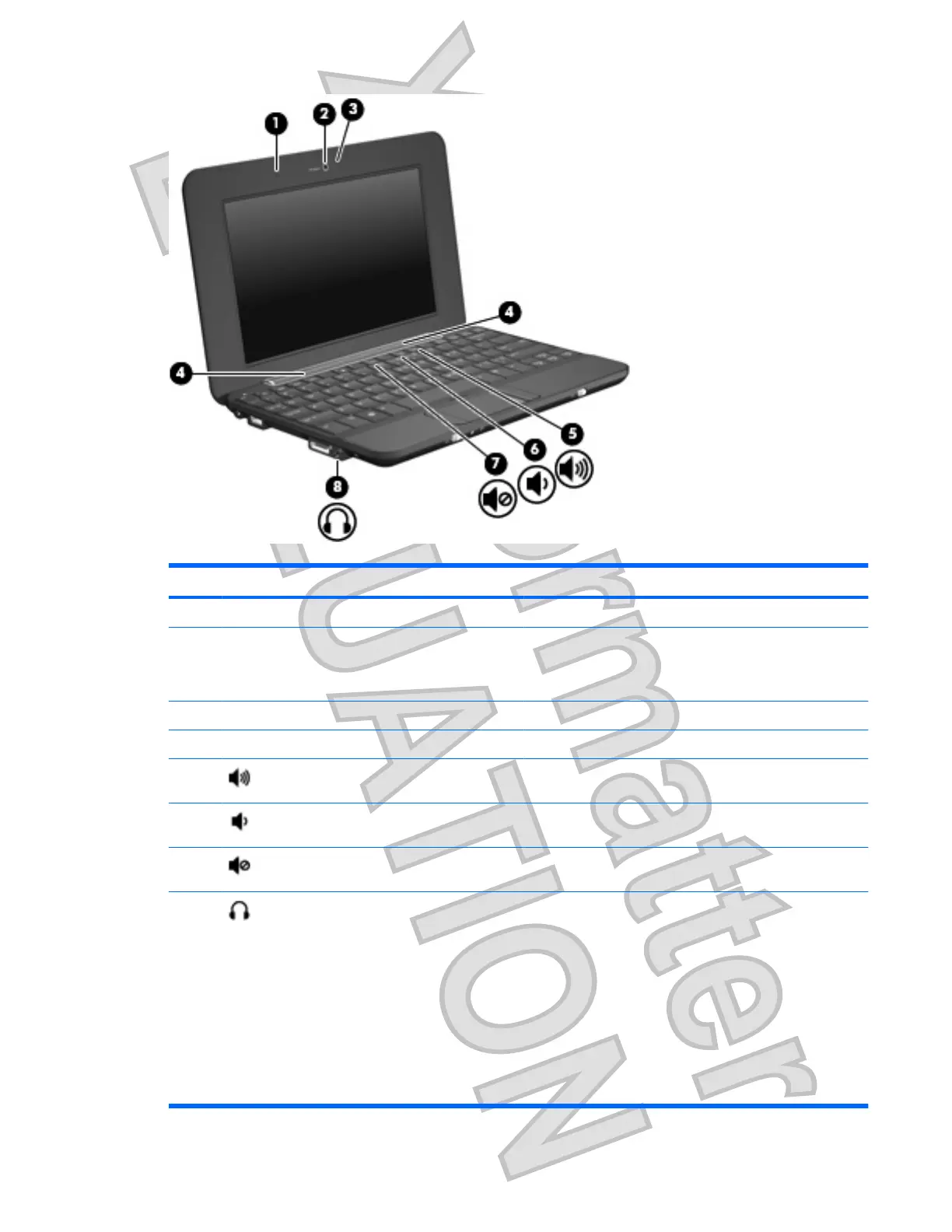
Component Description
(1) Internal microphone Records sound.
(2) Webcam Captures still photographs.
NOTE: For additional webcam features, you can install
optional software to expand the webcam experience.
(3) Webcam light On: The webcam is in use.
(4) Speakers (2) Produce sound.
(5) Volume up hotkey Increases computer sound when pressed in combination with
the fn key.
(6) Volume down hotkey Decreases computer sound when pressed combination with
the fn key.
(7) Volume mute hotkey Mutes computer sound when pressed in combination with the
fn key.
(8) Audio-out (headphone) jack/Audio-in
(microphone) jack
Produces sound when connected to optional powered stereo
speakers, headphones, earbuds, a headset, or television
audio. Also connects an optional computer headset
microphone, stereo array microphone, or monaural
microphone.
WARNING! To reduce the risk of personal injury, adjust the
volume before putting on headphones, earbuds, or a headset.
For additional safety information, refer to the Regulatory,
Safety and Environmental Notices.
NOTE: When a device is connected to the jack, the
computer speakers are disabled.
Multimedia features 31
Antenna House XSL Formatter (Evaluation) http://www.antennahouse.com/












 To Next Page