Display panel
IMPORTANT: Install the new display panel together with all other parts in the replacement kit. Do not reuse
any old parts. Return all old parts to HP for warranty processing.
CAUTION: it is very important to use the exact cable that shipped with the replacement panel. Failure to use
the correct cable may result in panel failure.
To remove the display panel:
1. Prepare the computer for disassembly (see Preparing to disassemble the computer on page 19).
2. Remove the rear port cover (see Rear port cover on page 23).
3. Remove the stand (see Attaching and removing a stand on page 20).
4. Remove the access panel (see Access panel on page 24).
5. Remove the optical drive (see Replacing the optical drive on page 30).
6. Remove the system board shield (see System board (EMI) shield on page 32).
7. Remove the top trim (see Top trim on page 48).
8. Remove the right trim (see Right trim on page 51).
9. Remove the bottom panel and trim (see Feet, bottom panel and trim on page 53).
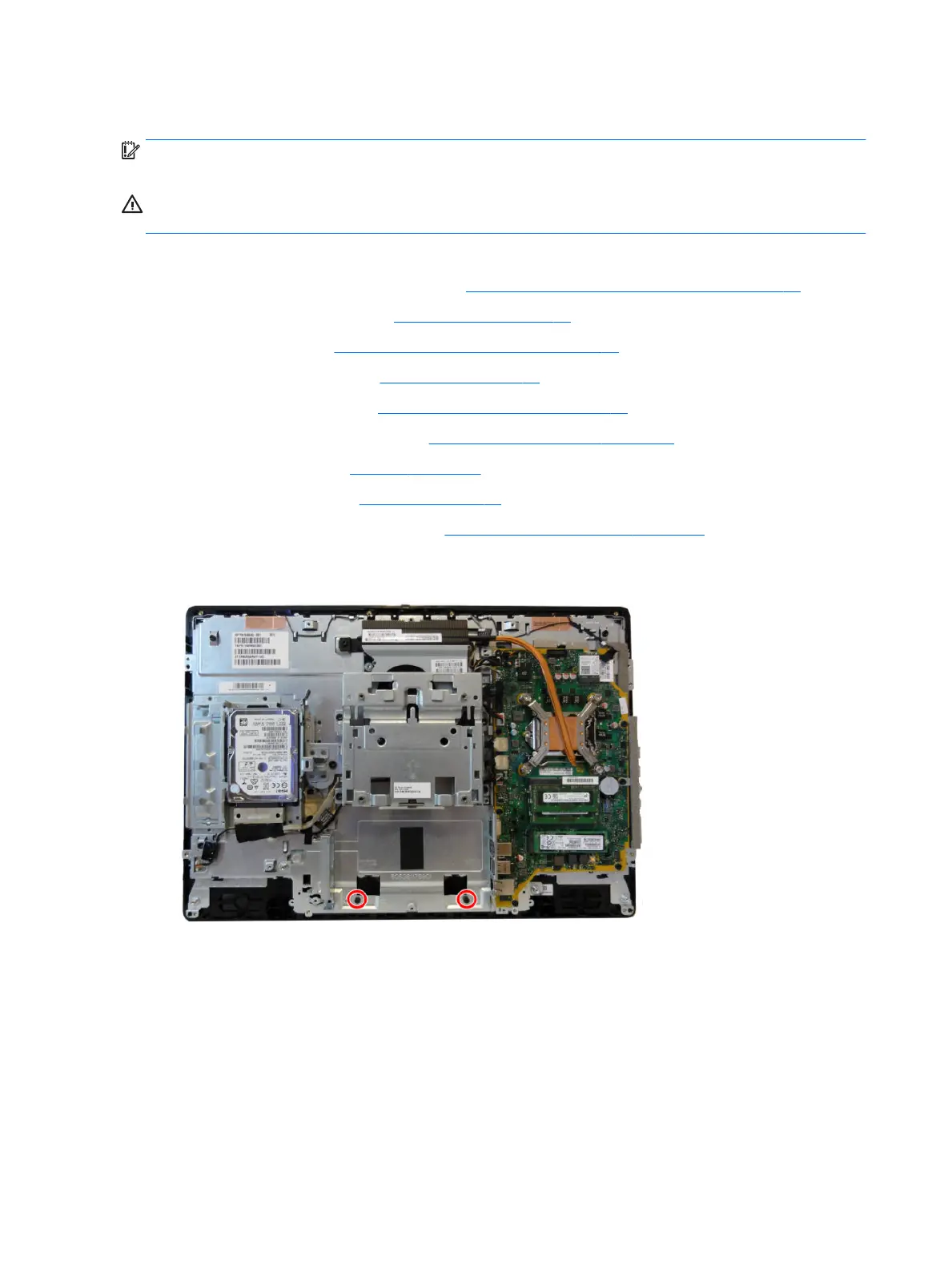
10. Non-touch models: To separate the bezel from the main frame, remove the two Torx screws that secure
the bezel to the frame.
56 Chapter 4 Removal and Replacement Procedures








 To Next Page