13 U S B c o n f i g u r a t i o n
The router provides a USB 2.0-compliant port for network-connected users to share files through
FTP or File Sharing. The files can be on an attached storage device that supports any number
of partitions in VFAT, NTFS, EXT2, EXT3, or EXT4 format.
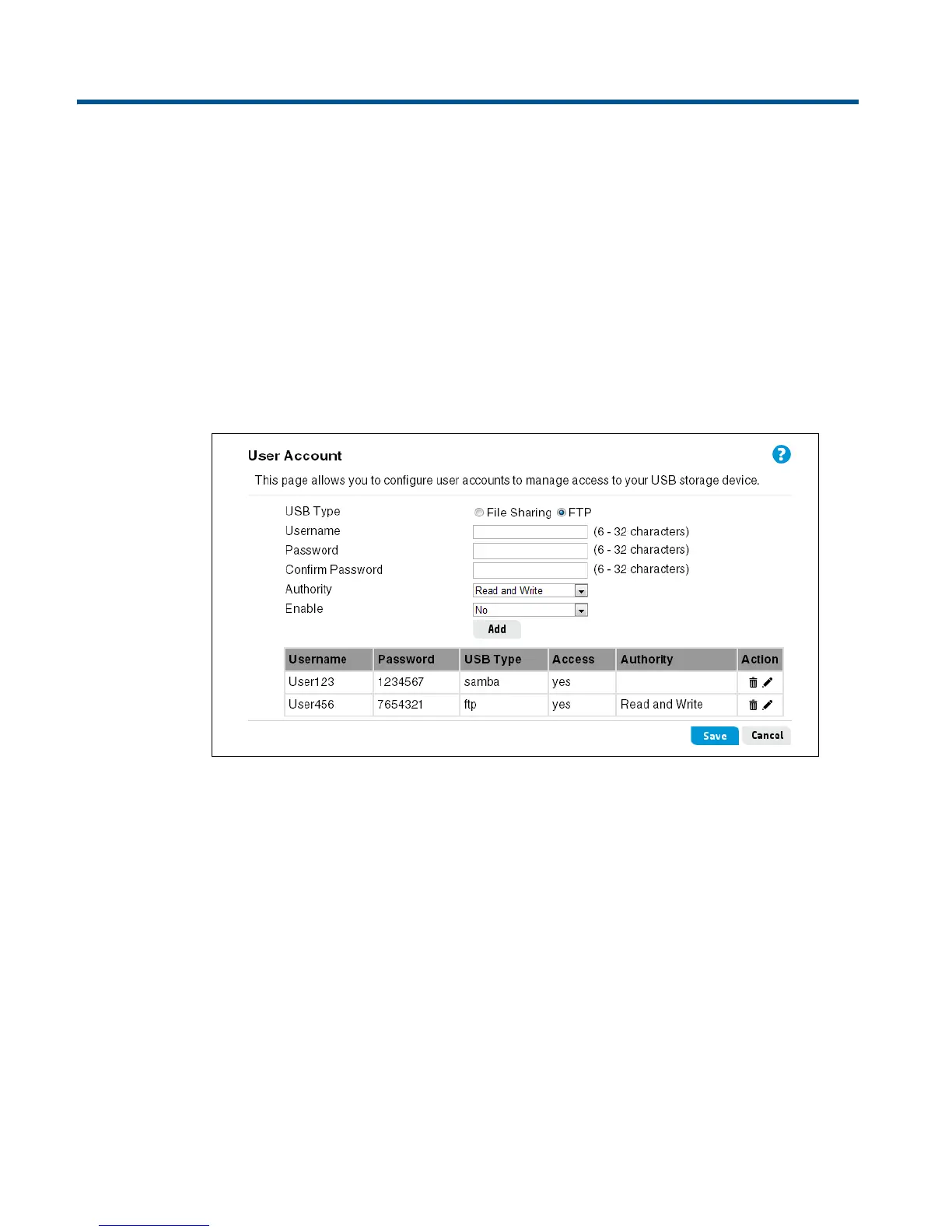
User Account
A File Sharing user can use Windows Network Neighborhood to access files on a USB drive.
An FTP user can log into the FTP server using an FTP client. A maximum of eight File Sharing
accounts and eight FTP accounts can be defined (total 16 accounts maximum).
This page includes the following settings:
USB Type
Selects a user account for access to USB files through File Sharing or FTP.
Username
Enter a name containing 6 to 32 characters (do not use characters ! # $ % ^ & * ( ) + ~ ` " ' {
} [ ] | \ / : ; ? > < , = or space).
Password
Enter a password containing 6 to 32 characters (do not use two or more successive spaces, or
characters ` " & ' # \).
Confirm Password
Enter the same password for confirmation.


 To Next Page
 Loading...