94 Firewall configuration
URL filtering
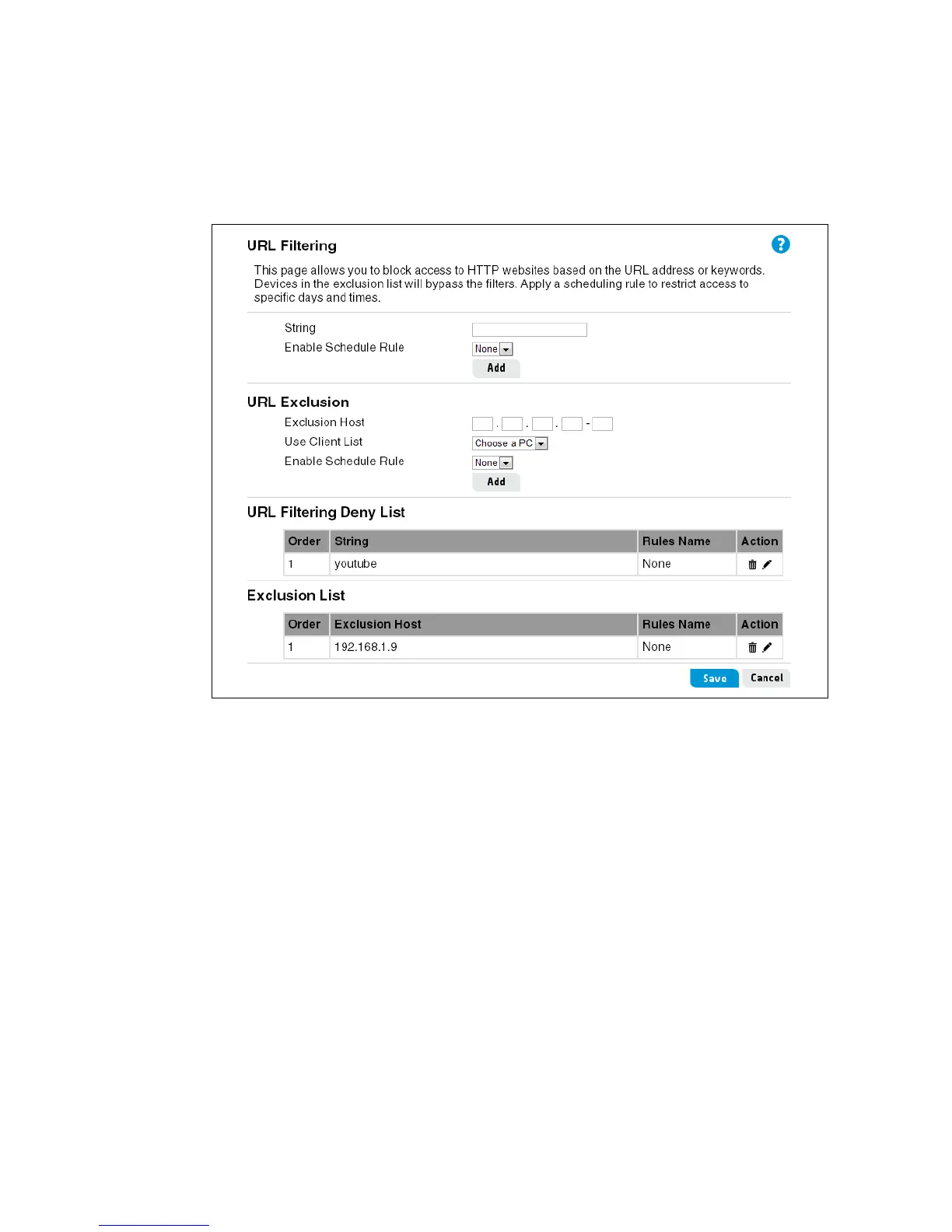
The URL Filter feature blocks access to websites based on matching a specified URL address or
specific keywords (HTTPS is not supported). For each filter rule, enter the URL address or a
keyword, and then select a time schedule rule to apply, if needed. Also, specified computers on
the local LAN can be excluded from the URL filtering by adding them to the Exclusion List. A
maximum of 20 URL filter rules and 10 URL exclusion rules can be defined.
This page includes the following settings:
String
The URL text or keywords that match websites to block.
Enable Schedule Rule
The name of a scheduling rule to apply to the filter, as configured on the Tools > Scheduling
page.
URL Exclusion
Configures specific computers on the local LAN that are excluded from the URL filtering.
• Exclusion Host: The IPv4 address, or range of addresses, of computers on the local
network to exclude from the URL filtering.
• Use Client List: Selects a computer name or IP address from the list of clients already
assigned an IP address by the router.
• Enable ScheduleRule: The name of a scheduling rule to apply to an excluded host, as
configured on the Tools > Scheduling page.


 To Next Page