128 Tools
Scheduling
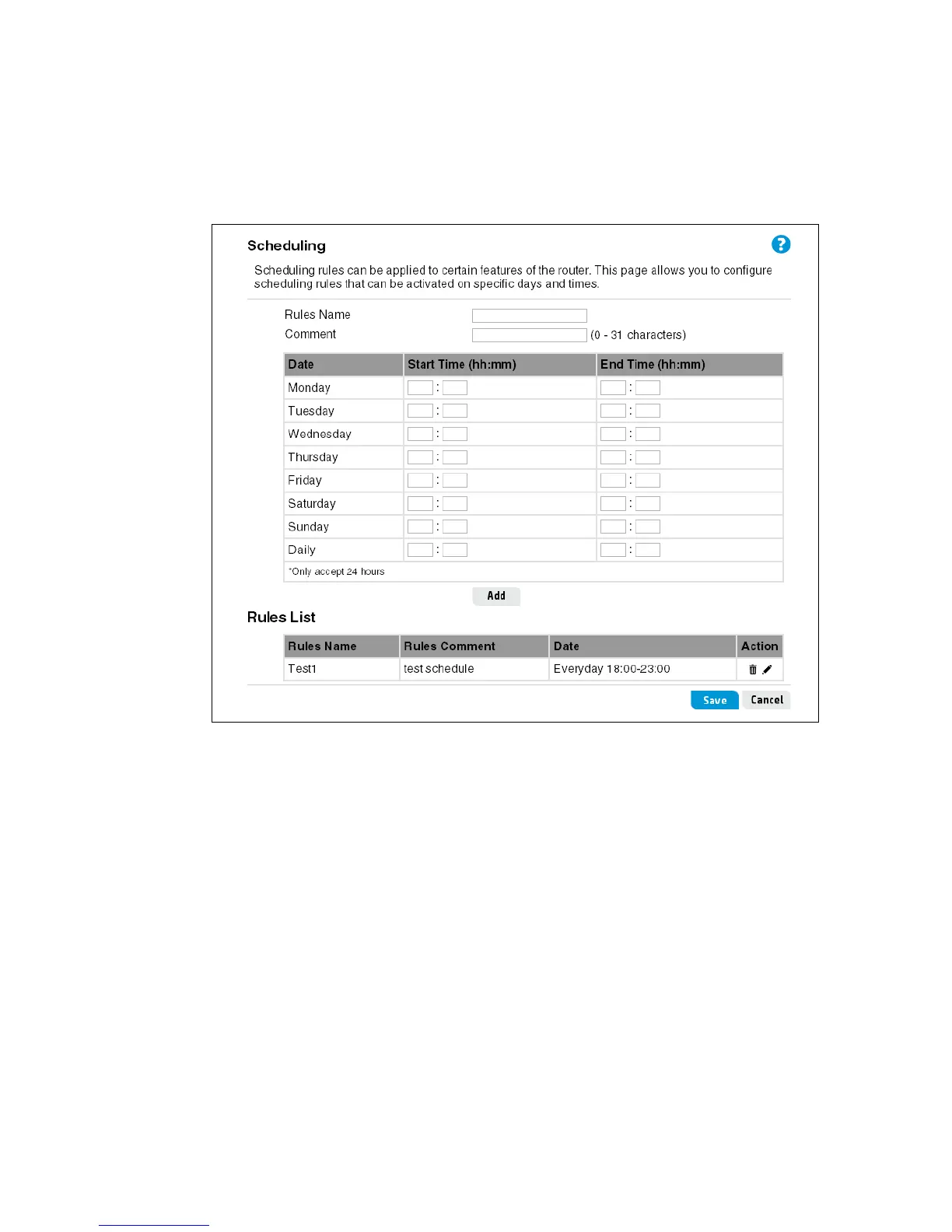
The Scheduling feature enables the scheduling of access control and LAN server rules. Each
access control or LAN server rule can be selectively activated at a predefined scheduled time.
The user must first define a schedule rule on the Scheduling page, and then associate the
schedule rule with a control rule on the Firewall and Wireless pages. A maximum of 10
schedule rules can be defined.
This page includes the following settings:
Rules Name
A name for the scheduling rule. (Do not use the characters ` “ & ‘ # \.)
Comment
A comment of up to 31 characters that describes the scheduling rule. (Do not use the characters
` “ & ‘ # \.)
Date
Selects a day of the week, or daily.
Start/End Time
Specify the start and end times for the schedule in the standard 24 hour format.
Rules List
This table includes all the configured schedules on the router.


 To Next Page