General administration settings 25
General administration settings
The Admin page configures the following settings for the router:
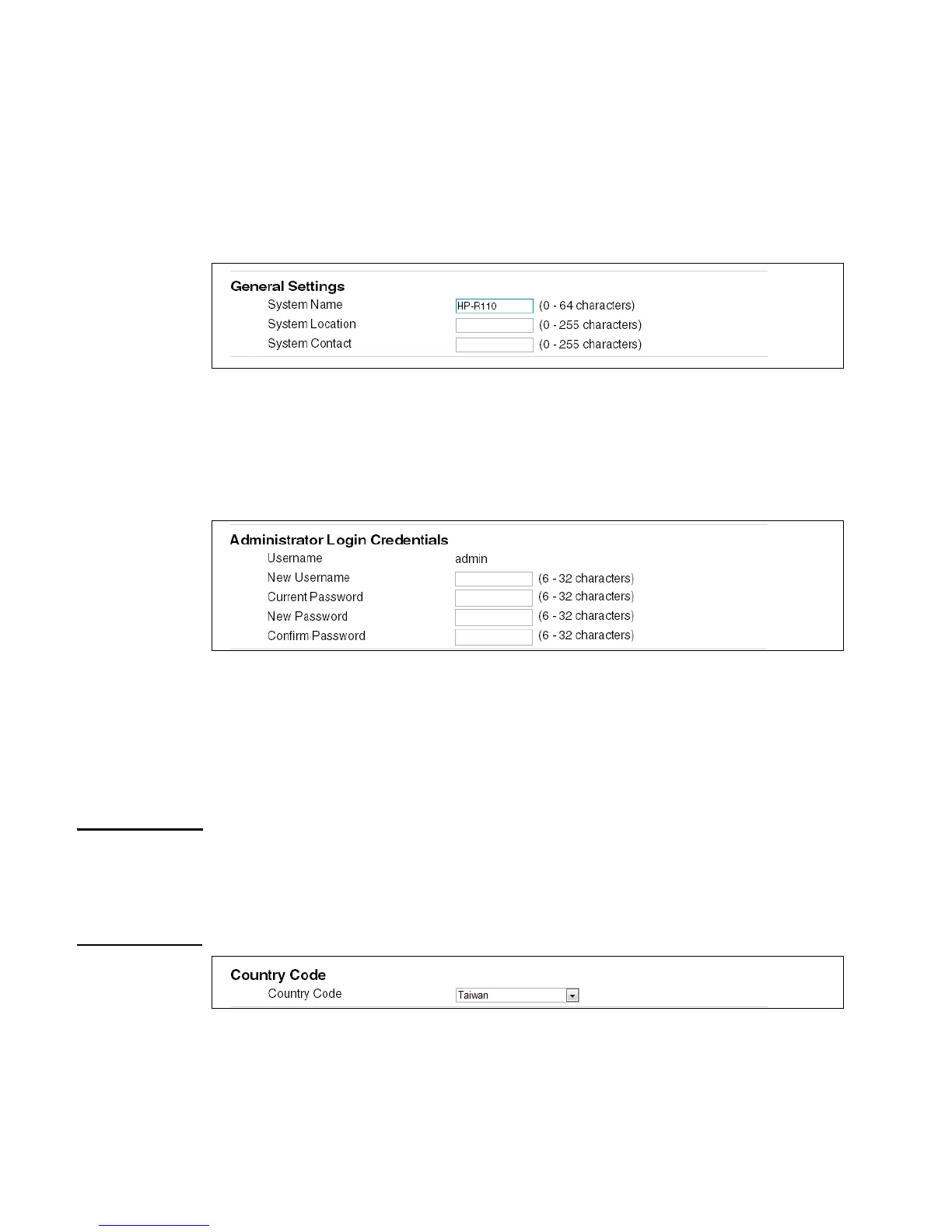
System information (General) settings
Configures settings that help identify the router, including the system name, location, and the
name of a person to contact for administrative purposes. The system name appears on the
banner and login screen. (Do not use characters ` " & ' # \)
Administrator login credentials
Configures the web management interface login username and password. The administrator
user name and password can be from 6 to 32 alphanumeric and special characters. (Do not
use characters ` " & ' # \)
Setting the Country Code
The country of operation, also known as the regulatory domain, determines the availability of
certain wireless settings on the router. When the country is set, the router automatically limits
the available wireless channels and channel width, and adjusts the radio power level in
accordance with the regulations of the selected country.
Caution Incorrectly selecting the country can result in illegal operation and can cause harmful
interference to other systems. You must ensure that the router is operating in accordance with
channel, power, indoor/outdoor restrictions, and license requirements for the intended country.
If you fail to heed this caution, you might be held liable for violating the local regulatory
compliance.
Configuring web server settings
This section configures access to the web management interface.


 To Next Page