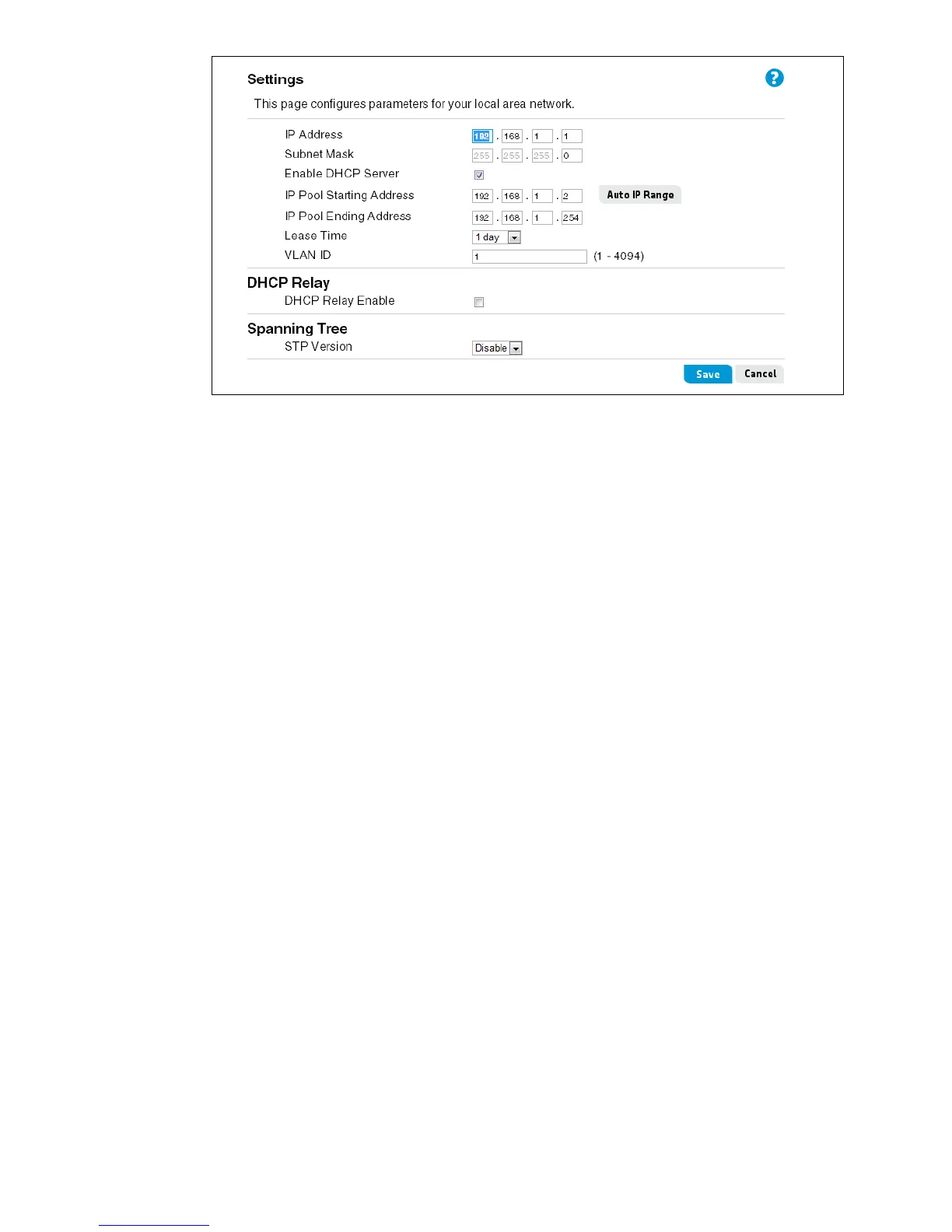
LAN Settings 45
This page includes the following settings:
IP Address
The IPv4 address of the router for the default VLAN.
Subnet Mask
There should be no need to change the subnet mask; however, it is possible to change the
subnet mask if necessary. Only make changes to the subnet mask if you have a specific reason
to do so.
Enable DHCP Server
The Dynamic Host Configuration Protocol (DHCP) server function automatically assigns IP
addresses to each computer in a VLAN. The DHCP server can be turned off if necessary.
Turning off the DHCP server requires you to manually set static IP addresses for each computer
in the VLAN.
IP Pool Starting/Ending Address
The IP pool is the range of IP addresses set aside for dynamic assignment to the computers in
the VLAN. The default is 2-254 (253 computers). You can enter new starting and ending IP
addresses for the VLAN IP pool, or click Auto IP Range to automatically set a valid range of
addresses.
Lease Time
The length of time the DHCP server reserves an IP address for each computer in the VLAN.
VLAN ID
The ID number for the default VLAN. The default VLAN ID is 1. For more information on
configuring VLANs, see “VLAN settings” on page 47.


 To Next Page