Need help?
Do you have a question about the HP Z40c G3 and is the answer not in the manual?
Essential safety guidelines to prevent injury and equipment damage during service operations.
Critical service procedures and precautions, including ESD handling and component replacement guidelines.
Essential steps, tools, and materials required for safely disassembling the monitor.
Procedure for safely removing the monitor's power board, including connector identification.
General procedures for repairing or replacing various connectors on the monitor's main board.
This document serves as a Maintenance and Service Guide for the HP Z40c G3 model, providing comprehensive information for trained service personnel. It outlines procedures for spare parts, removal and replacement of components, diagnostic tests, and problem troubleshooting. The guide emphasizes safety information and precautions essential for proper service, ensuring the safe and reliable operation of the equipment.
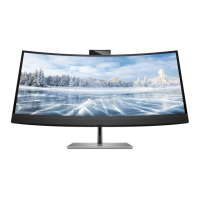
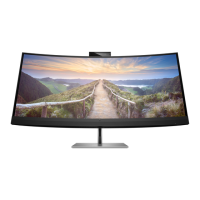
The HP Z40c G3 monitor is a sophisticated display designed for various applications, offering a range of features to enhance user experience and productivity. Its primary function is to provide a high-quality visual output, suitable for tasks requiring detailed imagery and extensive screen real estate.
The monitor boasts a three-sided borderless curved diagonal viewable screen, designed to offer an immersive viewing experience. It supports full-screen display for lower resolutions and includes custom scaling to maximize image size while preserving the original aspect ratio. The liquid crystal display (LCD) utilizes active matrix and in-plane switching (IPS) technology, contributing to its visual performance.
A key feature is its wide color gamut, which provides coverage of sRGB and P3(D65) color spaces, ensuring accurate and vibrant color reproduction. The nonglare panel with an LED backlight enhances viewing comfort, especially in brightly lit environments. With a wide viewing angle, the monitor allows for clear visibility from various positions, whether sitting, standing, or moving from side to side.
Ergonomically, the monitor offers tilt, swivel, and height adjustment capabilities, allowing users to customize their viewing setup for optimal comfort and posture.
For enhanced productivity, the Z40c G3 includes Dual Picture beside Picture (PbP) functionality. This allows users to view inputs from DisplayPort, HDMI, and Thunderbolt simultaneously, with each input occupying a half of the screen. An integrated HP Device Bridge technology further streamlines workflow by enabling the use of a single keyboard and mouse across two connected computers. This not only facilitates control of software but also allows for seamless transfer of files and data between the two systems.
User interaction is managed through five on-screen display (OSD) buttons. Four of these buttons are reconfigurable, providing quick access to commonly used operations. The OSD adjustments are available in several languages, simplifying setup and screen optimization. Color space presets for P3(D65) are also available, catering to specific color accuracy needs.
The monitor incorporates an energy saver feature, designed to meet requirements for reduced power consumption, aligning with environmental standards. For physical security, a security cable slot is located on the rear of the monitor, allowing for an optional security cable to be attached. Cable management features are also included to help organize and route cables and cords, contributing to a tidy workspace.
Connectivity options are extensive, including a DisplayPort™ video input (with a cable included in select regions) and a High-Definition Multimedia Interface™ (HDMI) video input. It also features two USB Type-C® Thunderbolt™ ports (with a cable included in select regions), an RJ-45 (network) jack for network connectivity, and four downstream USB ports. These USB ports support battery charging, allowing users to power peripheral devices such as keyboards, mice, or USB hard drives. The monitor also offers Plug and Play capability, if supported by the operating system, simplifying device setup.
The monitor stand is removable, providing flexibility for various mounting solutions. It includes an HP Quick Release 2 device for quick attachment and detachment of the monitor head to the stand. VESA® mounting brackets (100 × 100 mm) are supported, enabling attachment to wall-mount devices or swing arms, and facilitating integration into workstations.
The guide outlines important safety information and precautions for service personnel, emphasizing the need for a dry and clean working environment, proper safety devices, and approved tools. It warns against performing actions that could cause hazards or make the product unsafe. A critical safety instruction is to always disconnect the product's power from the main supply before opening the cabinet.
Modules containing electrical components are sensitive to electrostatic discharge (ESD), and the guide mandates following ESD safety procedures when handling these parts. It also highlights that some products may contain multiple batteries, advising against disassembly or exposure to high temperatures to prevent explosions. Government requirements for battery recycling and disposal are also referenced.
Repair procedures are strictly for professional service technicians in a repair center, not end users. The guide notes that the primary side of the monitor is a high voltage area. Compliance with RoHS (Restriction of Hazardous Substance in Electrical and Electronic Equipment Directive) requirements is stressed, particularly regarding the use of lead-free solder wire and matching capacitor polarities and specifications during replacement.
Specific instructions for replacing capacitors include careful insertion to avoid short circuits and ensuring the board does not get wet. Soldering should be done quickly to prevent overheating, and the soldering iron tip must be kept clean and tinned. After repairs, a thorough inspection of the circuit board and a function test of the power supply are required.
The guide also addresses ERP Lot5 requirements, stating that professional repairers must have technical competence and comply with applicable regulations, with official registration systems serving as proof of compliance. Repairers must also have insurance covering liabilities from repairs.
Firmware updates for the monitor are available on support.hp.com, with instructions to check if an update is necessary. Before returning a repaired product to the customer, an AC leakage current check on exposed metallic parts is mandatory to ensure electrical safety.
The guide includes an illustrated parts catalog with descriptions and part numbers for major components, aiding in identification and ordering. It specifies how to order power boards from HP authorized repair centers and provides information on purchasing capacitors and connectors from EU distributors like Digi-Key and Würth Elektronik. Cables can be purchased from the HP part store, and internal/external power supplies from EET.
Detailed removal and replacement procedures are provided for various components, starting with preparation for disassembly, which includes cleaning the workspace, identifying the disassembly area, and preparing for material flow. Required equipment includes a press fixture, working table, screwdriver, knife, gloves, cleaning cloth, ESD protection, and a scraper bar.
The guide provides step-by-step instructions for removing the rear cover, EMI AL and screws, disconnecting cables, removing the bracket assembly, USB board, hinge bracket holder, webcam module assembly, speaker assembly, bezel assembly, middle cover assembly, power key BD, joystick board, and finally, the power board, driver board, and interface board. Each step is accompanied by instructions on which screws to remove and how to disconnect components.
For connector repair (HDMI, DisplayPort, USB-C, RJ45, USB-A), the guide details using a soldering iron and de-soldering pump to remove solder, followed by using a hot air gun to melt remaining solder. It then instructs on lifting the old connector, placing the new component, and soldering it, emphasizing matching the PCB footprint.
A function test section ensures all functions are working after repair, including HDMI, DP, USB-C Alt-Mode, USB-C PD, and USB Hub tests. The troubleshooting section provides solutions for common problems like a blank screen, flashing video, blurred images, "Check Video Cable" messages, "Input Signal Out of Range" errors, monitors not entering sleep mode, "OSD Lockout" messages, "Power Button Lockout" messages, and issues with the camera and USB ports. Solutions range from checking power and video connections to adjusting OSD settings and ensuring proper USB connections.
 General
| HD type | UltraWide 5K HD |
|---|---|
| Color depth | 10 bit |
| Color gamut | 100 % |
| Pixel pitch | 0.181 x 0.181 mm |
| Pixel density | 139 ppi |
| Response time | 14 ms |
| Backlight type | Edge LED |
| Display diagonal | 39.7 \ |
| Anti-glare screen | Yes |
| Display resolution | 5120 x 2160 pixels |
| Display technology | LED |
| Native aspect ratio | 21:9 |
| Vertical scan range | 29 - 71 Hz |
| Maximum refresh rate | 60 Hz |
| Screen curvature rating | 2500R |
| Contrast ratio (typical) | 1000:1 |
| Display number of colors | - |
| Display diagonal (metric) | 100.8 cm |
| Display brightness (typical) | 300 cd/m² |
| Supported graphics resolutions | 640 x 480 (VGA), 720 x 400, 800 x 600 (SVGA), 1024 x 768 (XGA), 1280 x 1024 (SXGA), 1280 x 800 (WXGA), 1440 x 900 (WXGA+), 1600 x 1200 (UXGA), 1600 x 900, 1680 x 1050 (WSXGA+), 1920 x 1080 (HD 1080), 1920 x 1200 (WUXGA), 2560 x 1440, 2560 x 1600 (WQXGA), 3840 x 2160, 4096 x 2160, 5120 x 2160 |
| HP segment | Business |
| Megapixel | 13 MP |
| Certification | BIS; BSMI; CB; CCC; CE; CECP; CEL; CEL Grade 1; cTUVus; EAC; ENERGY STAR®; E-standby; FCC; GS Mark; ISO 9241-307; KC/KCC; NOM; PSB; SEPA; TCO Certified; TUV-S; VCCI; WEEE; ISC; Low blue light; South Africa Energy; UAE; Ukraine certificates; Zoom Certified; Windows Hello |
| Product color | Black, Silver |
| DisplayPort version | 1.4 |
| Thunderbolt 3 ports quantity | 2 |
| USB Type-A downstream ports quantity | 4 |
| Tilt angle range | -5 - 20 ° |
| Panel mounting interface | 100 x 100 mm |
| AC input voltage | 100 - 240 V |
| AC input frequency | 50 - 60 Hz |
| Power consumption (max) | 310 W |
| Power consumption (standby) | 0.5 W |
| Power consumption (typical) | 72 W |
| Sustainability certificates | ENERGY STAR |
| Cables included | DisplayPort, HDMI |
| Package type | Box |
| Package depth | 226 mm |
| Package width | 1070 mm |
| Package height | 558 mm |
| Package weight | 20600 g |
| Operating temperature (T-T) | 5 - 35 °C |
| Operating relative humidity (H-H) | 20 - 80 % |
| Harmonized System (HS) code | 85285210 |
 Weight and Dimensions
| Depth (with stand) | 292.5 mm |
|---|---|
| Width (with stand) | 947.4 mm |
| Height (with stand) | 644.8 mm |
| Weight (with stand) | 14300 g |
| Depth (without stand) | 141.95 mm |
| Height (without stand) | 447.1 mm |

 To Next Page