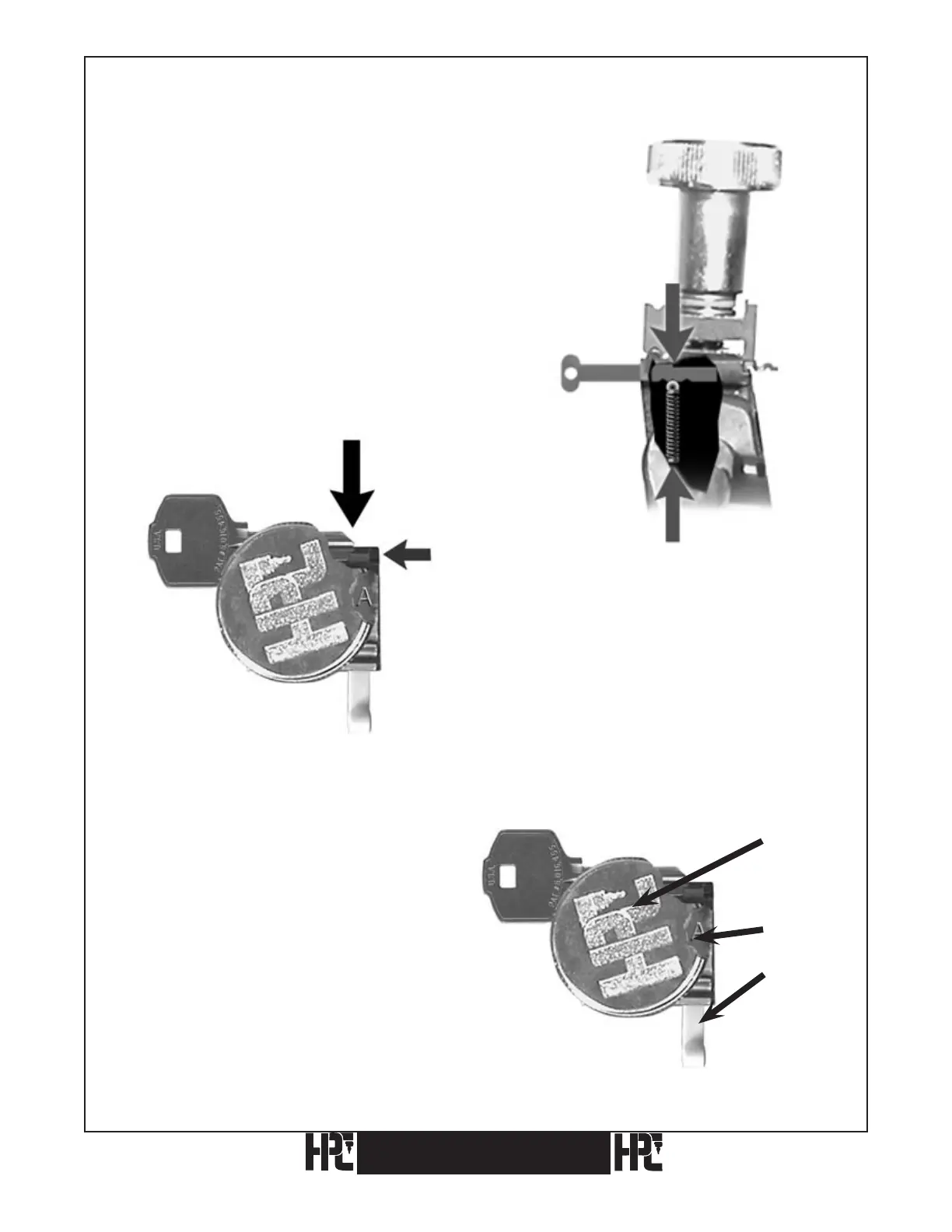
3.3.4 Red Tip Gauge In Position 2 (Middle Short Tip Stop) Using Jaw A (Example:
KABA-PEAKS 6-Pin, DSD #608)
1) The Red Tip Gauge is pushed inward to Position 2.
The Tip Gauge is pulled to the rear (position 1)
while cutting.
Note: Make certain to pull the Tip Gauge to the
rear (position 1) before cutting.
2) The key is gauged from the
bottom stop, not the tip.
3) Be sure the key lies flat against the back
edge of the Bottom Jaw before
tightening the Wing Nut.
Fig. 3. The Wing Nut and Top Jaw of the vise partially
removed to show a top view of the Bottom Jaw only
for key positioning and Tip Stop settings.
24
Wing Nut
Jaw A
Red Tip Stop
Red Tip Gauge
Position 2
CodeMax
®
CodeMax
®


 To Next Page