THT45 - THT45W - THT46
5 OPERATING INSTRUCTIONS
5.1 DESCRIPTION OF THE MAIN INTERFACE
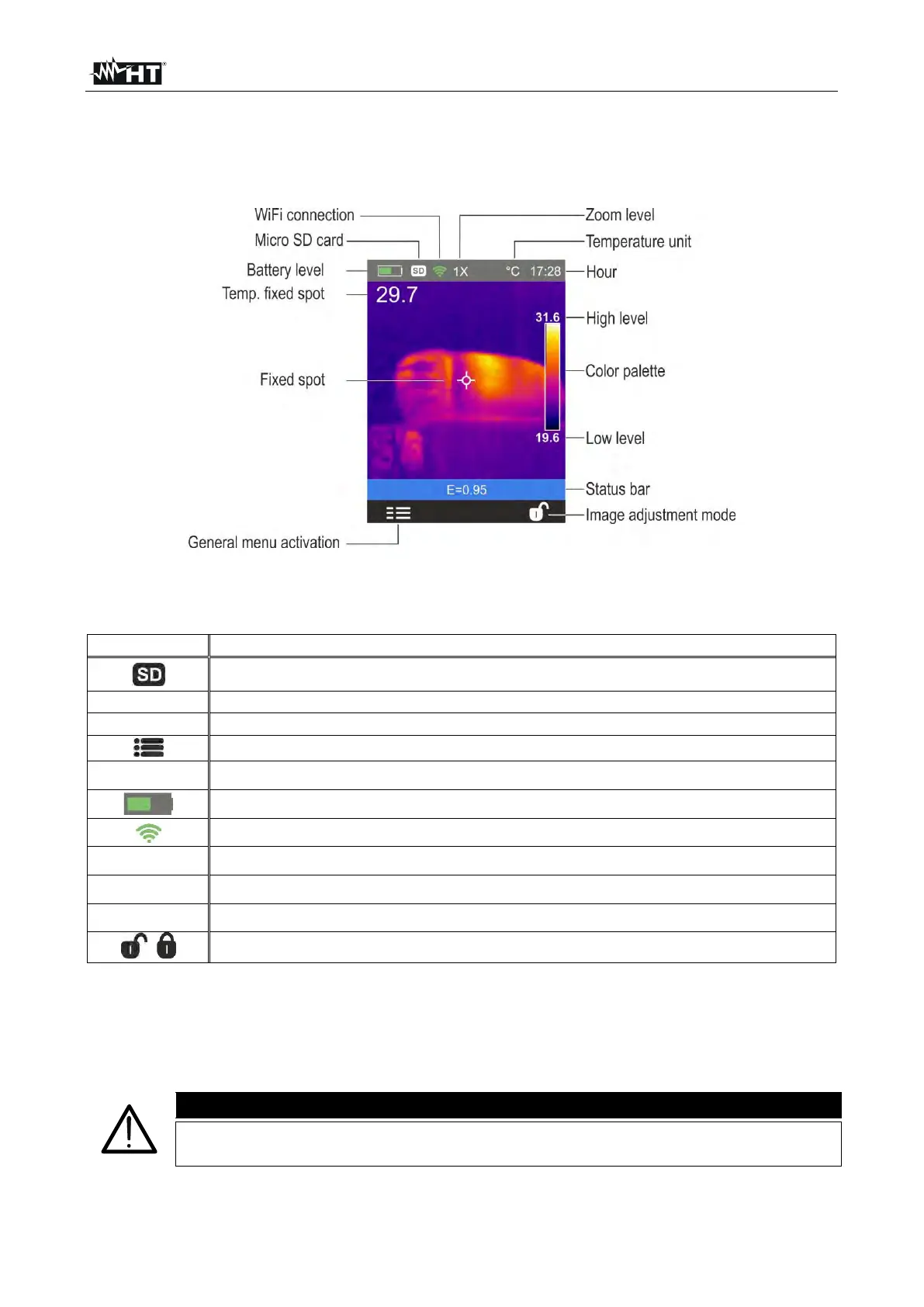
The instrument shows the following main interface on the display:
Fig. 5: Main instrument interface
The meaning of the symbols found on the display is described below.
Micro SD card inside the instrument
Set value of object emissivity
Indication of the temperature measuring unit
Access to the functions of the main menu
Indication of the Zoom percentage (x1 x32)
Battery charge level indication (see § 8.2)
Indication of active WiFi connection (only THT45W)
Indication of the system's current time
Indication of temperature levels of the IR image (see § 5.2.7)
Indication of color palette (see § 5.2.5)
Image adjusting mode setting (see § 5.2.7)
5.1.1 Image focusing
Focusing the IR image found on the instrument's display must be performed manually by
rotating the adjuster installed on the front part (see Fig. 2 - Pos. 12). Keep the instrument
steady while performing this operation.
Always focus the image before saving it, in order to perform correct
temperature measurements of the framed object.


 To Next Page