THT45 - THT45W - THT46
5.6.1 Use of Screening mode for surface temperature rapid measurement
1. Switch on the instrument by pressing key
2. Press key to enter the general menu
3. Open the “Emiss” menu and set the emissivity parameter to a value between 0.95 and
0.98 (typically 0.95) (see § 5.2.3)
4. Open “Range” menu and select the "Screening" mode (see § 5.2.3)
5. Open the “Emiss” menu, set the “Alarm” mode and set the maximum temperature
threshold by using the or keys (see § 5.2.3)
6. Activate the visualization of the "S" (fixed central spot) cursor on the display inside the
"Measure" menu (see § 5.2.2)
7. Select the desired color palette (suggested Iron or Grey) (see § 5.2.5)
8. Select automatic measuring mode (see § 5.2.7)
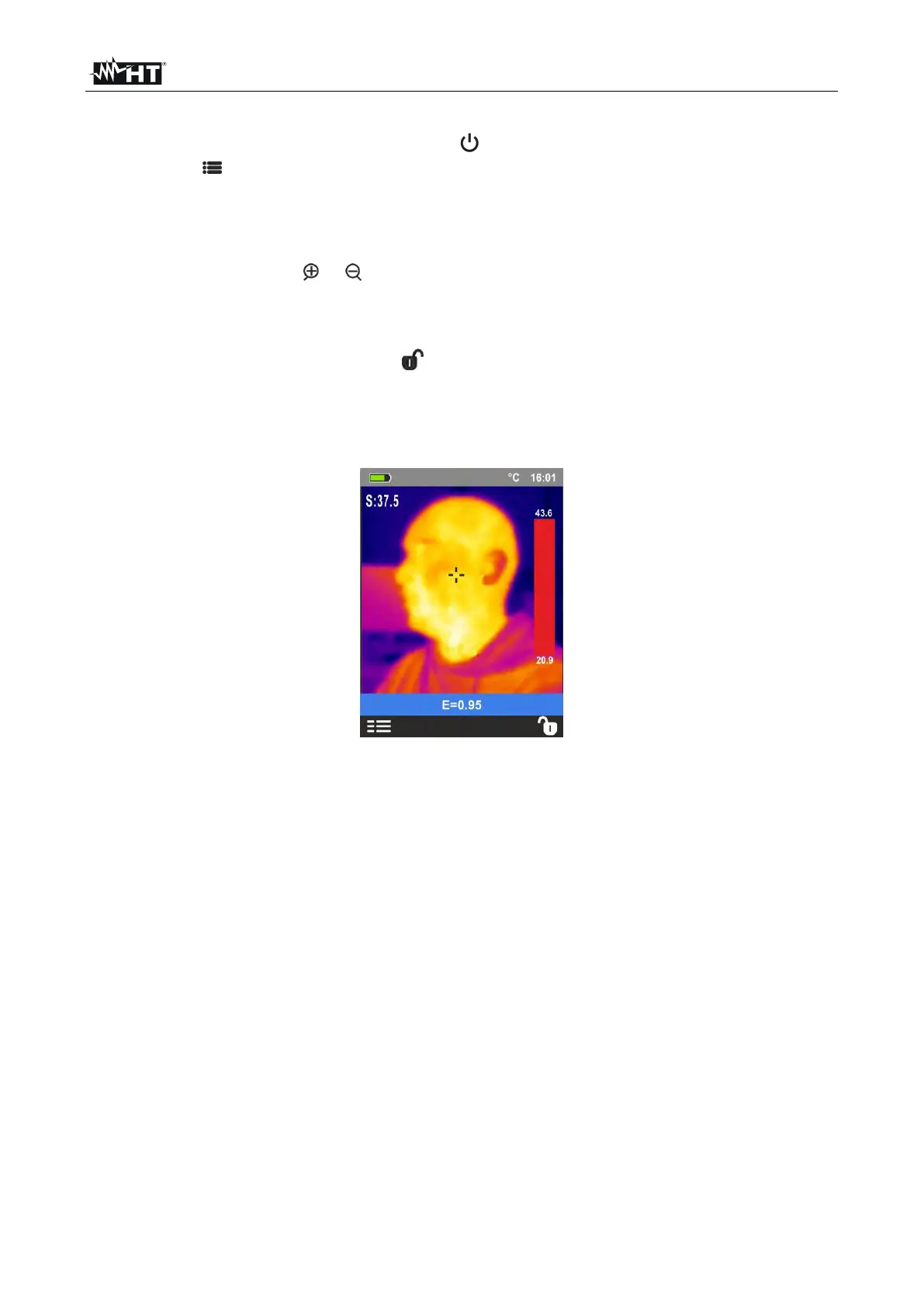
9. Frame the subject on test at a recommended distance of 1m. With temperature of the
subject higher than the set alarm threshold value the bar associated with the palette
turns red and flashes on the display (see Fig. 37) and an acoustic alarm is activated
(THT45, THT46)
Fig. 37: Visualization of alarm condition in Screening function


 To Next Page