THT45 - THT45W - THT46
5.2.2 Measure Menu
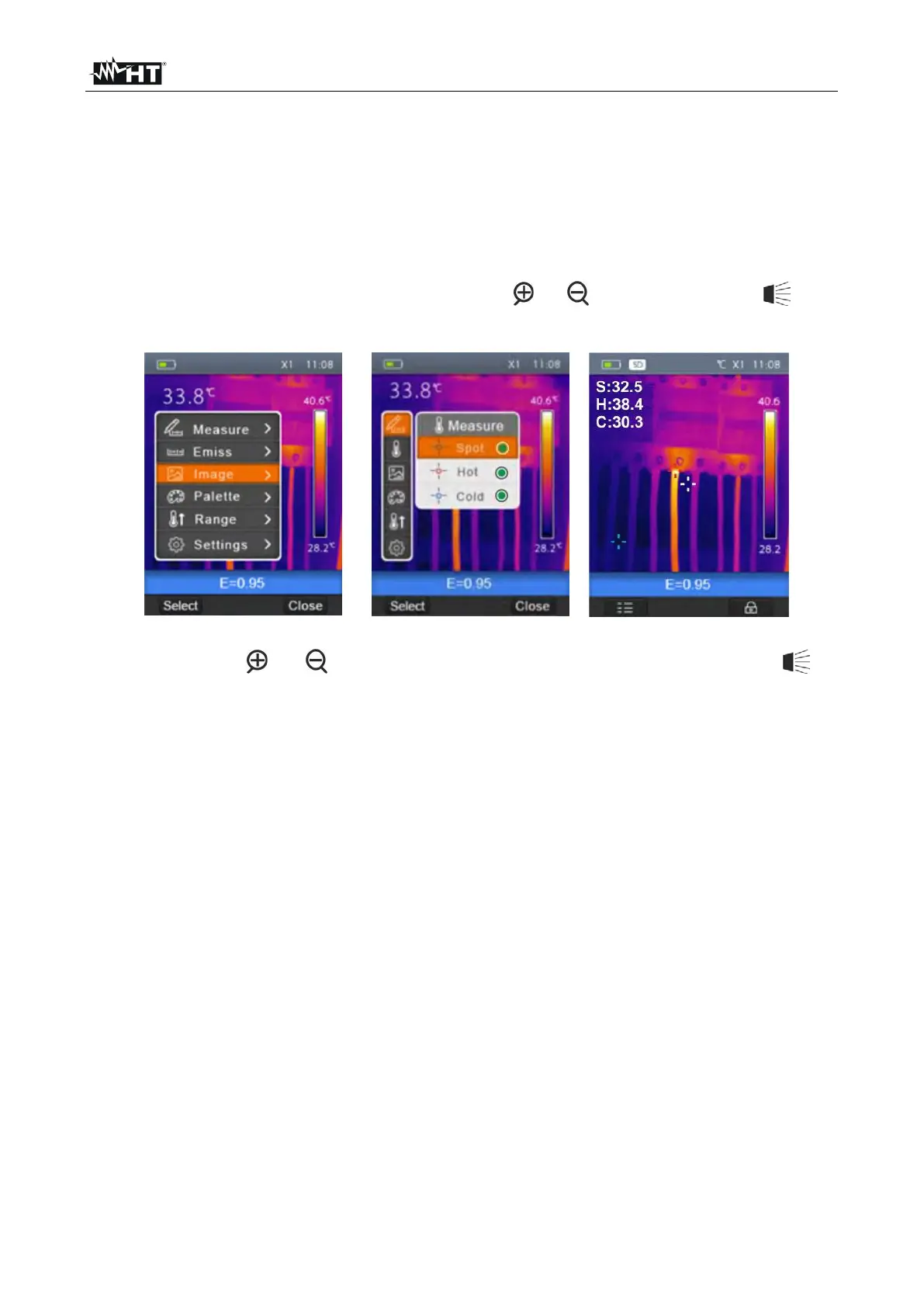
In this section it is possible to select/deselect the display of the three available measuring
cursors independently. The thermal camera has:
1 steady cursor (point) in the middle of the display
1 dynamic cursor which identifies the temperature of the hottest spot of the image
1 dynamic cursor which identifies the temperature of the coldest spot of the image
1. Select the item “Measurement” with the keys or and press the key . The
screen Fig. 17 – Right side is shown on the display.
Fig. 17: Setting of measuring cursors
2. Use the keys or and press and hold the key “Select” or the key to
select/deselect the desired measuring cursors among the options: Spot (steady white
cursor, marked by the letter “S”), Hot (max value red cursor, marked by the letter “H”),
Cold (min value blue cursor, marked by the letter “C”). The values of the temperatures
associated with the cursors are found on the top left-hand side of the display.
3. Press the “Close” key to confirm your selection and go back to the general menu.


 To Next Page