Initial operation
Product boot/shutdown
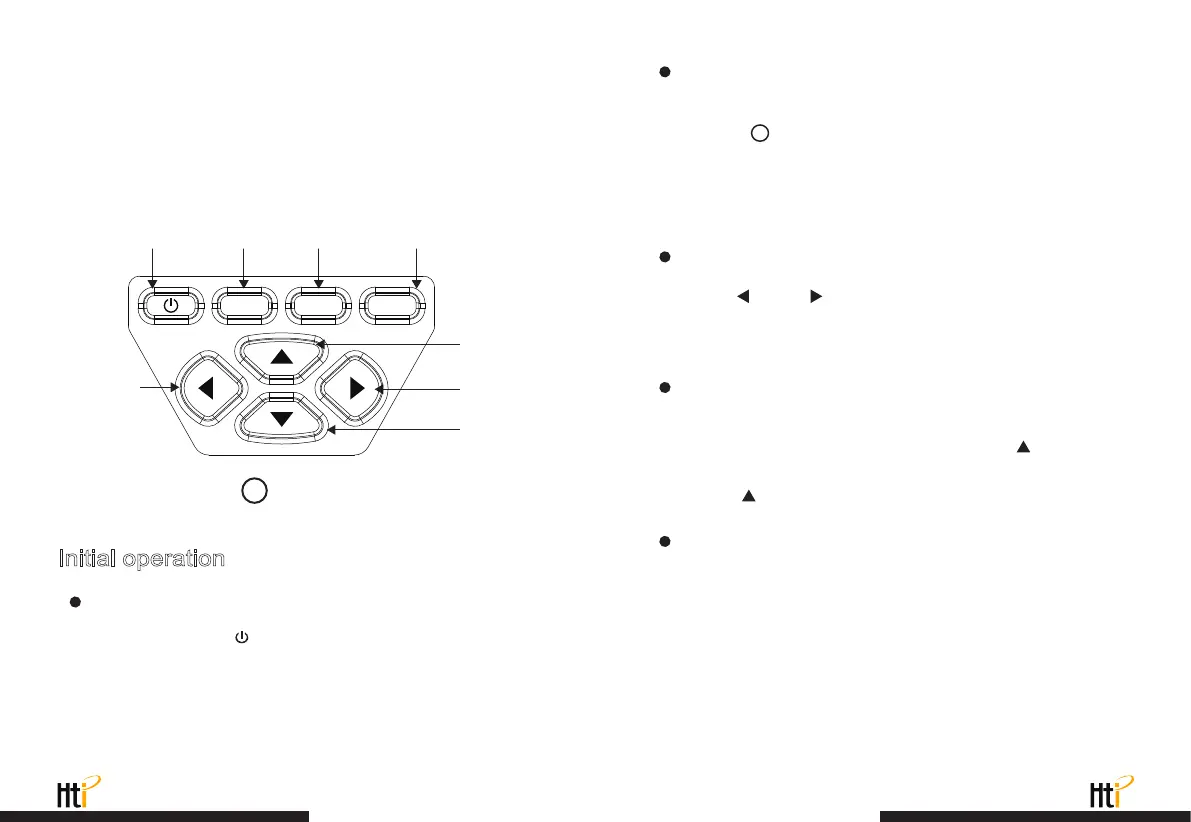
3. Key description
On/off key Menu key Entry key Selection key
Press and hold the “ ” button for more than 3 seconds to turn
the Thermal Imaging on or off.
The lowest temperature cursor: used to indicate the lowest temperature
position in the screen area. It will move with the movement of the lowest
temperature. The cursor displays red. The temperature value is displayed
at the central position of the screen.
MENU SELECT ENTER
Up key
Right key
Left key
Down key
4
The function to hide highest/lowest temperature column
at the screen bottom
under the operation after normal start up, press “ ” key and
the screen bottom will display highest/lowest temperature column.
Press “ ” can also hide it.
LCD screen display
After turning on the power, open the lens protection cover, as
shown in , the screen shows the thermal imaging status.
Witching between infrared thermal image and visible image
press “ ” or “ ” key to switch the degree of fusion between
inferred thermal images and visible images (the degree of fusion is
0%, 25%, 50%, 75% and 100%).
Note:
Time adjustment may be required when you move the camera
between environments with widely varying ambient temperatures.
Image capture
Short press the image capture button. When the capture is
successful, the screen will show the prompt “ Save image? ”. If you
want to select “Yes” at this time, please press the “ MENU ” button
or short press the image capture button to save the image. If you
want to select “No”, please press the “ SELECT ” key to confirm
that the image is not saved.
2
www.xintest.com.cn
19
www.xintest.com.cn
20



 To Next Page