4. Introduction to “color palette” sub-menu
4.1. Color palette description
4.2. Application of color palette
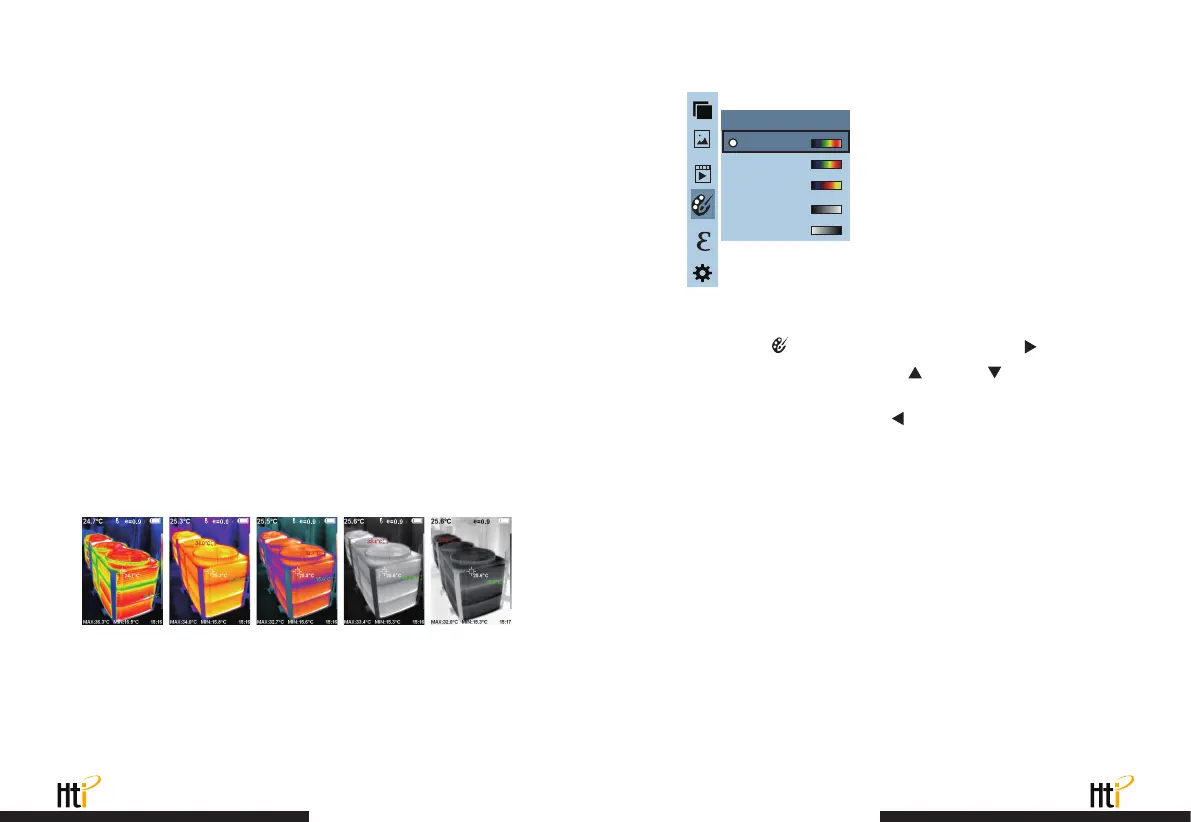
The following is the image of the same object with selection of different
color palettes.
As shown in the figure, press “ MENU ” key to enter the main menu
and select
“ ”
(color palette) option and press
“ ”
key to
enter the color palette list. Press
“ ”
and
“ ”
keys in
navigation to select the color palette. Then press “ SELECT ” key to
select the color palette. Press
“ ”
to return. Press “ MENU ” key
to exit from the menu.
The palette can be used to change the pseudo-color display of the
infrared image on the display. Some tune Swatches are better
suited for specific applications and can be set up as needed. The
palette is divided into: rainbow, iron red, cool, white hot, black hot,
five palettes. These palettes work best with high thermal contrast
and provide additional color contrast between high and low
temperatures.
Suitable selection of color palette displays the details of the target
objective better. Rainbow, iron oxide red and cold color palettes
focus on display of color. Such color palettes are very suitable for
high heat contrast and are used to improve the color contrast
between high temperature and low temperature. But the black &
white and white & black color palettes provide even linear color.
Iron oxide redRainbow Cold color White heat Black heat
www.xintest.com.cn
25
www.xintest.com.cn
26
L
5
L
5
L
5 5
L
5
Spectra
Iron
Cool
White
Black
Color palette



 To Next Page