3 Numeric Key Functions
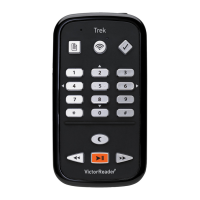
3.1 Numeric Key pad List
• 1: Bookshelf if pressed, User Guide if pressed and held
• 2: Navigation element
• 3: Delete / Copy / Move or edit landmark or route in orientation mode
• 4: Back
• 5: Where am I
• 6: Forward
• 7: Menu, Text-to-Speech voice Toggle if pressed and held
• 8: Navigation Element
• 9: Text-to-Speech / Recorded audio modes toggle / Random and Loop modes toggle
(Music), Backtrack in orientation mode
• Star: Cancel if pressed, Key pad Lock if pressed and held, explore mode when using GPS
• 0: Info if pressed, Key Describer Mode if pressed and held
• Pound: Confirm, battery level if press and held
3.2 Navigation Keys
Trek allows you to navigate by chapter, section, page, time jump, paragraph, or any other existing
indexed element defined by the producer of the book.
Use the 2 and 8 keys to choose a navigation level. These differ from book to book but typically level
1 means chapter, level 2 means section, and level 3 means sub-section and so on. The page
element may not be present on all books. The phrase level is usually the smallest navigation
element but this is defined by the book producer. Trek limits phrase jumps to a maximum length of
1 minute. First, choose a navigation level (chapter, page, etc.), using the 2 and 8 keys. Then use
the 4 and 6 keys to move backward and forward between elements at the selected level. The 2 and
8 keys will announce only the levels available for the book. The phrase level is always provided for
DAISY books but its extent depends on the book producer. You can choose to save the last used
navigation level for each book from the Navigation and Playback configuration menu.
3.2.1 Undo navigation
Pressing the Star key within 10 seconds of any single move backwards or forwards using keys 4
or 6 or single go to page move will undo the operation and return you to your previous position.
The Undo function does not apply to the Rewind or Fast Forward buttons.
3.3 Time Jump Navigation Mode
Time Jump navigation can be selected using the 2 and 8 keys.
Press the key 4 to move backward or the key 6 to move forward by the jump interval.
You can choose to turn on or off any or all of the time intervals (30 seconds, 1, 5, 10 or 30 minutes)
in the Navigation and Playback section of the configuration Menu (key 7). Only the time jump
intervals you turned on will appear in the up and down navigation menu.
3.4 Text-to-Speech Navigation Elements
When Trek is in Text-to-speech mode there will be additional text navigation levels added to the 2
/ 8 (up / down) key rotation. These include the text elements: screen, paragraph, line, sentence,
word, spell and character. If you do a search in a text then a Search level is added to allow search
of the next or previous search term. Screen and line elements are defined arbitrarily as 25 lines per
screen and a maximum of 80 characters per line. As with other navigation levels, you move


 To Next Page