27 Fish Finder Setup
Changing the MEGA Live Mode
Your fish finder will automatically select the best mode for your installation. Use the
following instructions to manually change the MEGA Live Mode to Down, Forward,
or Landscape.
1. With a MEGA Live 2 View displayed on-screen, tap the MEGA Live Mode icon
in the top bar.
2. Tap Auto, or use the Cursor pad and Enter key, to turn Auto off.
3. Tap, or use the Cursor pad and Enter key, to select a MEGA Live Mode.
Down Mode:
Forward Mode:
Landscape Mode:
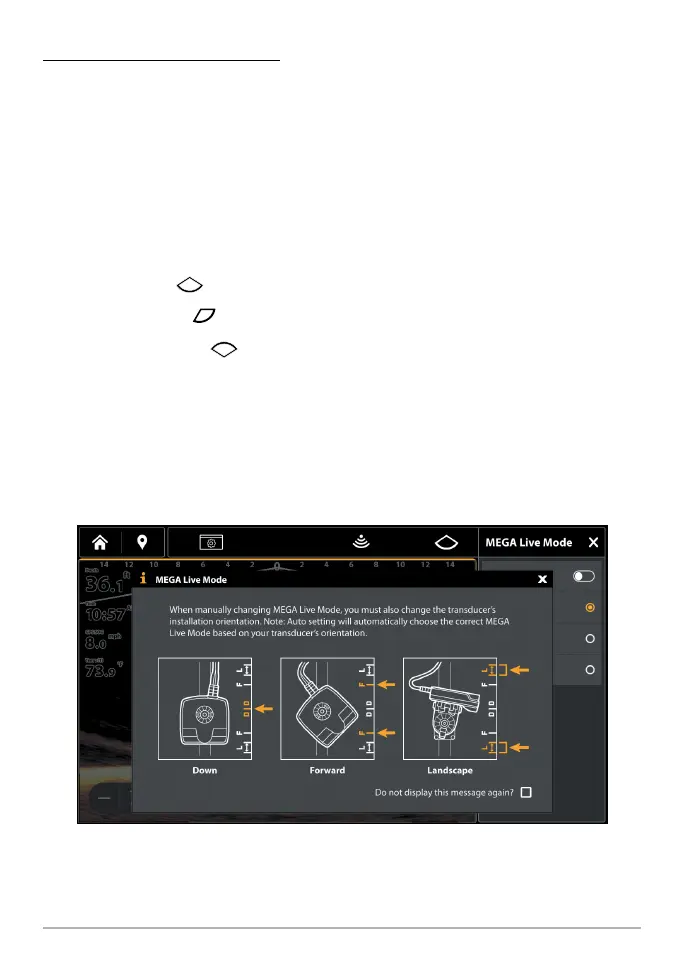
When you manually change the MEGA Live Mode, a message box will display
reminding you to also change the transducer’s installation orientation. For
instructions on changing the installation orientation, see Step 2 of Install the
Trolling Motor Mount, Section 6: Route the Cables and Connect Power.
Changing the MEGA Live Mode



 To Next Page