24Fish Finder Setup
2. Set Up MEGA Live 2 on the Fish Finder
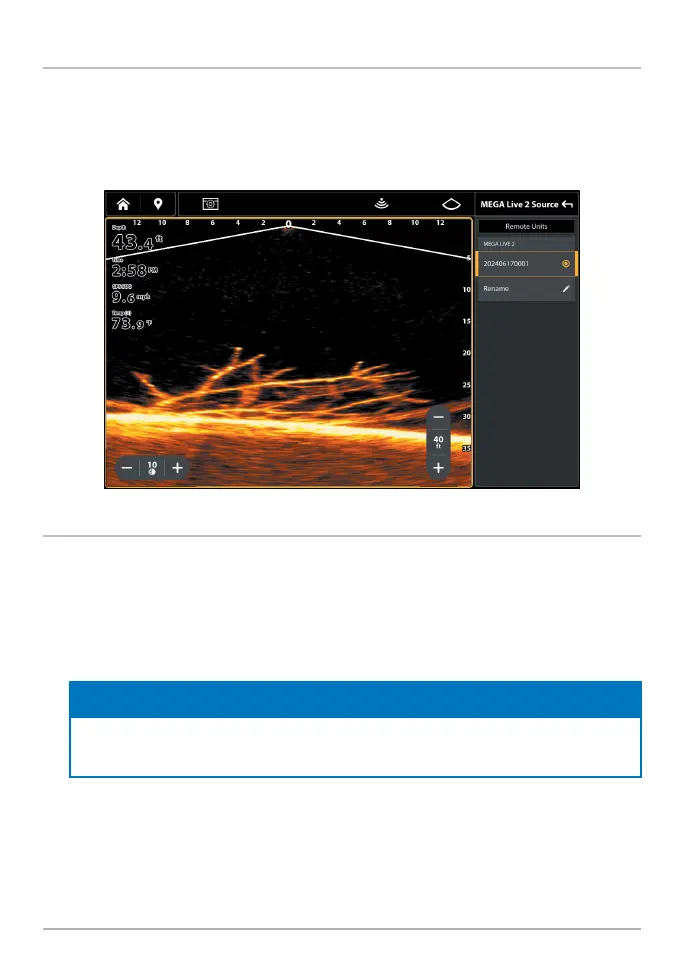
Your XPLORE, APEX, or SOLIX fi sh fi nder will automatically detect and subscribe
to MEGA Live 2. To review the selected sonar sources, open the XPress menu and
select Settings > MEGA Live 2 Source.
Reviewing Sonar Sources
3. Test MEGA Live 2 on the Fish Finder
It is important to confi rm that the MEGA Live 2 transducer is providing sonar returns
to the display. The instructions in this section should be performed at trolling speeds
in calm, open water, in a large area that is far from shallow water, boats, or other
obstacles.
1. From the Home screen, tap the View icon in the menu tray.
NOTE
Once the MEGA Live 2 has been detected the fi rst time, the MEGA Live 2 view will display
on the Favorite Views widget.
2. Tap MEGA Live 2 and select your preferred MEGA Live 2 view.
3. The sonar returns from the MEGA Live 2 will begin to display on the MEGA
Live 2 View. Review the display for the following information and see the
illustrations Reviewing the MEGA Live 2 View.
• Bottom: Confi rm that the bottom is visible on-screen.



 To Next Page