INSTALLATION
3
Install the Channels
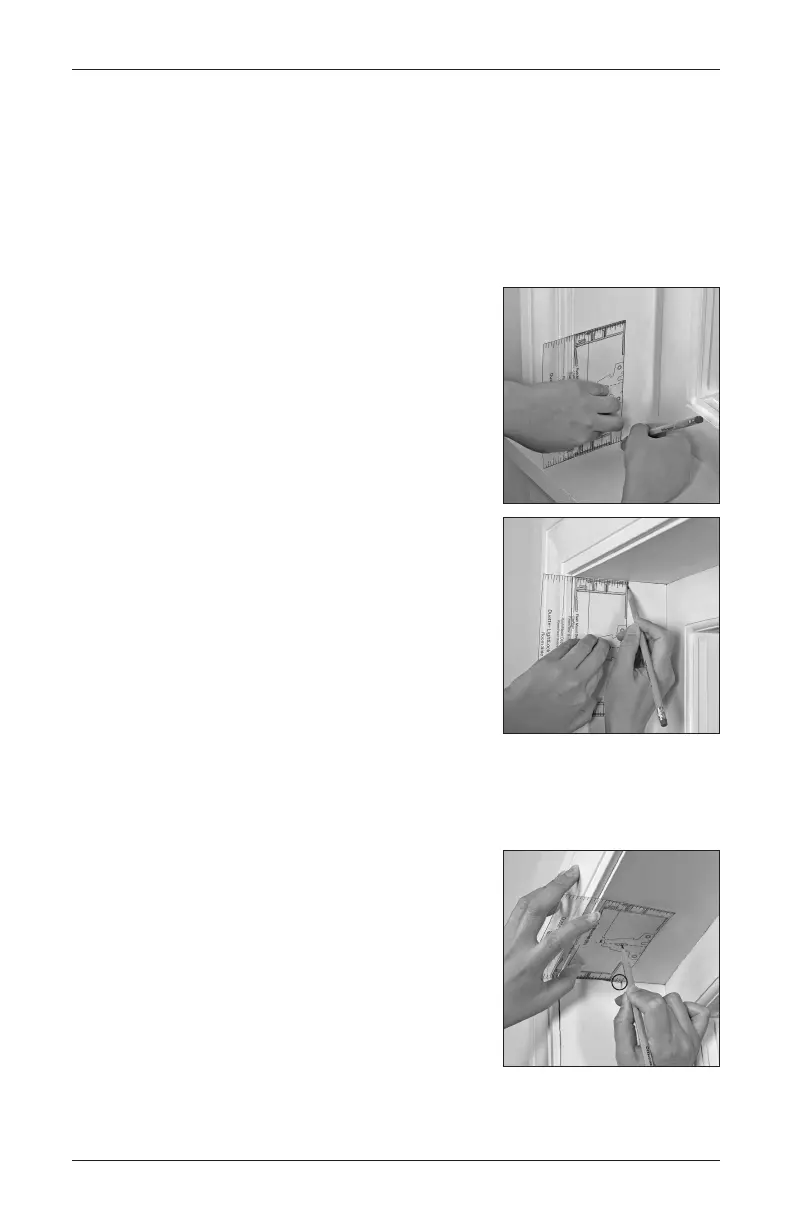
■ Using the outline on the template, determine where to mount the side channel.
➤ If your shade is PowerView
®
(battery pack/DC power supply), the minimum mounting
depth for flush mount is 2
1
⁄
2
". Trim the template at the dotted line prior to use.
➤ If your shade is PowerView (battery wand — high and low mount), the minimum
mounting depth for flush mount is 3".
■ Place the template at the bottom of the left side jamb
and mark the rear edge of the template on the jamb.
➤ This mark represents the rear edge of the mounting
channel.
■
Repeat this step for the top of the left jamb.
■
Repeat above steps for the right jamb.
■
Using the template, mark the location for the installation brackets on the head jamb.
➤
Place the template in the top left corner of the window opening.
➤
Line up the back edge of the template with the mark
previously made on the side jamb.
➤
Mark the center hole, if depth permits.
➤
Repeat for the right side.
➤
If more than two installation brackets came with your
order, space additional bracket(s) evenly between the
two end brackets and mark their location.





 To Next Page