H Y D R O P O O L I N D U S T R I E S
28
SPA CONTROL SYSTEM – EUROPE
OPTIONAL UPGRADE
PLATINUM SERIES, SERENITY/MILLENNIUM ELITE +
CONTROL SYSTEM HPL203/205, TOPSIDE PANEL DLX. DIG.
INITIAL START-UP
When you initially power up your Hydropool hot tub, it will
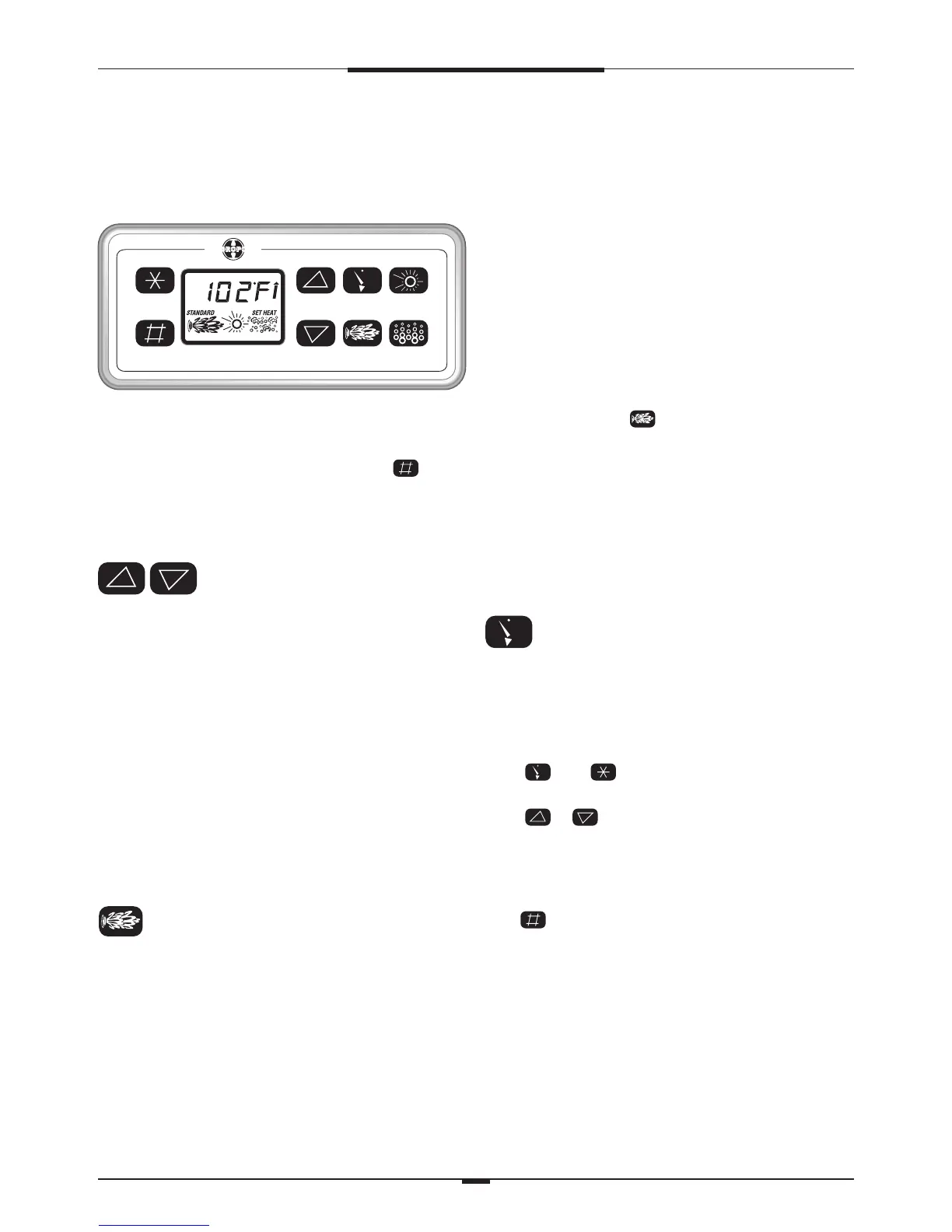
be in ‘Economy’ mode. Simply press the mode pad to
switch the system to ‘Standard’ operation and begin
heating. The spa water will heat to 38˚C unless you adjust
the set temperature.
TEMPERATURE ADJUSTMENT
The current water temperature is continually displayed on
the topside control panel.
TO CHECK THE SET TEMPERATURE
When either of these pads is pressed once, the LCD will
display the set temperature as well as the words SET hEAT.
TO CHANGE THE SET TEMPERATURE
Press either pad and the display will flash the set
temperature. Pressing either pad a second time will increase
or decrease the set temperature (depending on which pad is
pressed). After 3 seconds, the LCD display will return to the
current water temperature.
THE TEMPERATURE IS ADJUSTABLE AS FOLLOWS
4˚C; 16˚C to 26˚C in 2˚ increments; 26˚C to 40˚C in 1˚increments.
PUMP/JETS FUNCTION
Press this pad to activate the pump(s)
SINGLE PUMP SYSTEM (P1)
1st press – turns on low speed of pump
2nd press – turns on high speed of pump
3rd press – turns off high speed of pump
DUAL PUMP SYSTEM (P1 & P2)
1st press – turns on low speed of P1
2nd press – turns on high speed of P1
3rd press – turns on P2
4th press – turns off high speed of P1
5th press – turns off P2
The low speed pump will start automatically when the
system calls for heat (in STANDARD mode only - see
MODE FUNCTION), when a filter cycle is activated, or when
a freeze condition is detected. When low speed is already
on, the 1st press of the pad puts the pump directly into
high speed.
PUMPS AUTOMATIC TIME-OUT
P1 high speed and P2 - 15 minutes
P1 low speed - 4 hours
CLEAN-UP CYCLE
After P1 high speed is turned off either manually or
automatically, P1 low speed circulates the water for 1 hour.
TIME
Press this pad once to view the time of day. After 3 seconds
the display will return to the current water temperature.
SETTING THE SYSTEM CLOCK TIME
After the initial start-up, the SET TIME message will flash on
the LCD screen:
Press Then
Press or
After either pad is pressed once, hours will automatically
increase or decrease in one-minute increments. Press either
pad again to stop the sequence.
Press to exit ‘set time’ programming.




 To Next Page