H Y D R O P O O L I N D U S T R I E S
34
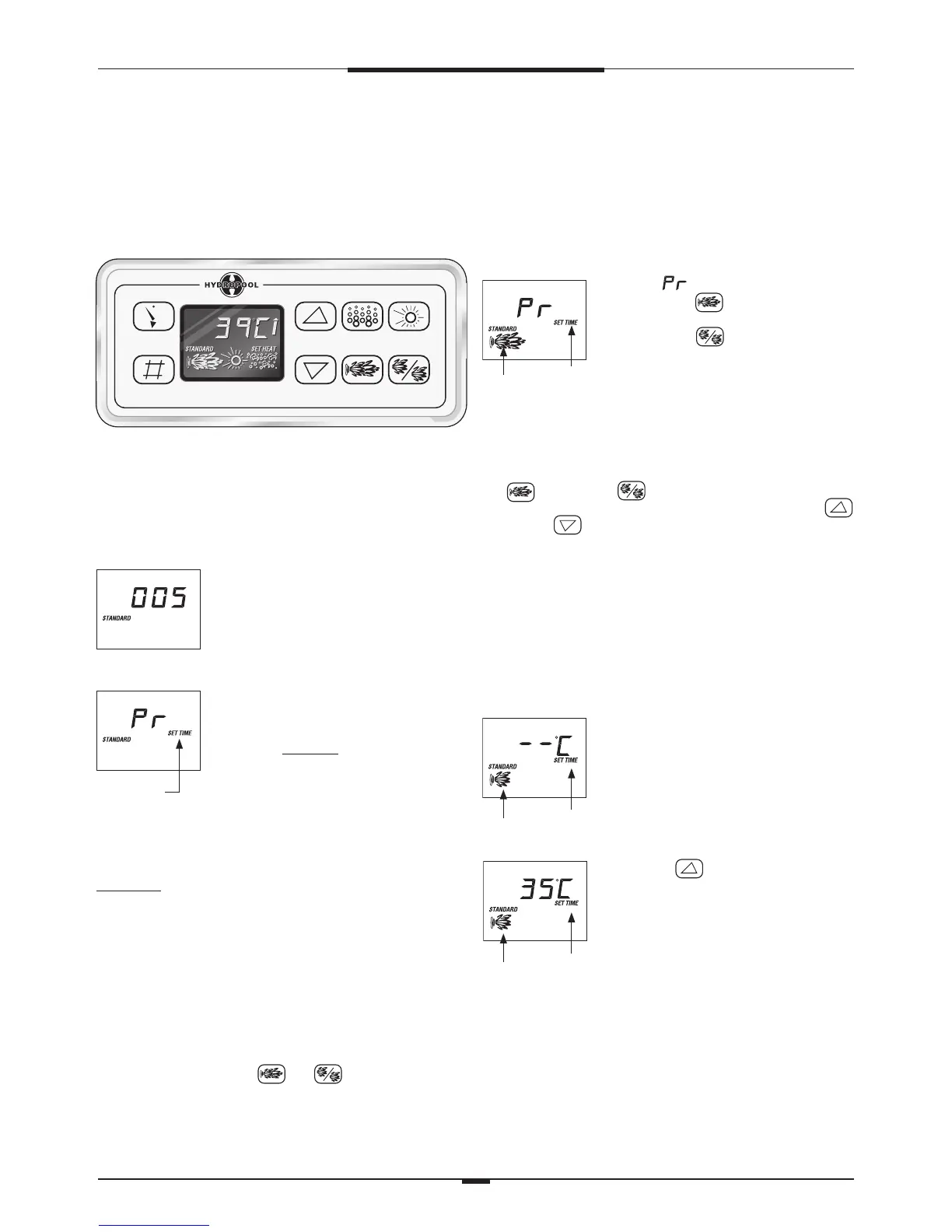
PUMP PRIMING MODE
As soon as is indicated on the topside
panel, push the pad to start Pump 1
in low speed, then again to switch to high
speed. Push the pad to start Pump 2
and Pump 3. These are both single speed
- high only. All of the pumps will now
be operating in high speed to facilitate
priming. See FILLING, CHECKING AND
STARTING YOUR HOT TUB - p. 15 for
complete instructions on pump priming.
Once pump priming has been successfully completed, press
the pad and the pad to turn off the pumps. Next,
manually exit PRIMING MODE by pressing either the
pad or the pad. If you do not manually exit PRIMING
MODE, it will automatically exit after 4 to 5 minutes. Be sure
that the pumps have been primed before exiting this mode.
TEMPERATURE CONTROL
FUNCTIONALITY AND ADJUSTMENT
After you manually or automatically exit the PRIMING
MODE, your hot tub will automatically heat to the factory
preset default temperature of 37.5˚C. The topside panel will
briefly show the default temperature, and then the display
will appear as follows:
Flashing
Pump 1 Low Speed Icon
(Not Flashing)
Note that the water temperature is not
yet displayed, as the system requires
approximately 2 minutes of water
flow through the heater to determine
temperature. After 2 minutes the display
will show the current measured water
temperature.
Flashing
Pump 1 Low speed Icon
(Flashing)
Press the pad to adjust the
temperature to the desired setting. The
word hEAT will appear on the display
indicating that the heater has been
activated. The system automatically
activates Pump 1 low speed every 30
minutes for at least 2 minutes. After
2 minutes, the spa water temperature
is determined. At this point, if the
water temperature is lower than the set
temperature, P1 will continue to run
and the word hEAT will appear on the
display. The heater will operate until the
water temperature reaches the set
temperature point, after which, both the
heater and Pump 1 low will automatically
turn off.
INITIAL START-UP
Before applying voltage to power-up your hot tub, it is very
important that you understand the sequence of events that
occur when the system is activated in order that the pumps
can be primed efficiently and damage to the pumps can be
avoided.
At initial power-up, this display will
appear, and the system will show 4 sets
of numbers in succession (ie. 49 then
88 then 21 then 24). These numbers
represent the current software revision,
and the system input voltage.
After the initial software indicators
are shown, this display will appear. This
display is indicating that the system is
in PUMP PRIMING MODE. This mode
will last for 4 to 5 minutes before
automatically exiting and entering the
normal operation mode. You can also
manually exit PUMP PRIMING MODE
after the pumps are primed (see PUMP
PRIMING MODE).
Definition: ‘Priming’ a pump is a term used to describe the
process in which air trapped in the plumbing and pump
wet-end (referred to as an ‘air lock’) is released, allowing
the pump to move water efficiently through the plumbing
system and to the jets.
While in this mode, the heater circuit is disabled to
allow the priming process to be completed without the
possibility of energizing the heater element during low flow or
no flow conditions. The system will not automatically activate
any of the functions, however, the pumps can be manually
activated by pushing the or pad on the topside
control.
SPA CONTROL SYSTEM – EUROPE
TITANIUM SERIES CONTROL – II
SYSTEM CONTROL HPL303, TOPSIDE PANEL DLX. DIG
Flashing
Flashing
Pump Icons
(Not Flashing)




 To Next Page