Installation, Programming and Maintenance User Guide Oxymatic Smart
V. 1.3.2. May 2015
23
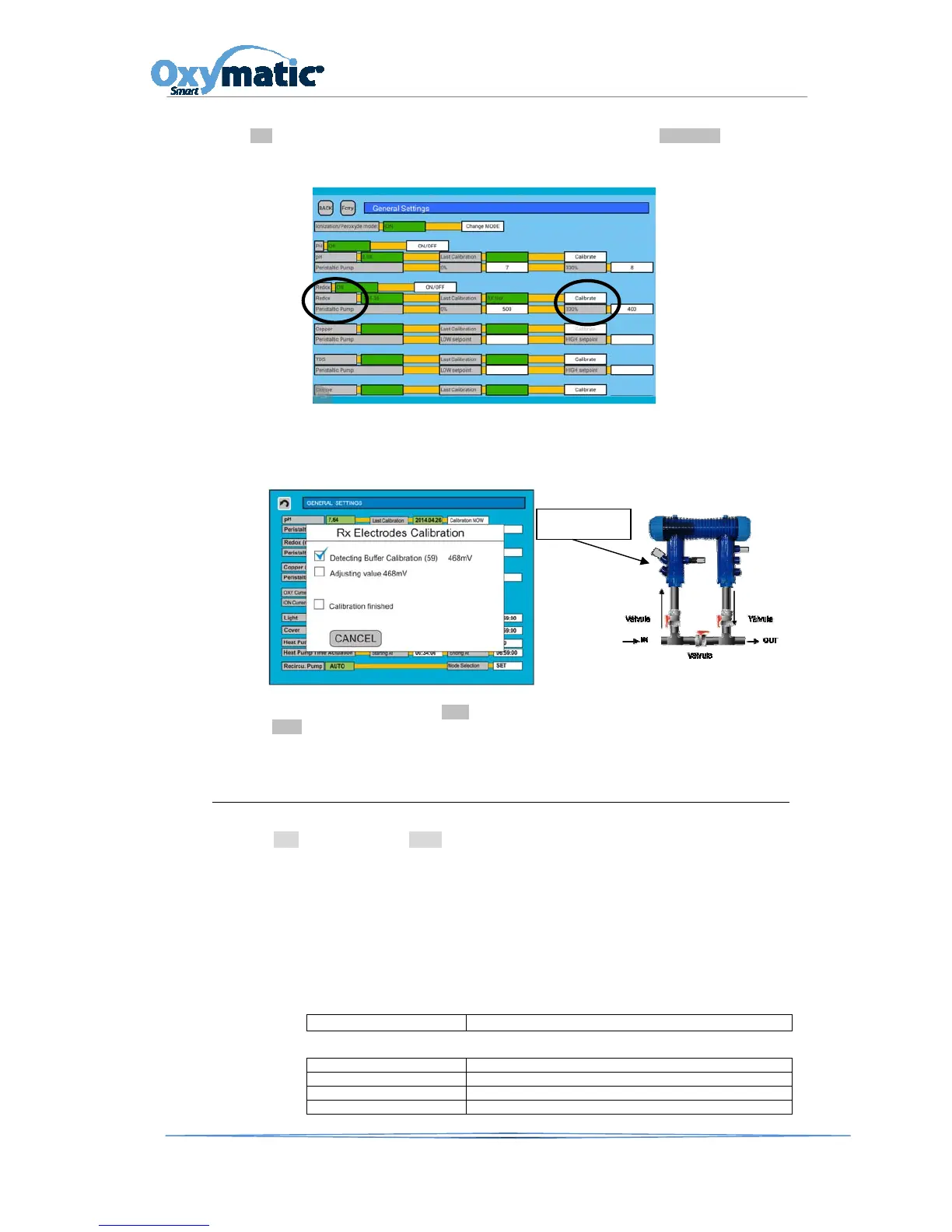
If our system has the option Redox, we need to calibrate the Redox probe. In the main screen, press
the SET button and enter the password 1122. In the option Redox, go to CALIBRATE in order to
calibrate the Redox probe.
We perform the same operation as that used to calibrate the pH probe. We insert the Redox probe
into the 468mV grading solution. The system will detect the reading and continue with calibration.
Once calibrated, the probe must be inserted into the chamber.
Once the probe is calibrated, press the Back button. It will take us back to the main screen, we then
press the AUTO button so that our system will now work with the new calibration.
8.2. PRIVATESWIMMINGPOOLS
PRE-SET program: Press the PROG button on the main screen. You have the ability to select one
of the pre-set programs, according to water temperatura and conditions.You can see this below,
and select the program that best meets your requirements.
For the OXYMATIC system to function effectively, we need to bear in mind that the daily hours of
operation will depend directly on water temperature. The higher the temperature, the greater the
number of hours of operation required.
As a general rule, the CONTINUOUS operating hours are:
PROGRAMAS
START UP Solo Ionización
PROGRAMAS CON SISTEMAS DE COBRE
AUTO-TEMP Funcionamiento de Oxy -



 To Next Page