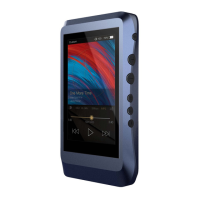
Power on/off:
1. Press and hold the power button to power on.
2. After the DX220 is powered on, a long press of the Power
button to display the pop up window, press Power Off button
to power off the DX220.
Power on/off the screen:
Single press the power button to power on/off the screen after
the DX220 was powered on.
Reset:
When the DX220 stop unexpectedly duringoperation and the
keys are no longer responsive, press and hold the power button
for 10 seconds to reset the DX220.
Charging:
DX220 supports three quick charge protocols, QC3.0, PD2.0,
and MTK PE Plus. Charging can be done with a standard 5V
USB charger or with quick charger that is compliant the stated
3 protocols. A full charge takes about 2.5 hours with the afore
mentioned quick charge types.
The DX220 can work as a USB DAC for Windows PC, Mac
computer, and Linux computer.
It is driver free on Mac computer and Linux computer. For
Windows PC, one can download the driver from iBasso. com
and install it following the steps, before using the USB DAC
function.
Connecting to a computer to work as a
USB DAC:
Basic Operation:
11


 To Next Page