EasyManua.ls Logo

Icare HOME2 - User Manual

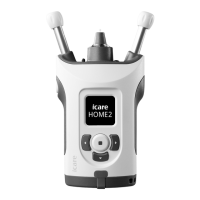
Icare HOME2
48 pages
Print Icon
To Next Page IconTo Next Page
Loading...
ENGLISH
Instruction Manual
iCare HOME2
Rx Only (U.S.)

Table of Contents

Other manuals for Icare HOME2

Questions and Answers

  • J
    James Jones Jr.Aug 19, 2025
    What to do if Icare Medical Equipment shows 'INCORRECT ALIGNMENT'?
    • V
      vwagnerAug 19, 2025
      If the Icare Medical Equipment displays 'INCORRECT ALIGNMENT', press the Measure button to acknowledge the error. Reposition the tonometer so the probe is perpendicular to the center of your eye, ensuring your eye is properly open.
  • D
    Debra PhelpsAug 21, 2025
    What to do if Icare Personal Care Products shows 'INCORRECT ALIGNMENT'?
    • M
      matthewhernandezAug 21, 2025
      If the Icare Personal Care Products tonometer displays 'INCORRECT ALIGNMENT', it means the probe wasn't perpendicular to the center of your eye or it hit an eyelid or eyelashes. Press the Measure button to acknowledge the error. Reposition the tonometer so the probe points perpendicularly to the cornea, and keep your eye properly open.
  • M
    Matthew WiseAug 23, 2025
    What to do if Icare Personal Care Products says 'TOO FAR'?
    • J
      juanmurphyAug 23, 2025
      If your Icare Personal Care Products device shows 'TOO FAR', press the Measure button to acknowledge the error. Then, shorten the forehead and cheek supports.
  • T
    tiffanysalinasAug 26, 2025
    What to do if Icare HOME2 says 'TOO NEAR'?
    • V
      Vanessa VegaAug 26, 2025
      If your Icare Personal Care Products device displays 'TOO NEAR', press the Measure button to acknowledge the error. Then, lengthen the forehead and cheek supports.
  • M
    Mark SteeleAug 27, 2025
    Why does my Icare HOME2 say 'REPEAT'?
    • P
      pwilliamsAug 28, 2025
      If the Icare Personal Care Products displays 'REPEAT', it indicates a problem with the probe's movement. The suggested solution is to repeat the measurement.
  • J
    Justin RiveraAug 30, 2025
    What to do if Icare HOME2 Personal Care Products shows a Bluetooth Error?
    • S
      Suzanne WestAug 30, 2025
      If you see a 'Bluetooth Error' message on your Icare Personal Care Products device, it means the PIN code was entered incorrectly, or the pairing was removed by iCare EXPORT or iCare PATIENT2. To resolve this, press to acknowledge the notification and then repeat the pairing process from the beginning.
  • S
    Savannah WilliamsSep 1, 2025
    What to do if Icare HOME2 Personal Care Products says Bluetooth Connected?
    • A
      Autumn TurnerSep 1, 2025
      If your Icare Personal Care Products device displays 'Bluetooth Connected', simply press the screen to acknowledge the notification.
  • D
    Derek SparksSep 4, 2025
    What to do if Icare HOME2 Personal Care Products says Pairing Cancelled?
    • A
      Anthony RiceSep 4, 2025
      If your Icare Personal Care Products device displays 'Pairing Cancelled', press the screen to acknowledge the notification. If needed, repeat the pairing process from the start.
  • A
    Anthony NortonSep 6, 2025
    What to do if Icare HOME2 Personal Care Products says Rental Expired?
    • K
      Kimberly JonesSep 6, 2025
      Return the rented Icare Personal Care Products tonometer to the clinic, or discuss extending your rental period with the clinic.
  • J
    Jessica RaySep 8, 2025
    What to do if Icare Medical Equipment displays 'REPEAT'?
    • J
      jeanettefieldsSep 8, 2025
      If the Icare Medical Equipment displays 'REPEAT', press the Measure button once to acknowledge the error, and then repeat the measurement.

Summary

Safety Information

For Patients and Healthcare Professionals

General warnings and precautions for users, including handling, maintenance, and probe usage.

Intended Use

Essential Performance

Restrictions of Use

Contraindications

Lists medical conditions or situations where the tonometer should not be used.

Introduction

Buttons and Parts

Identifies and labels the various buttons and components of the tonometer.

Get Started

Insert the Batteries

Step-by-step instructions for opening the battery cover and inserting batteries.

Take a Measurement

Insert the Probe

Detailed instructions on how to correctly insert a single-use probe into the tonometer.

Switch on the Tonometer

Steps to power on the device, ensuring correct date/time settings before use.

Find the Correct Measurement Position

Explains how to position the tonometer against the face for accurate measurements.

Adjust the Supports and Position the Tonometer

Instructions on adjusting forehead and cheek supports for optimal fit and measurement accuracy.

Measure Your Eye Pressure

Guides the user through the actual eye pressure measurement process.

Errors During the Measurement

A table detailing common error messages, their causes, and corrective actions.

Switch Off the Tonometer and Dispose of the Probe

iCare Software System

Install the Software

Instructions for installing the iCare software on computers and mobile devices.

Transfer Measurement Data to iCare CLINIC or iCare CLOUD

Step-by-step guides for transferring data via USB or Bluetooth.

Troubleshooting

Maintenance

Replace the Probe Base

Detailed instructions for safely removing and replacing the tonometer's probe base.

Clean and Disinfect the Tonometer

Procedures for cleaning and disinfecting the tonometer and its parts.

Return the Tonometer for Service or Repair

Guidance on how to contact support and prepare the device for service.

Technical Information

Icare HOME2 Specifications

General IconGeneral
Product TypeTonometer
ConnectivityBluetooth
CompatibilityiOS and Android devices
Probe TypeDisposable probes
DisplayLCD
Intended UseSelf-measurement of intraocular pressure (IOP)
TechnologyRebound Tonometer