EasyManua.ls Logo

Icare HOME2 - Errors During the Measurement

Icare HOME2
48 pages
Print Icon
To Next Page IconTo Next Page
To Previous Page IconTo Previous Page
Loading...
23
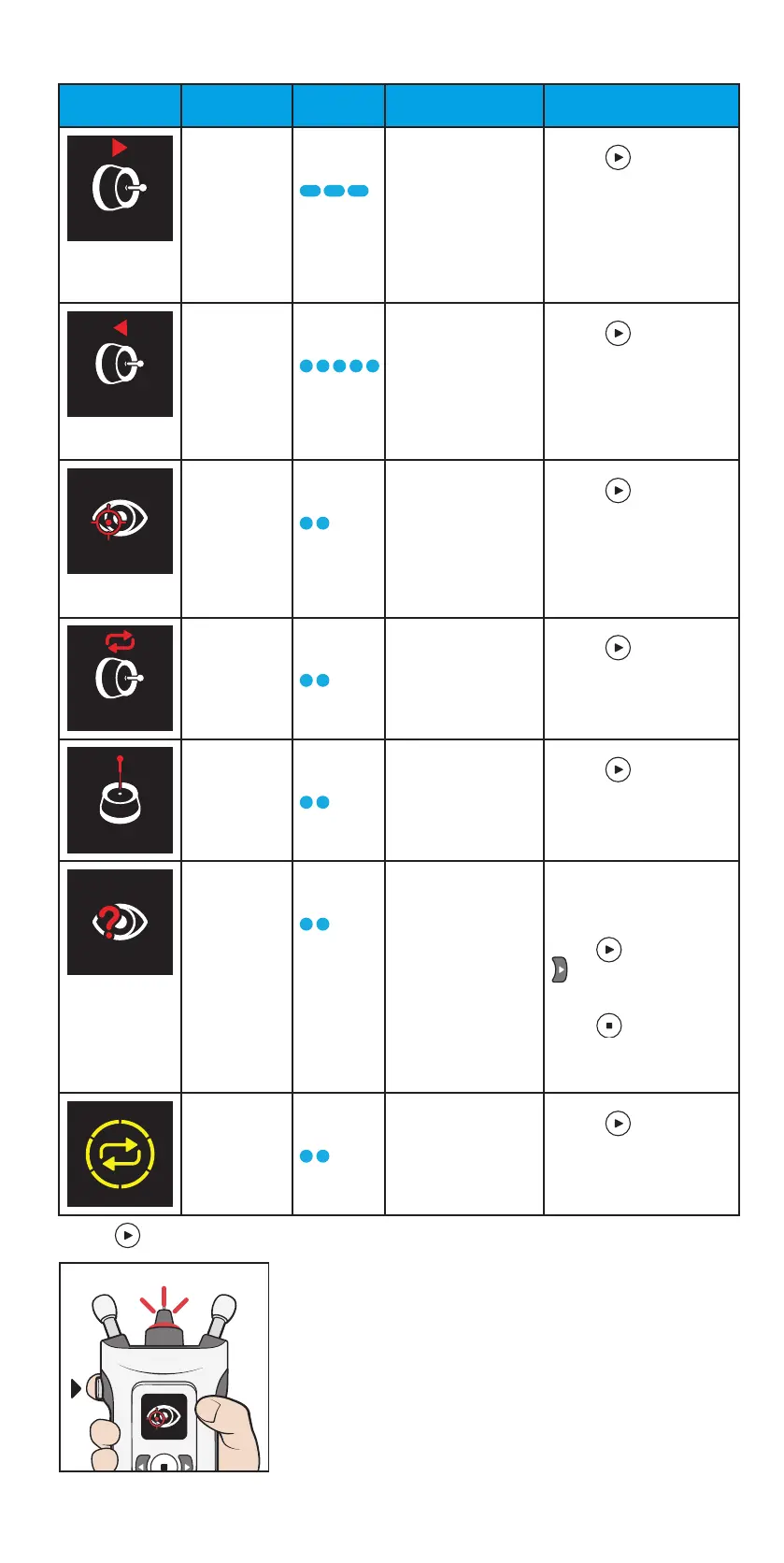
8.7 Errors during the measurement
Screen Text Sound Description
Actions
TOO FAR 3 long
beeps
The measurement
was taken too
far from the eye.
The probe did not
touch the eye.
Press the Measure
button once to
acknowledge the error.
Turn the supports
clockwise until the
probe is about 5 mm
(0.2 inches) from your
eye and you see a green
light ring.
TOO NEAR 5 short
beeps
The measurement
was taken too
close to the eye.
Press the Measure
button once to
acknowledge the error.
Turn the supports
counterclockwise until
the probe is about
5 mm (0.2 inches) from
your eye.
INCORRECT
ALIGNMENT
2 short
beeps
The probe was not
perpendicular to
the cornea or the
probe hit an eyelid
or eyelashes.
Press the Measure
button once to
acknowledge the error.
Position the tonometer
so that the probe points
perpendicularly to the
center of your eye. Keep
your eye properly open.
REPEAT 2 short
beeps
The probe did not
move properly or
did not make a
clean contact with
the cornea.
Press the Measure
button once to
acknowledge the error.
Measure again or
change the probe.
CHANGE 2 short
beeps
The probe did not
move.
Press the Measure
button once to
acknowledge the error.
Change to a new probe.
DETECTION
ERROR
2 short
beeps
The sensor could
not detect which
eye was being
measured (right or
left).
Collect your hair from
your temple to behind
your ear. Make sure your
face is fully uncovered.
Press , then press
until the correct
eye (right or left) is
shown on the display.
Press to confirm,
or press the return
button to cancel the
measurement.
REPEAT 2 short
beeps
The variation in the
measurements was
too high.
Press the Measure
button once to
acknowledge the
error. Repeat the
measurement.
Press to acknowledge the error and to continue measuring.

Table of Contents

Other manuals for Icare HOME2