27
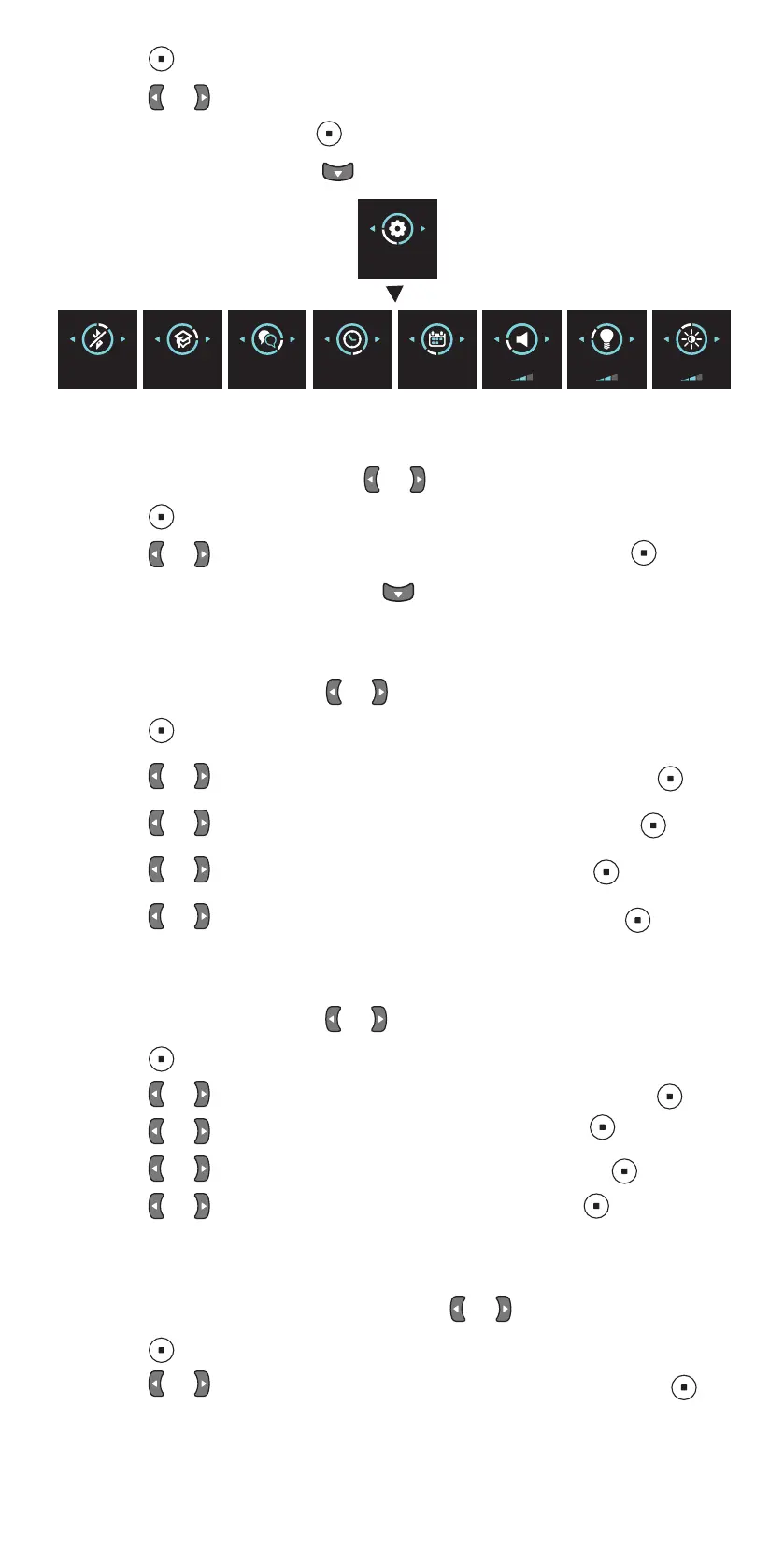
3. Press .
4. Press or to move between the various settings.
5. To select a setting, press .
6. To exit the settings, press
PRACTICE
MODE
SETTINGS
BLUETOOTH
OFF
LANGUAGE
ENGLISH
TIME
17:20
DATE
09/05/2019
SOUND LIGHT BRIGHTNESS
11.1 Language settings
1. To change the language, press or until you see LANGUAGE.
2. Press .
3. Press or until you see the language you want, and press .
4. To go back to the settings, press .
11.2 Time settings
1. To change the time, press or until you see TIME.
2. Press .
3. Press or until you see the time format you want, and press .
4. Press or until you see the time zone you want, and press .
5. Press or until you see the hour you want, and press .
6. Press or until you see the minutes you want, and press .
11.3 Date settings
1. To change the date, press or until you see DATE.
2. Press .
3. Press or until you see the date format you want, and press .
4. Press or until you see the year you want, and press .
5. Press or until you see the month you want, and press .
6. Press or until you see the day you want, and press .
11.4 Volume settings
1. To change the volume level, press press or until you see SOUND.
2. Press .
3. Press or until you hear the volume level you want, and press .


 To Next Page