DX8
Dual Balance Charger/Discharger/DC Power
Parameters Setup
Parameters Setup
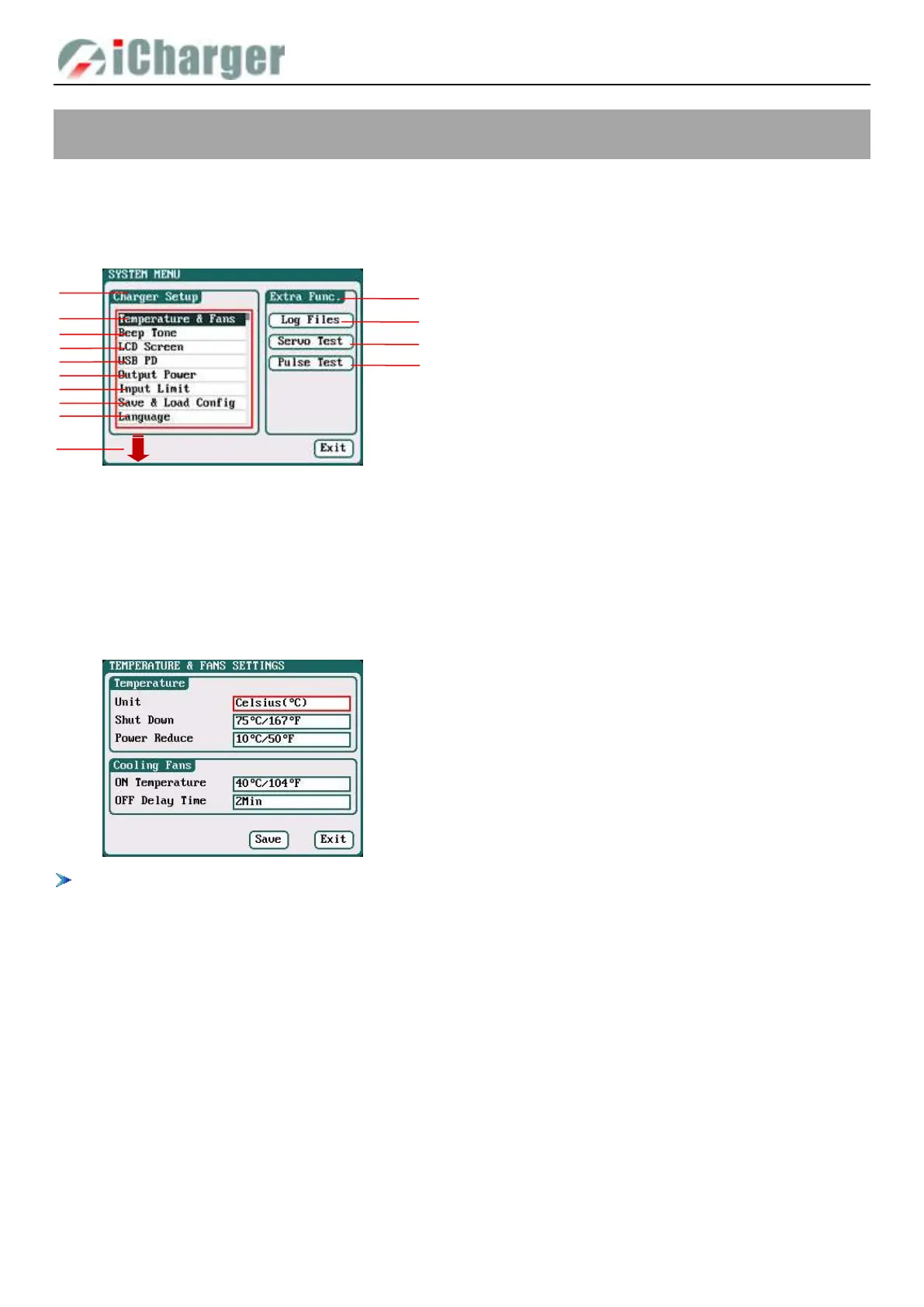
Press <> button on the initial interface to enter the SYSTEM MENU interface, setting and testing of the system parameters,
storage and servo can be completed on this interface.
Charger Setup
After setting all parameters, click “Save” to save and return to the previous interface.
Temp. & Fans Setup
Select SYSTEM MENU→Temperature&Fans to enter the setup interface
When the charger’s internal temperature reaches the ON Temperature, the fan will start automatically to dissipate heat,
and adjust speed automatically depends on the temperature increasing or decreasing. When the temperature exceeds the
Power Reduce temperature, the charger will stop increasing (temp. shown in orange) by reducing the highest power limit.
When the temperature reaches Shut Down temperature, the charger will shut down. [When temp. >Shut Down-3, the
temperature is shown flashing in red]. When the temperature is lower to the ON Temperature, the fan will keep running
within the setting time of OFF Delay Time.
1. Charger Setup Menu
2.Temp. & Fans Setup 3.Beep Tone
4. LCD Screen 5.USB PD
6. Output Power Setup 7.Input Limit
8.Save & Load Configuration Setup
9.Language Setup
10. Calibration
11.Extra- Function
12.Log Files Manage 13. Servo Test
14. Pulse Test
1:Temperature:
Unit:Celsius (default), Fahrenheit
Shut Down: 65℃-80℃; default: 80℃
Power Reduce: -5℃-20℃; default: -10℃
2:Cooling Fans:
ON Temperature:30℃-50℃; default: 40℃
OFF Delay Time:0Min-10Min; default: 2Min



 To Next Page