24
8
BATTERY CHARGING
New2001
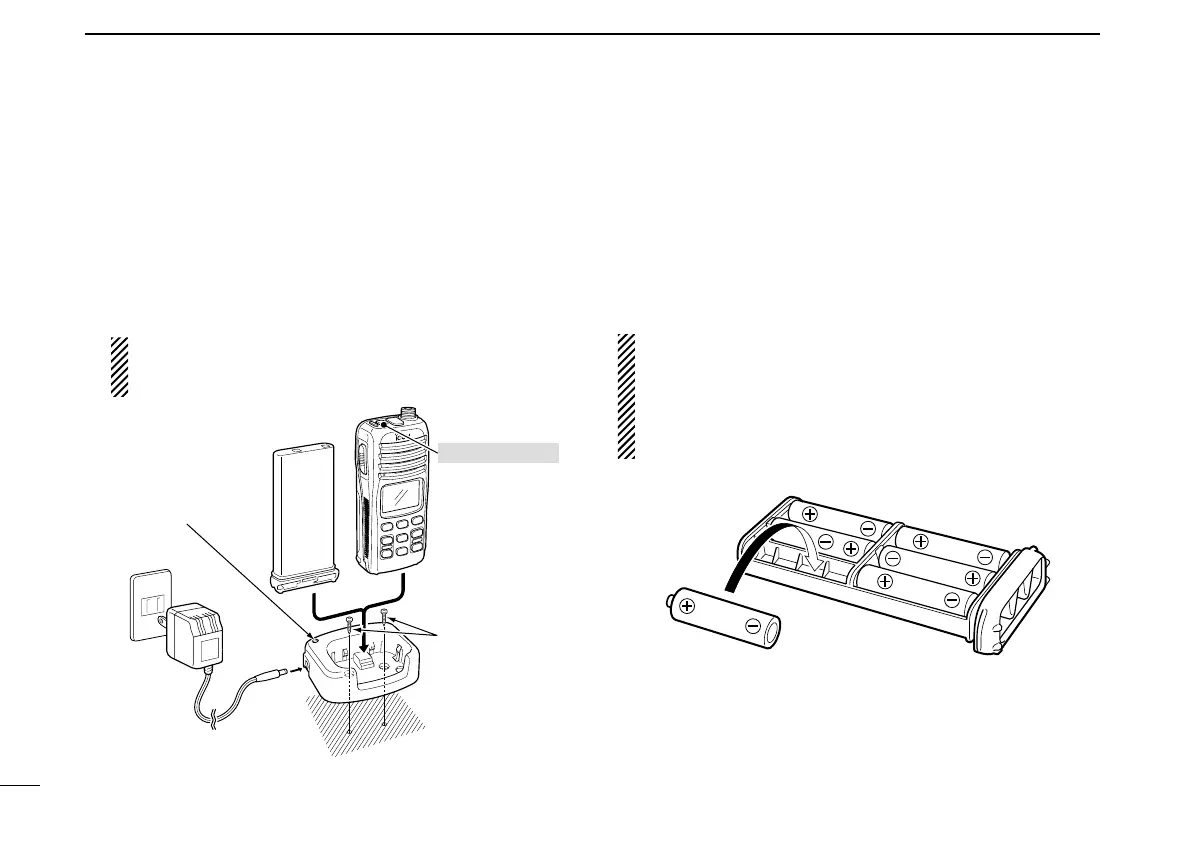
D Charging connections
q Attach the BC-150 to a flat surface, such as a desk or
cabin, etc., if desired.
w Connect the AC adapter as shown below.
e Insert the battery pack with/without the transceiver into
the charger.
• The charge indicator lights green.
r Charge the battery pack approx. 8 hours, depending on
the remaining power condition.
DO NOT charge BP-224 more than 12 hours. Oth-
erwise, BP-224 will be damaged. BP-224 must be
charged for 8–12 hours only.
■ Optional battery case
When using a battery case attached to the transceiver, in-
stall 6 × AA(R6) size alkaline batteries as illustrated below.
q Remove the battery case from the transceiver.
w Install 6 × AA(R6) size alkaline batteries.
• Be sure to observe the correct polarity.
CAUTION:
• When installing batteries, make sure they are all the
same brand, type and capacity. Also, do not mix new
and old batteries together.
• Keep battery contacts clean. It’s a good idea to clean
battery terminals once a week.
Charge indicator
lights green when
the battery pack
(with/without the
transceiver) is
inserted.
BC-150
Supplied screws
Battery pack
Transceiver
Turn power OFF
AC adapter
(A different type, or no AC
adapter is supplied,
depending on the version.)



 To Next Page