37
9
CONNECTIONS AND MAINTENANCE
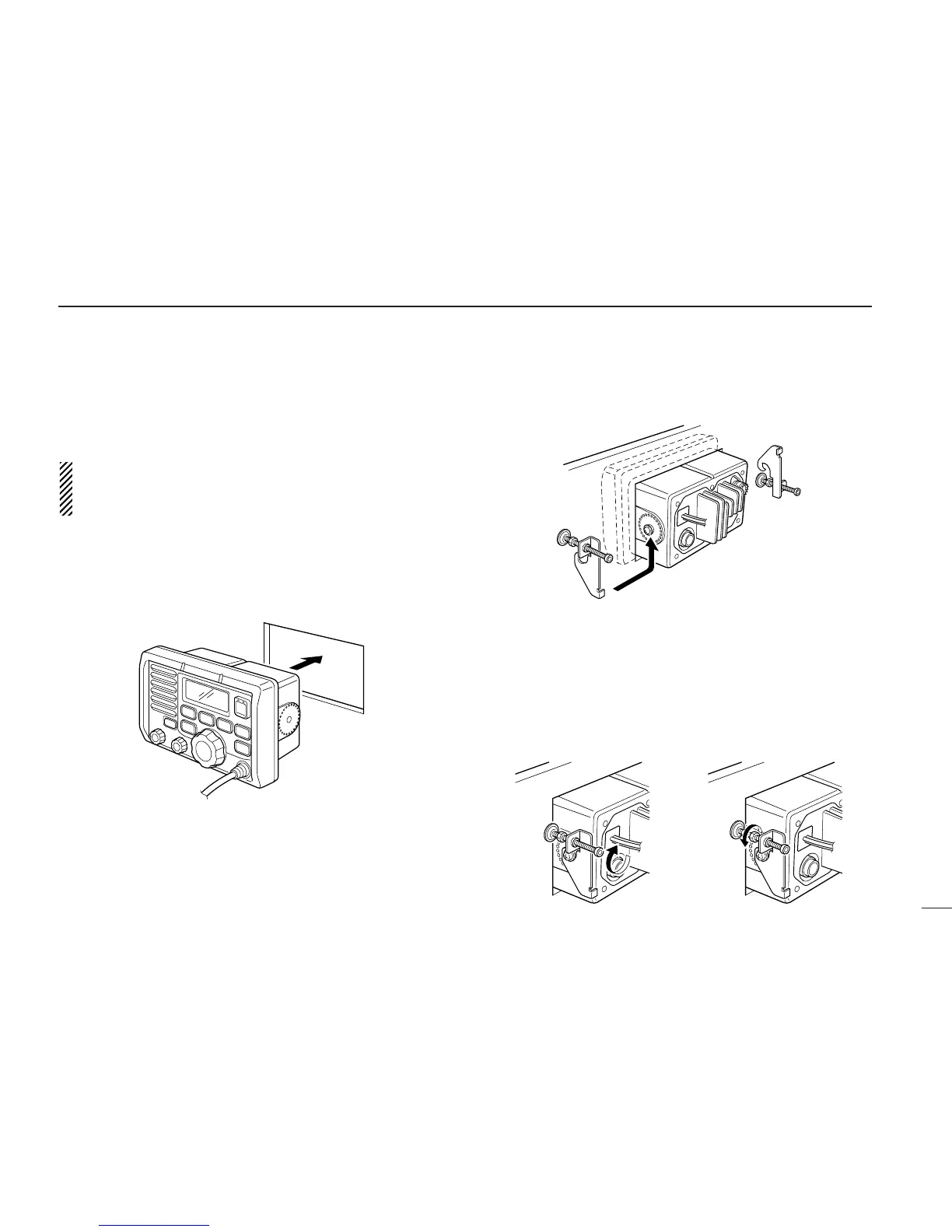
Using the optional mounting bracket
An optional MB-75 FLUSH MOUNT is available for mounting
the transceiver to a flat surface such as an instrument panel.
CAUTION: KEEP the transceiver and microphone at
least 1 meter away from your vessel’s magnetic navigation
compass.
q Using the template on the last page, carefully cut a hole
into the instrument panel (or wherever you plan to mount
the controller).
w Slide the transceiver through the hole as shown below.
e Attach the 2 supplied bolts (M5 × 8 mm) on either side of
the IC-M502.
r Attach the clamps on either side of the IC-M502.
• Make sure that the clamps align parallel to the IC-M502’s body.
t Tighten the end bolts on the clamps (rotate clockwise) so
that the clamps press firmly against the inside of the in-
strument control panel.
y Tighten the locking nuts (rotate counterclockwise) so that
the IC-M502 is securely mounted in position as below.
u Connect the antenna and control cable, then return the in-
strument control panel to its original place.



 To Next Page