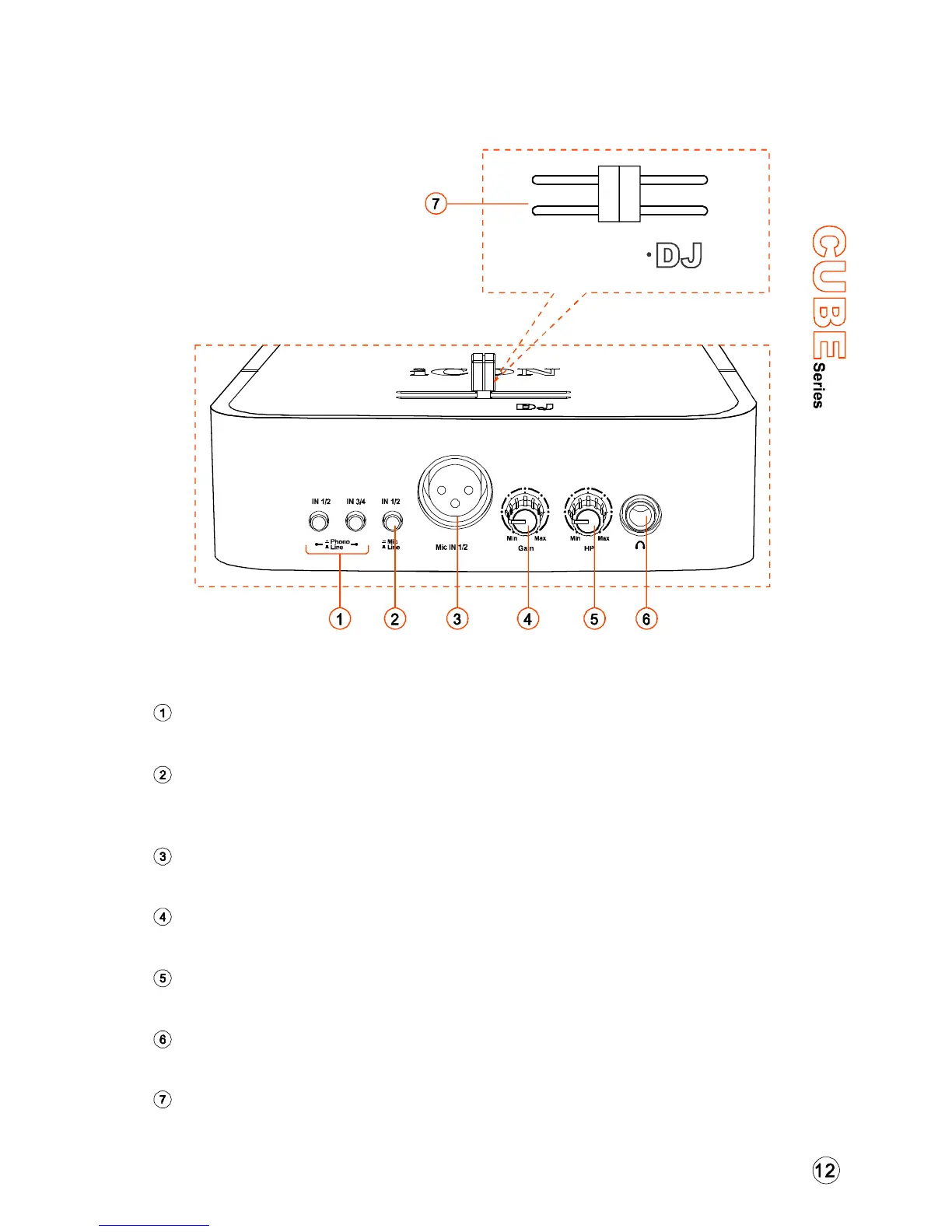
Front Panel - Cube DJ
“LINE/PHONO” SWITCH FOR INPUTS 1/2 & 3/4
“MIC/LINE” SWITCH FOR INPUTS 1/2
MIC INPUT CONNECTOR FOR INPUTS 1/2
MIC INPUT GAIN LEVEL CONTROL
HEADPHONE LEVEL CONTROL
HEADPHONE OUTPUT
MASTER VOLUME CONTROL CROSS FADER
Switch to adjust the input level of inputs 1/2 & 3/4 for different input devices.
Activate the button if the mic is used for inputs 1/2 otherwise use the line
input connectors (RCA) located on the rear panel.
This is unbalanced MIC level input for a dynamic microphone.
This potentiometer controls the input level of the mic.
This potentiometer controls the output level of the headphone output.
This output jack accepts a standard 1/4 stereo TRS headphone connector.
Horizontal cross fader “Master volume control” allows instant monitoring
between output 1/2 or 3/4.
″
USB2.0 High-Speed
CUBE
Master
1/2 3/4
CUBE


 To Next Page