Mac driver installation
Please follow the step-by-step procedures below to install your Cube series USB
recording interface and its driver.
Turn on your Mac
Note: Do not connect the Cube series
digital audio interface to your Mac yet
Insert the provided driver CD into
your CD-Rom.
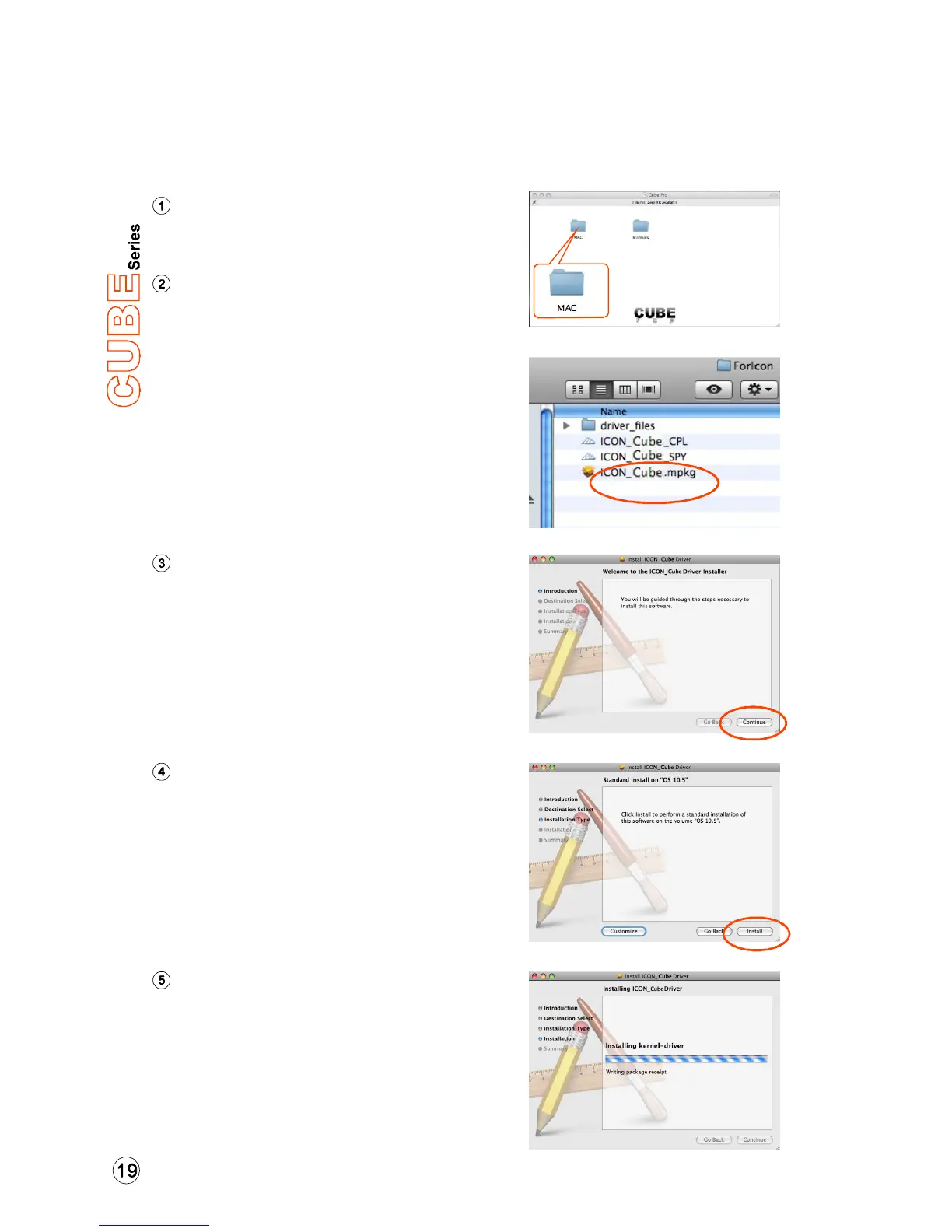
After you have inserted the provided
Driver CD into your CD-Rom, a pop-
up window should appear as shown
in Diagram 1, then click on the
"Mac” folder to open the installation
files list. Click “ICON_Cube.mpkg”
Diagram 2
Choose "Continue" when you see
the Welcome Screen shown in
Diagram 3
Welcome Screen appears
Click the "Change install location”
button if you would like to set your
preferred install location, otherwise
click the “Install” button.
Set install location
Diagram 3
Diagram 4
Diagram 5
Installation start
The driver installation has started,
please wait until the process has
completed.
Diagram 1


 To Next Page