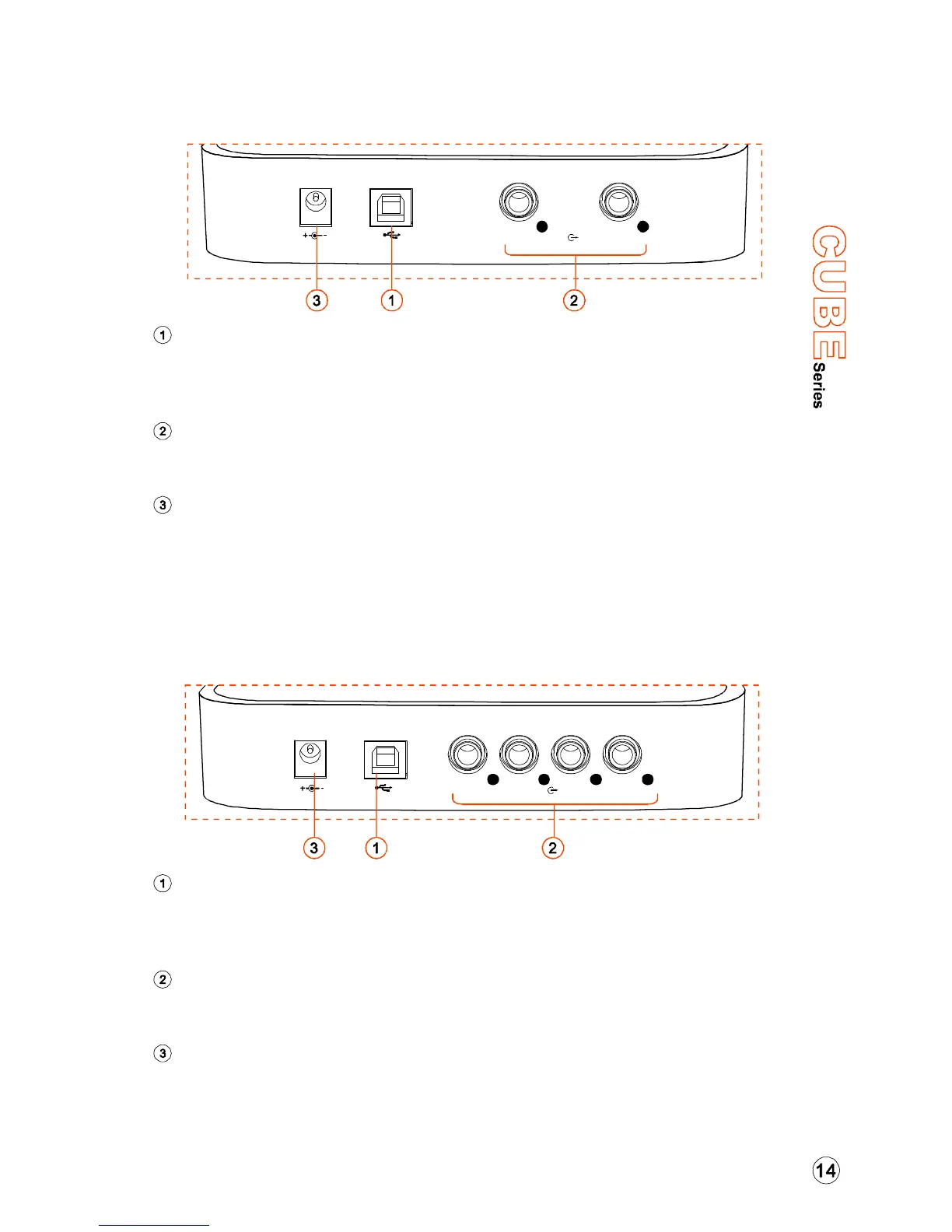
Rear Panel - Cube
Connect it with the provided USB cable to your computer's USB
connector. Your computer must have a USB2.0 connector to
maximize the performance of Cube.
These are unbalanced analog outputs on standard 1/4" TS connectors
at +6dBU line level.
USB 2.0 CONNECTOR:
LINE OUTPUTS 1-2:
POWER SUPPLY CONNECTOR:
Connect the 5VDC power supply to this jack using ICON AC adaptor in
case your notebook is not capable to supply sufficient power to Cube.
Note: Normally, extenal power supply is not needed, Cube series audio
interface is USB-bus powered.
Rear Panel - Cube Pro
Connect it with the provided USB cable to your computer's USB
connector. Your computer must have a USB2.0 connector to maximize
the performance of Cube Pro.
These are unbalanced analog outputs on standard 1/4" TS connectors
at +6dBU line level.
USB 2.0 CONNECTOR:
LINE OUTPUTS 1-4:
POWER SUPPLY CONNECTOR:
Connect the 5VDC power supply to this jack using ICON AC adaptor in
case your notebook is not capable to supply sufficient power to Cube Pro.
Note: Normally, extenal power supply is not needed, Cube series audio
interface is USB-bus powered.
5V DC
USB
Line Outs
12
USB
5V DC
Line Outs
1234


 To Next Page