Windows driver installation
Please follow the step-by-step procedures below to install your Cube series
USB recording interface and its driver.
Turn on your computer
Note: Do not connect the Cube series digital audio interface to your
computer yet
Insert the Driver CD into your CD-Rom.
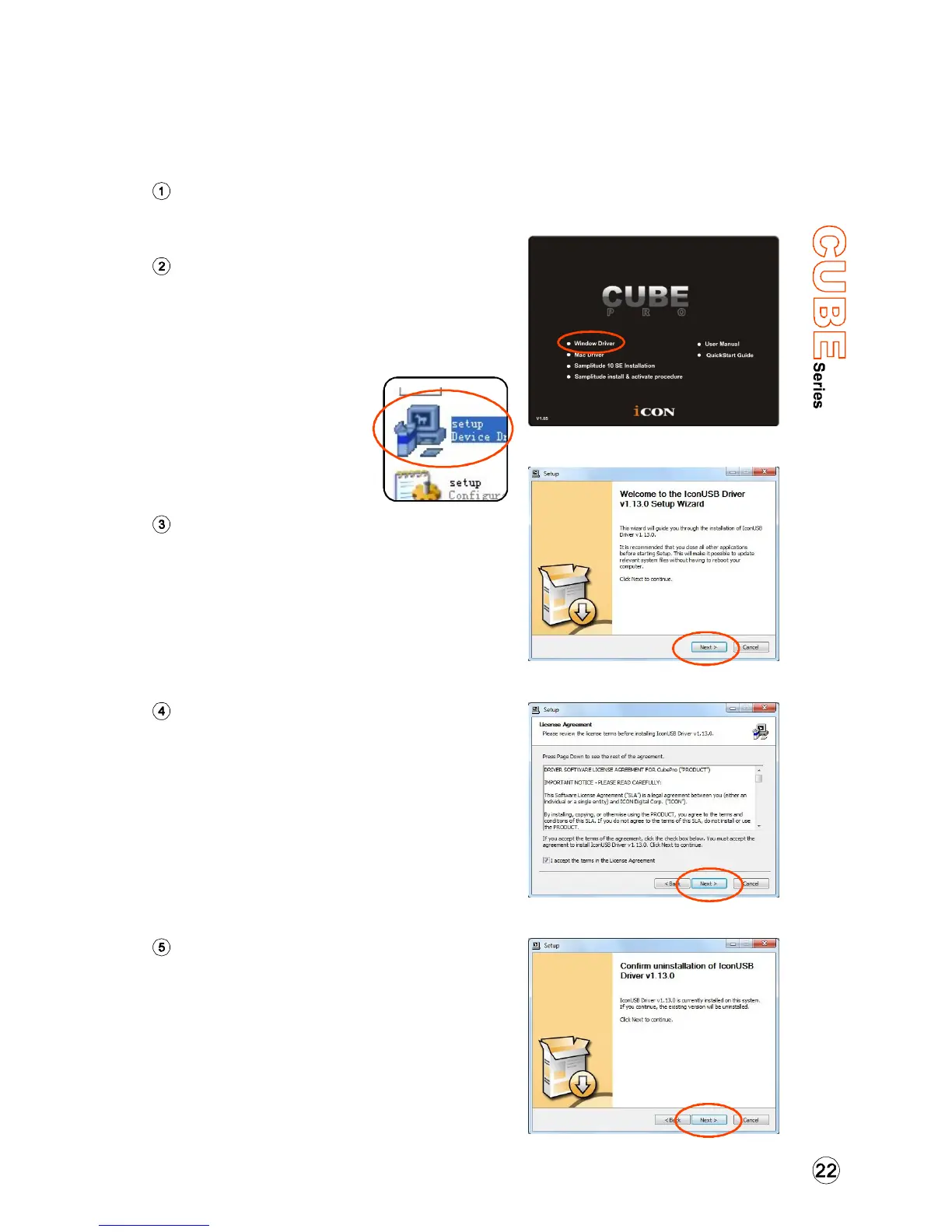
After you have inserted the provided
Driver CD into your CD-Rom, an
Installation screen should appear as
shown in Diagram 1, then click
"Windows Driver” for the
driver installation"
Note: If the Installation
screen do not appaer
automatically. Go to the
CD folder and
double click "Setup"
Choose "Next" when you see the
Welcome Screen as Diagram 2
shown
Installation Wizard appear
License Agreement
Check mark the “I accept the terms
in the License Agreement” and
click “Next”.
Confirm driver installation
A confirmation on the driver
installation screen will appear,
click “Next”.
Diagram 1
Diagram 2
Diagram 3
Diagram 4


 To Next Page