I.D.E. Systemy Elektroniczne 21
To access No code access submenu:
1. When the controller is in the programming mode (see page 5), in the
Protected settings submenu (see page 7), select No code access
submenu with buttons.
2. Press button.
To browse and/or change accessibility of the counters:
1. When the controller is in the programming mode (see page 5), in the
No code access submenu, select the counter with
buttons.
2. To change the accessibilty of the selected counter, press button.
To return to the Protected settings submenu, press button. To
leave the programming mode and save new setting in the long term
memory, press button or wait 60 seconds.
Code change
All new controllers have producer’s code (00000).
Range of setting: 5 numbers
Default setting: 00000
Available numbers:
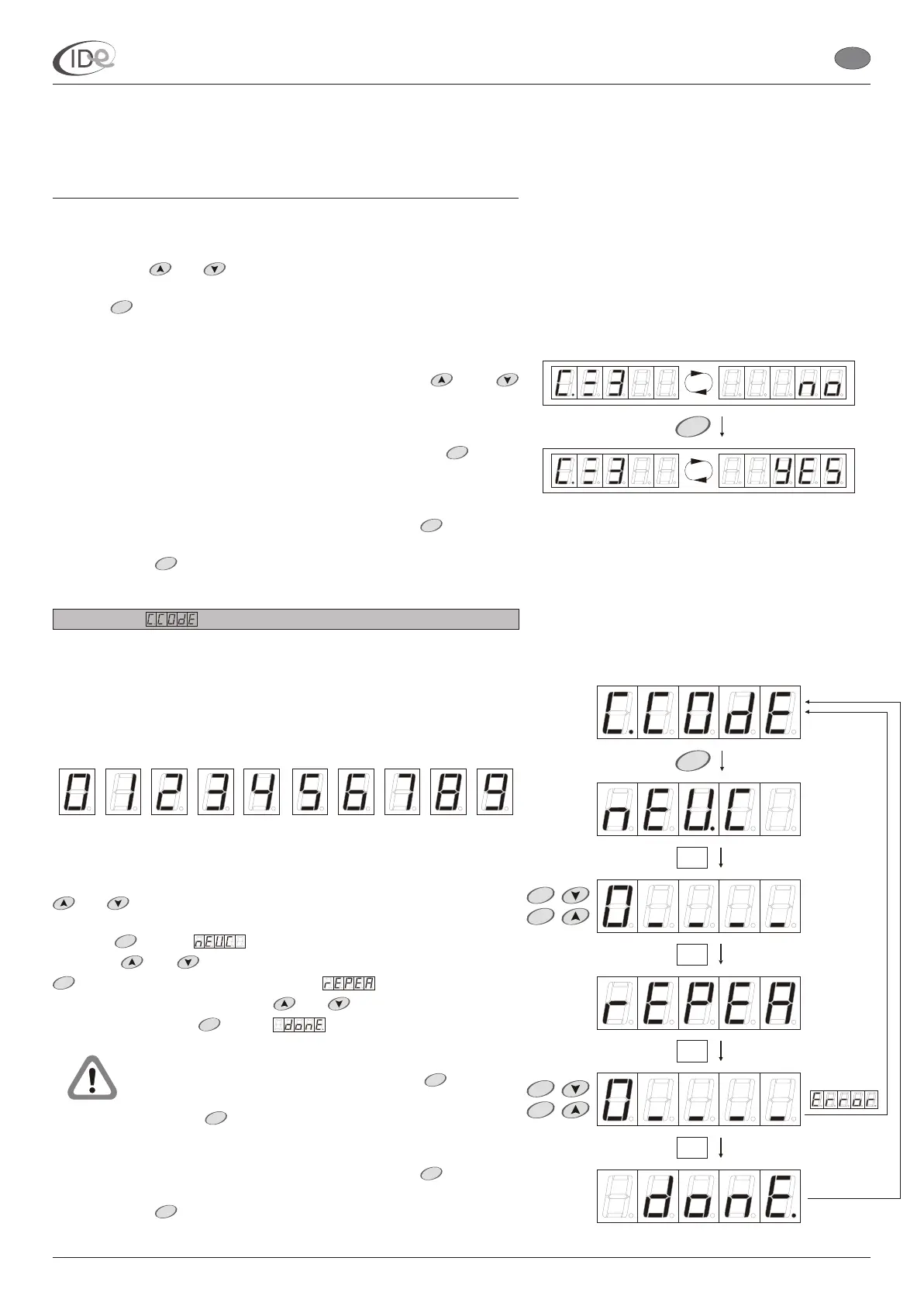
To change code:
1. When the controller is in the programming mode (see page 5), in the
Protected settings submenu (see page 7), select Code submenu with
buttons.
2. Press button. will be displayed for a while. Enter new
code with buttons, confirming each selected number with
button. After confirming fifth number, will be displayed for a
while. Enter new code again with buttons, confirming each
selected number with button. will be displayed for a while.
New code is saved automatically in the long term
memory, after confirming fifth number with button.
Pressing button causes previous number reedition.
To return to the Protected settings submenu, press button. To
leave the programming mode and save new setting in the long term
memory, press button or wait 60 seconds.
and
and
and
and
and
The selected counter symbol and the selected counter
setting is displayed alternately.
The selected counter symbol and the selected counter new setting is
displayed alternately.
To unable access of
the unauthorized people to the Protected settings submenu (see page
7), it is recommended that the code should be changed by the user.
START
START
STOP
MENU
START
START
START
START
STOP
STOP
MENU
P
P
START
PageVersion 1.1 07/2005
I.D.E. e1.01 sunbed controller
EN
START
STOP
T
START
T
T
START
STOP
T
Part II Operating manual
2. Programming mode



 To Previous Page