iDirect Evolution X5 Satellite Router Installation and Safety Manual 21
Evolution X5 Satellite Router Rear Panel
4.6 Evolution X5 Satellite Router Rear Panel
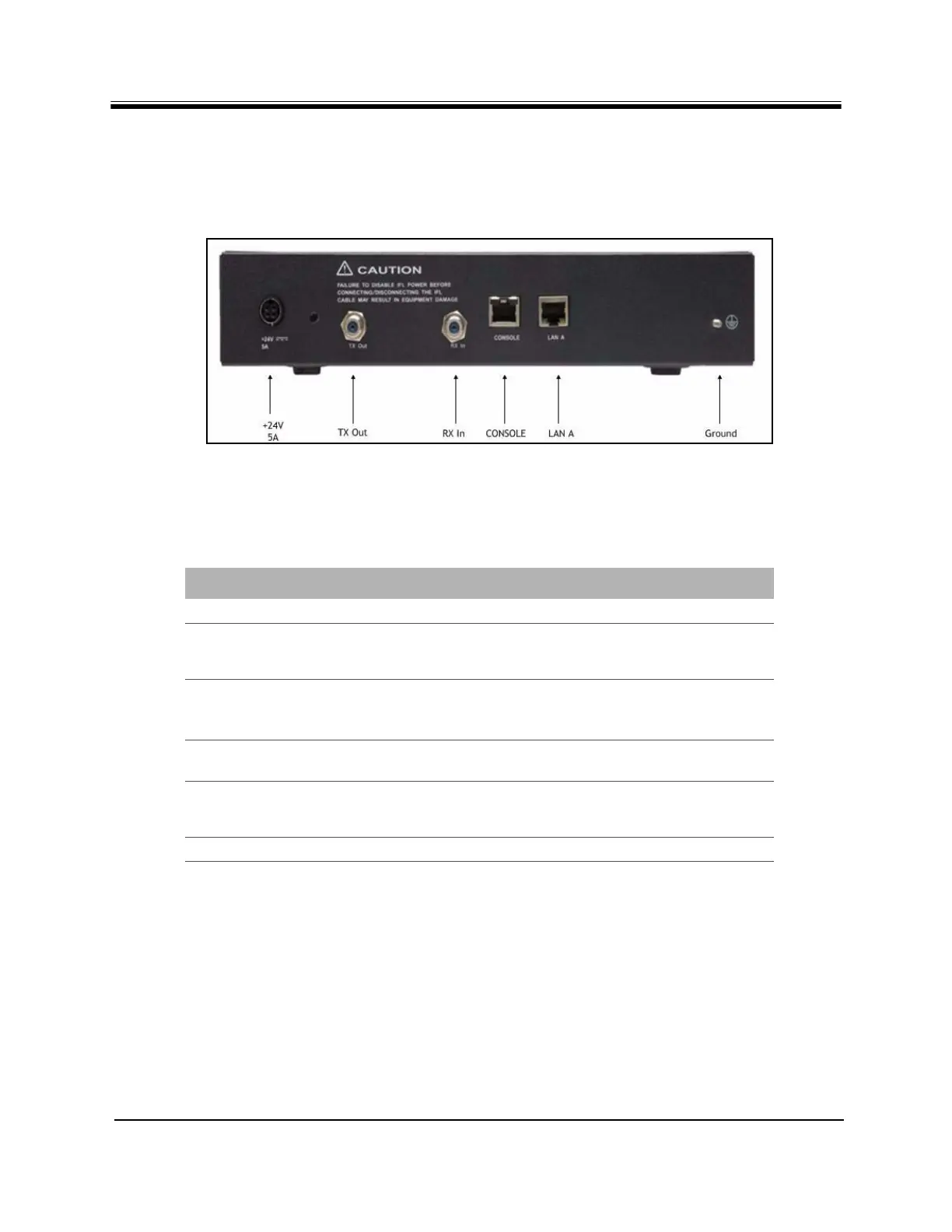
This section describes and illustrates the rear panel connectors. They are shown in Figure 5.
See Table 8 for a description of each connector and indicator.
Figure 5. Evolution X5 Satellite Router Rear Interface Connectors
Table 8. iDirect Evolution X5 Satellite Router Connectors
Label Connector Type Interface and Purpose
+24V 5A KyCon-KPJ4SS External +24VDC power supply
TX Out 75 ohm, F-Type L-Band Transmit signal to Block UpConverter (BUC)
capable of 10 MHz Reference and +24 VDC, 3.5
Amps maximum power to BUC
RX In 75 ohm, F-Type L-Band receive signal, capable of 10 MHz Reference
and DC power to LNB
75 ohm, F-Connector female
CONSOLE RJ-45 RS-232 servicing serial connection console to PC or
laptop
LAN A RJ-45 Category-5 STP or UTP cable, 10/100
Base-T Ethernet LAN port connects the Evolution X5
Satellite Router to the customer LAN Hub/switch
Ground 4-40 mounting stud chassis ground



 To Next Page