28 iDirect Evolution X5 Satellite Router Installation and Safety Manual
Preparing the Coax Cables
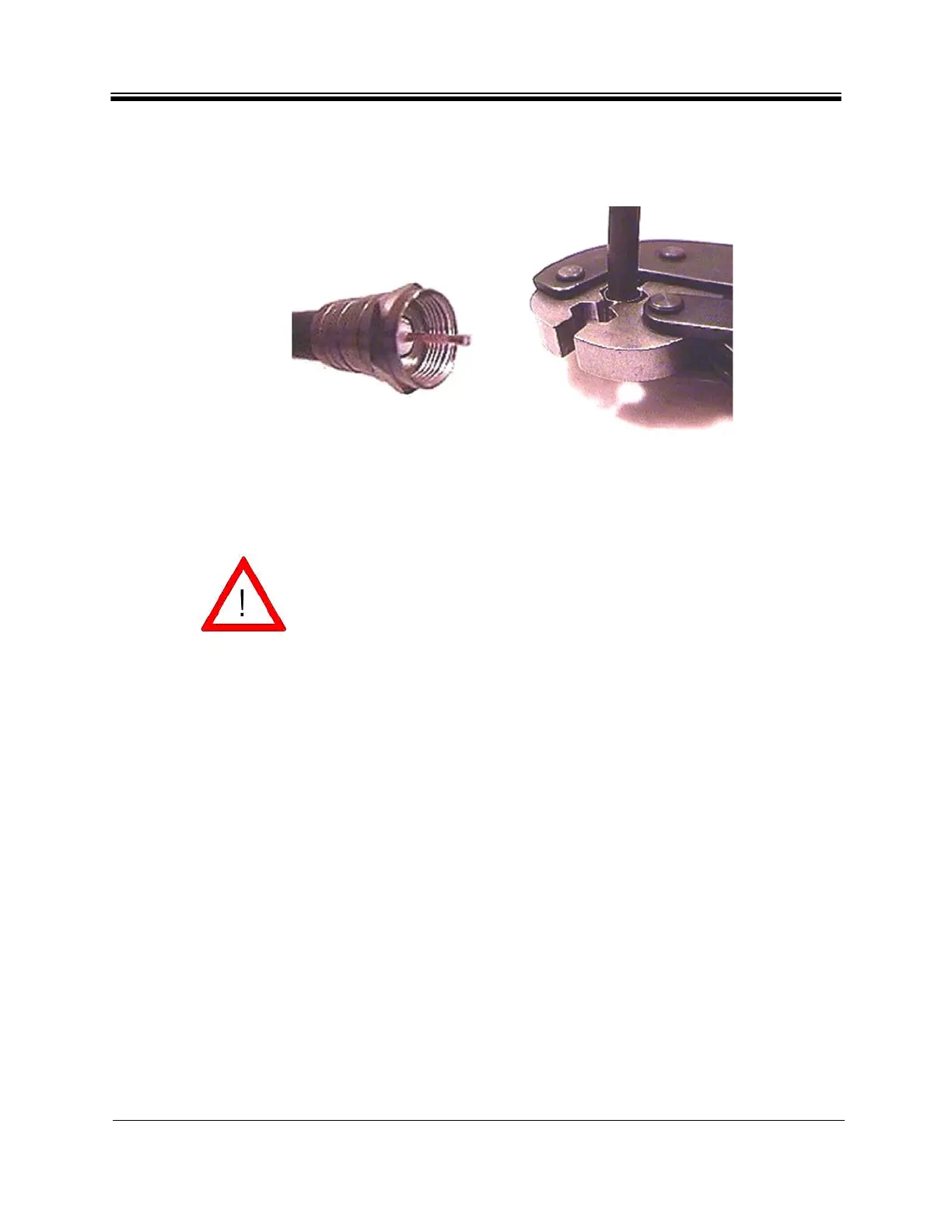
11. Inspect and ensure that the copper center conductor only protrudes 1/8 inch (3.2 mm)
nominally beyond the rim of the F-connector as shown in Figure 13. Trim if necessary.
Figure 13. Proper Center Connector Length and Crimping Technique
4.7.1 Console Port Cable Specifications and Pinout
Use the RJ-45-to-RJ-45 straight cable and RJ-45 to DB-9 female DTE adapter to connect the
Universal Line Card Console Port to the PC that is running terminal emulation software. You
can identify whether a cable is straight-through or cross-over by comparing the two RJ-45
connectors at the ends of the Ethernet cable.
The center conductor length must be a minimum of 1/16 inch (1.6 mm)
to a maximum of 1/8 inch (3.2 mm) protrusion beyond the rim of the F
type connector (see Figure 13). It must be straight and cylindrical
without any burrs at the end. Failure to follow this technique could
result in damage to the IDU, BUC, LNB connector and/or possible
intermittent service.



 To Next Page