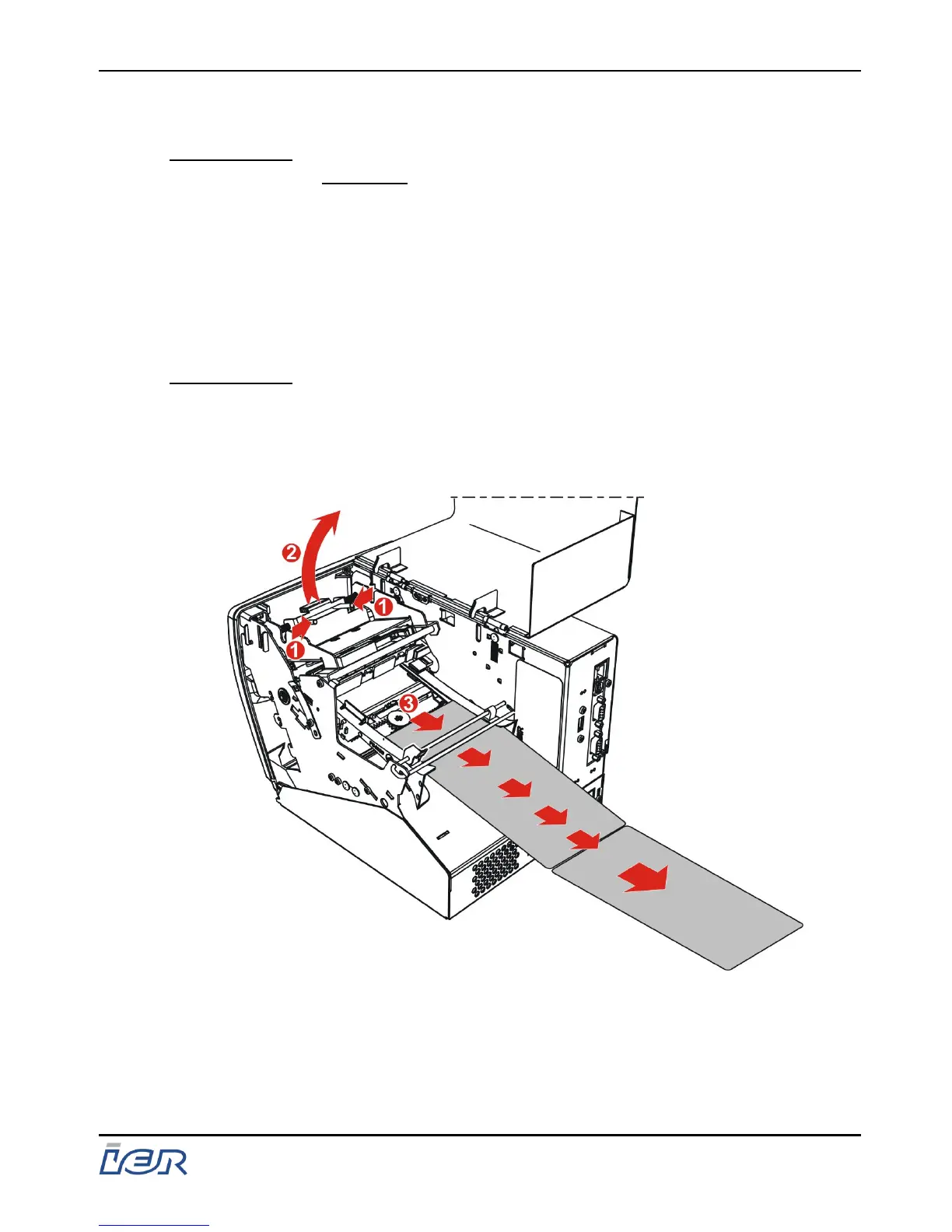
5.4.2 Manual Removal
IMPORTANT: IMPERATIVELY POWER DOWN THE PRINTER
BEFORE STARTING TO REMOVE THE PAPER
MANUALLY.
Manual removal may be necessary when documents have not
been successfully removed from the printer automatically (e.g. due
to a paper jam).
This operation is performed by unlocking the printhead support
then removing the media from the rear of the printer.
IMPORTANT: This action does not require you to open the
printhead; simply unlocking the support will suffice,
see page 38.
Ensure you re-lock the printhead support after
removing the paper, see page 40
Figure 5.4
Manual Paper Removal
IER 400B
User Guide
Ce document est la propiété d'IER et ne doit pas être reproduit ou communiqué sans autorisation écrite.
This document is the property of IER and may not be reproduced or communicated without prior written authorization
Page 43
N0C402B Rev. 1
July 6, 2009



 To Next Page