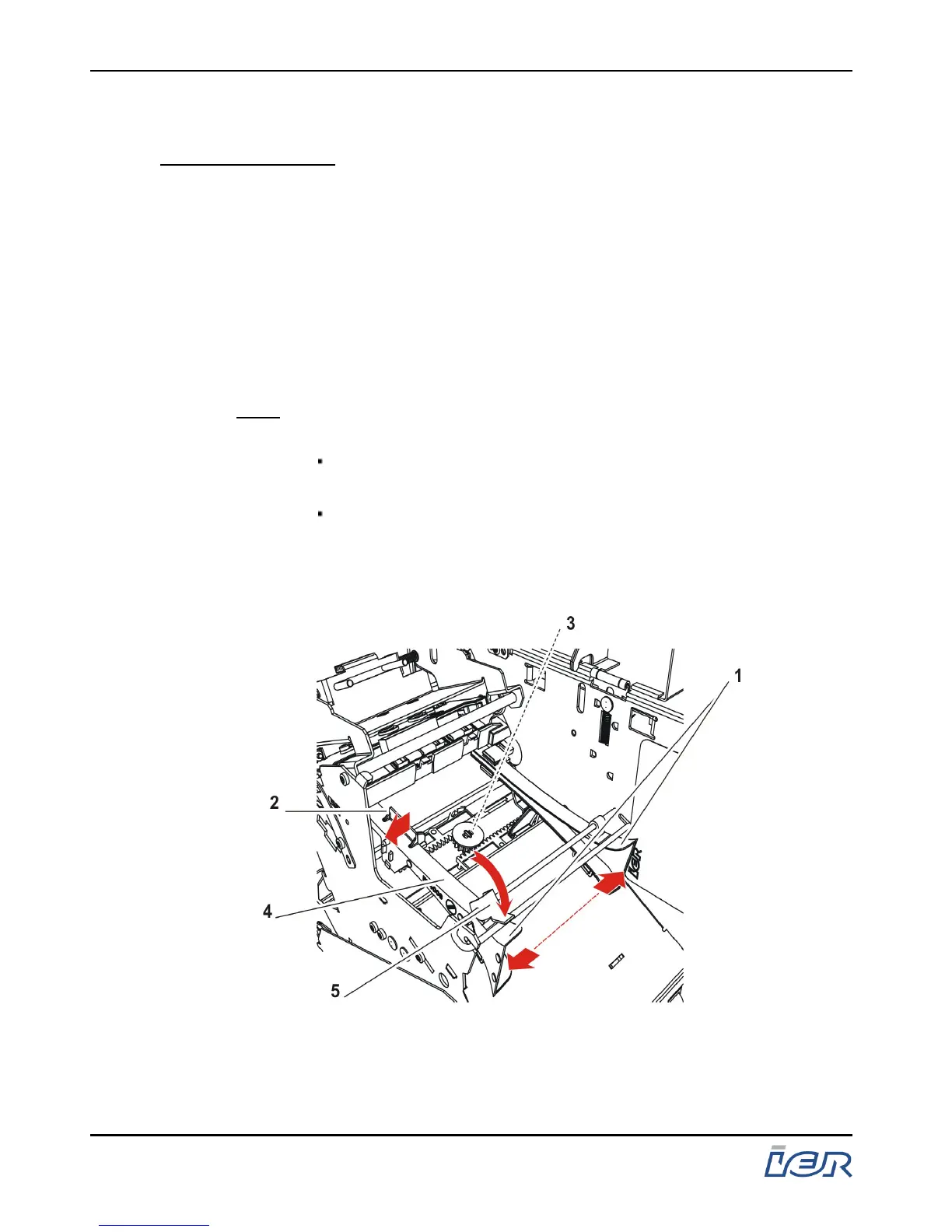
3.4 ADJUSTING THE PAPER PATH WIDTH
Preliminary Steps: - Make sure the media is correctly loaded. Refer the
corresponding section of the present User Guide.
- Switch the printer off.
3.4.1 Procedure
- Open the printer cover.
- Release the paper guide (1) locking lever (5) by rotating it
towards the rear of the printer.
- Grasp the paper guide adjustment tab (2) and pull it outwards.
Note: The following two paper guide configurations exist for the
printer:
Solely the outer guide (4) is mobile (i.e. printer version
with fixed inner paper guide), or
the two paper guides are mobile; in this case, moving
the outer paper guide moves the inner paper guide
symmetrically.
Figure 3.5
Moving the Paper Guide(s)
IER 400B
User Guide
Page 26
N0C402B Rev. 1
July 6, 2009
Ce document est la propiété d'IER et ne doit pas être reproduit ou communiqué sans autorisation écrite.
This document is the property of IER and may not be reproduced or communicated without prior written authorization



 To Next Page