Ultrasonic flow meter SU2020 SU8020 SU2021 SU8021 SU2621 SU8621
33
Frequency signal temperature:
FOU = OFF 0
2
1
3
4
5
FOU = ON 130
120
100
UL
Err
Err
= FrPx
MAW FSPx FEPx MEW
OL
100 120
[% MEW]
[% FrPx]
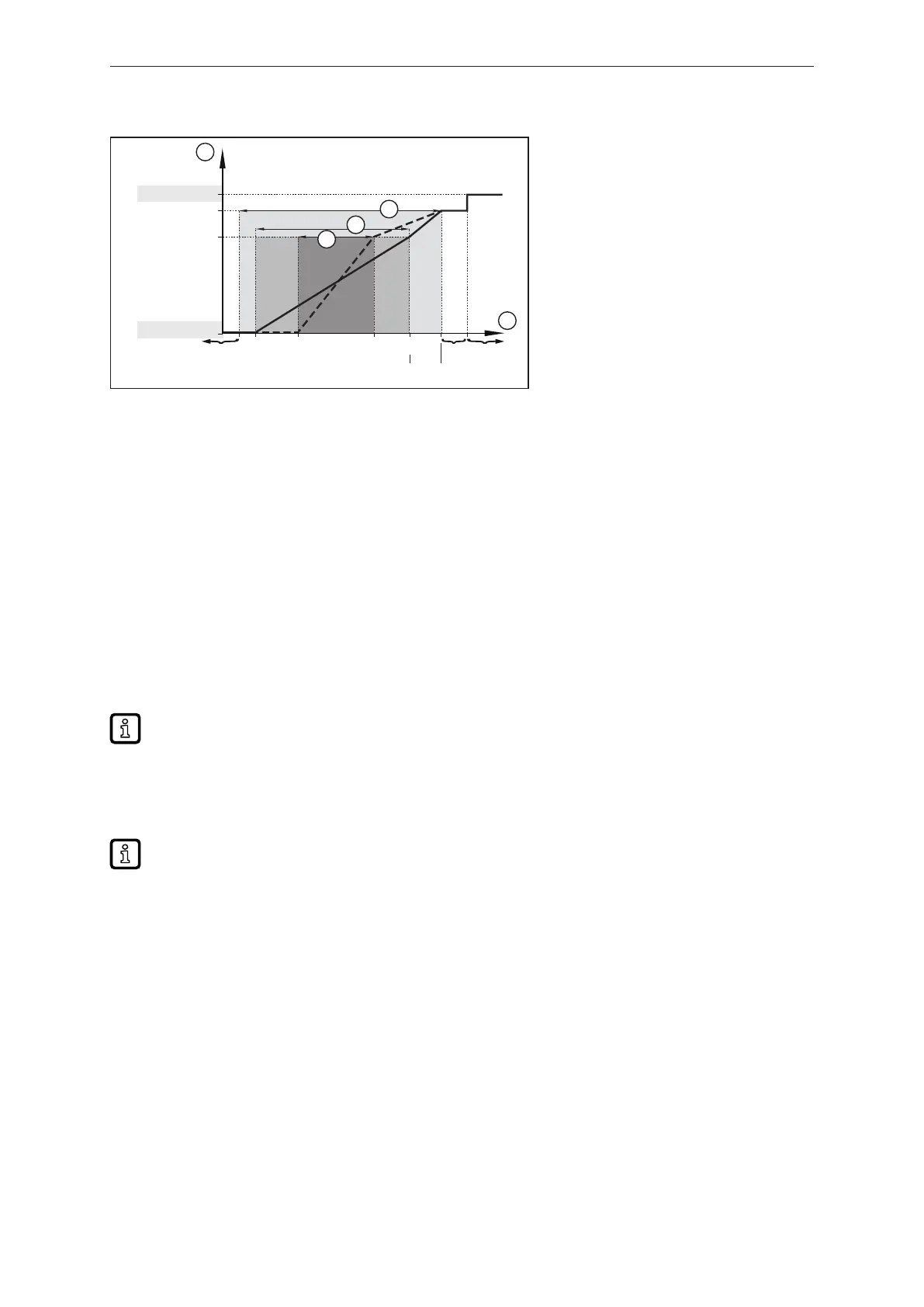
Fig.23: Output characteristics frequency output, temperature
1: Frequency signal MAW: Initial value of the measuring range
2: Temperature MEW: Final value of the measuring range
3: Display range FSPx: Frequency start point
4: Measuring range FEPx: Frequency end point
5: Scaled measuring range FrPx: Frequency signal (Hz) for upper measured value
Err: Error OL: Over limit
10.3.5.1 Parameter setting via unit keys: Frequency signal
ü Standard unit of measurement is selected: [EF] > [CFG] > [uni.x].
u Go to [EF] > [OUT1] to configure output OUT1.
u Select [SEL1] and set the process value: [FLOW] or [TEMP].
u Select [ou1] and set [FRQ].
u Select [FSP1] and set the lower measured value at which 0 Hz is output.
[FSP1] is only available for temperature measurement.
u Select [FEP1] and set the upper measured value at which the frequency set at [FrP1] (= 100 %) is
output.
u Select [FrP1] and set the frequency for the upper measured value in Hz.
The parameter settings for [FSP], [FEP] and [FrP] can be changed subsequently in the main
menu.
10.3.5.2 Parameter setting via IO-Link: frequency signal
ü Standard unit of measurement is selected: [Parameter] > [Basic settings] > [uni.x].
u Go to [Parameter] > [Output configuration].
u Select [SEL1] and set the process value: [FLOW] or [TEMP].
u Select [ou1] and set [FRQ].
u Call up [Parameters] > [Frequency Output 1].
u Select [FrP1] and set the frequency for the upper measured value in Hz.
u Call up [flow] or [temperature].
u Select [FEP1_FLOW] / [FEP1_TEMP] and set the upper measured value at which the frequency
set at [FrP1] (= 100 %) is output.
u Select [FSP1 - TEMP] and set the lower measured value at which 0 Hz is output.



 To Next Page