iMM183
Quick Start Guide
1.
Place 6 X "AA" size batteries (not supplied) into the compartment
on
the bottom of the unit. *
2.
Plug the AC adapter into a standard outlet. Plug the other end of the adapter into the
DC
jack
on the back
of
the unit.
3.
Connect the RCA plug
of
the wire antenna to the RCA jack
on
the back of unit, extend the wire
to full length.
4.
To program the Weather Channel for your area:
a.
Turn the unit off with POWERC)AL OFF on top
of
the unit.
b.
Press SETUP.
c.
Rotate the SEARCH wheel until
"2.
WB CHANNEL"
is
displays
on
the LCD screen.
d.
Press ENTER.
e.
Rotate the SEARCH wheel to scroll the weather channels manually until the weather
broadcast is found.
f.
Press ENTER to save this channel.
g.
Press SETUP to exit setup menu.
5.
Press WEATHER/HAZARD ON/OFF to listen to the weather radio. You can now receive
weather alerts for your area and surrounding areas.
* Batteries are not required, but are strongly recommended.
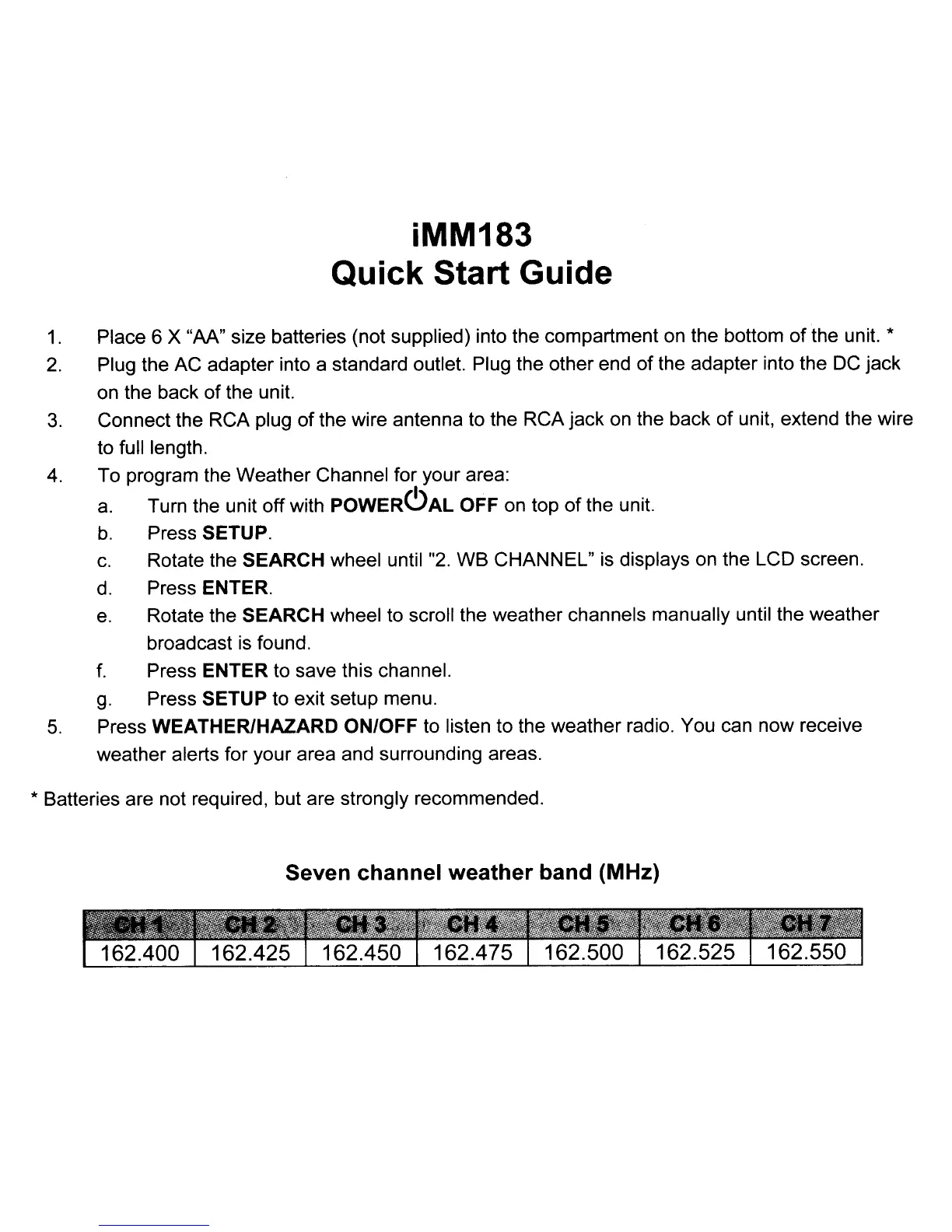
Seven channel weather band (MHz)
iMM183
Quick Start Guide
1.
Place 6 X "AA" size batteries (not supplied) into the compartment
on
the bottom of the unit. *
2.
Plug the AC adapter into a standard outlet. Plug the other end of the adapter into the
DC
jack
on the back
of
the unit.
3.
Connect the RCA plug
of
the wire antenna to the RCA jack
on
the back of unit, extend the wire
to full length.
4.
To program the Weather Channel for your area:
a.
Turn the unit off with POWERC)AL OFF on top
of
the unit.
b.
Press SETUP.
c.
Rotate the SEARCH wheel until
"2.
WB CHANNEL"
is
displays
on
the LCD screen.
d.
Press ENTER.
e.
Rotate the SEARCH wheel to scroll the weather channels manually until the weather
broadcast is found.
f.
Press ENTER to save this channel.
g.
Press SETUP to exit setup menu.
5.
Press WEATHER/HAZARD ON/OFF to listen to the weather radio. You can now receive
weather alerts for your area and surrounding areas.
* Batteries are not required, but are strongly recommended.
Seven channel weather band (MHz)



 To Next Page