47
INSTALLERUSER
MAINTENANCE TECHNICIAN
46
3.11 PROGRAMMING THE P.C.B.
e boiler is prepared for possible programming of several op-
eration parameters. By modifying these parameters as described
below, the boiler can be adapted according to specic needs.
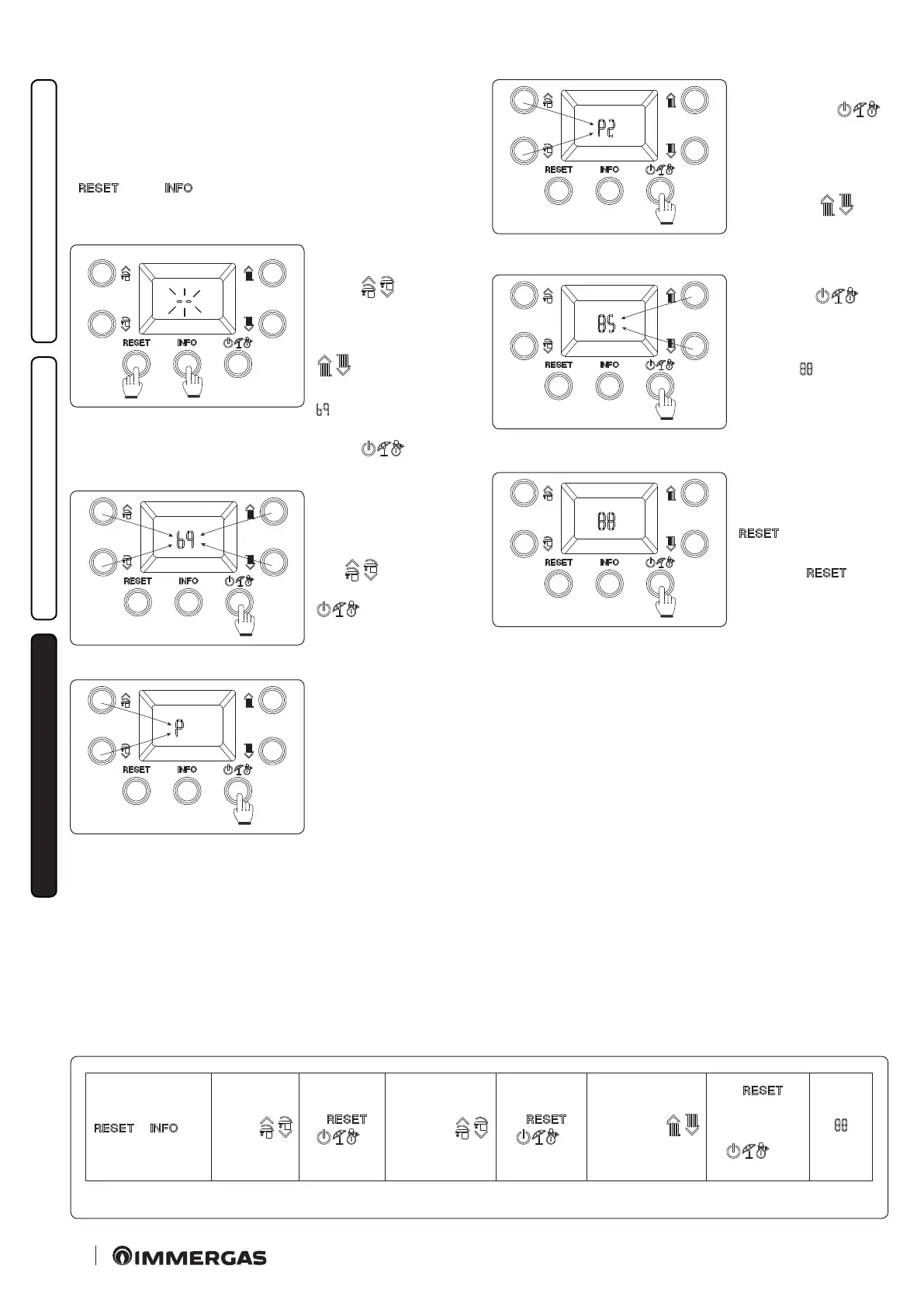
To access the programming phase, press and hold the buttons
“ ” and “ ” for more than 5 seconds, the display shows
two dashes “--” ashing and you must enter the password to access
the programming menus.
41
To enter the rst digit, use
the buttons to adjust the
DHW “ ”; to enter
the second digit, use the
buttons to adjust the cen-
tral heating temperature
“ ”.
To conrm the password
( ) and access the menu,
press the operating mode
button “ ”.
49
Once in the menu, you can
cyclically scroll the four
submenus (P, t, A, S) by
pressing the DHW but-
tons “ ”, to access the
menu press the button
“ ”.
43
e rst digit of the central
indicator (19) shows the
family of the parameter,
while the second digit
shows its number.
+ > 5’’
Menu
“P”
“t”
“A”
“S”
←
→
P0 - P5
t0 - t9
A0 - A6
S0 - S2
←
→
Value
parameter
←
(without
memorising)
> 1’’
(Memorise)
“ ”
44
Pressing the mode of op-
eration button “ ”
displays the value of the
selected parameter and by
pressing the buttons to
adjust the central heating
temperature “ ” you
can adjust its value.
45
Press the mode of opera-
tion button “ ” for
more than 1 second to
store the parameter value;
conrmation is given by
the word “ ” which ap-
pears for 2 seconds.
46
If you want to exit a pa-
rameter without changing
its value, press the button
“ ”.
Wait for 15 minutes or
press the “ ” but-
ton to exit programming
mode.
Programming phase sequence.






 To Next Page