34
STZSkW ed 12/07 ZEUS Superior kW
Technical DocumentationTechnical Documentation
Circuit board programming.
The ZEUS Superior kW boiler is prepared for eventual
programming and customisation of several functioning
parameters.
By modifying these parameters described below it will be possible
to adapt the boiler according to specic needs.
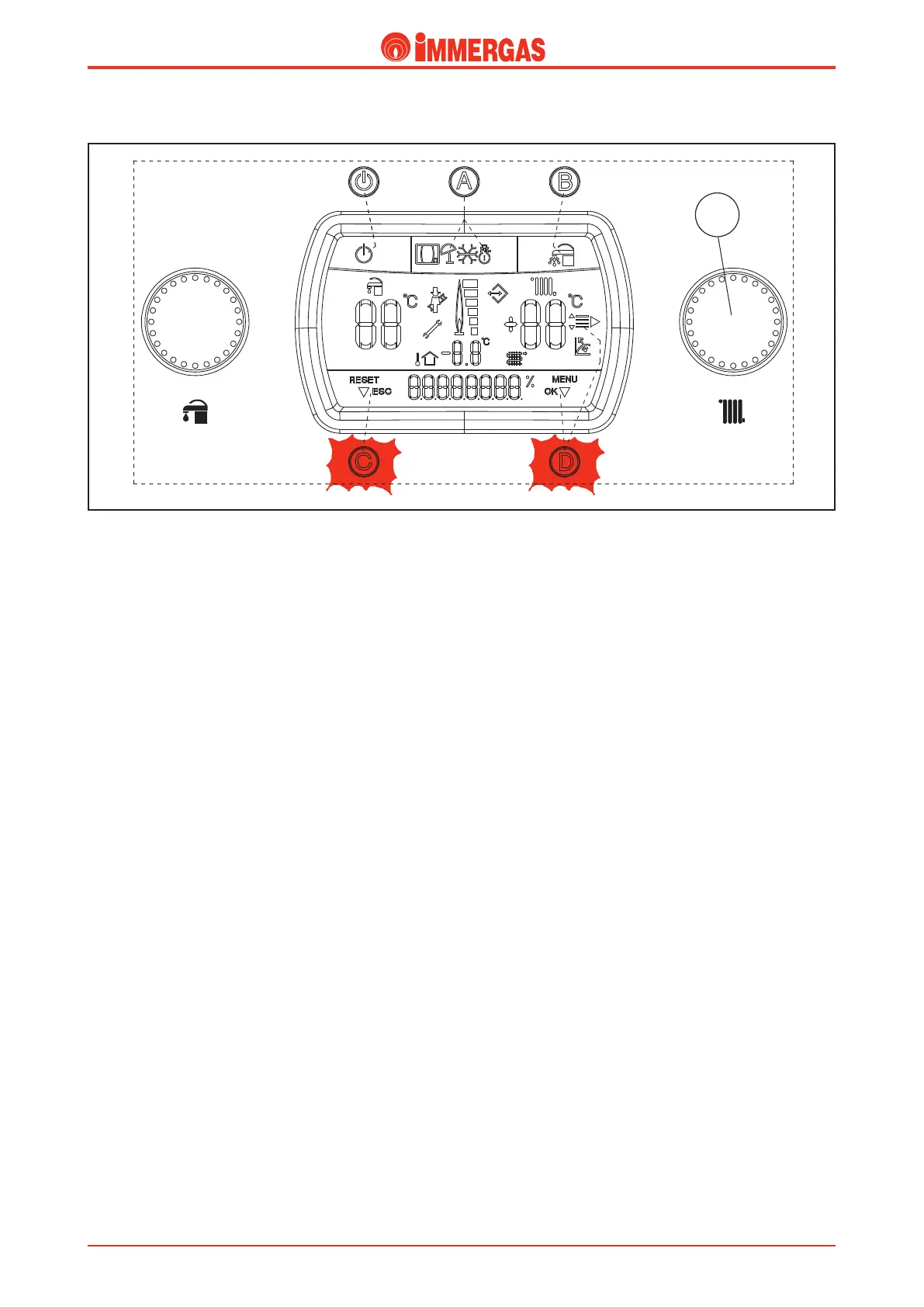
By pressing button “D” it is possible to access a menu divided
into three main parts:
- Information “M1” (INFO)
- customisation “M3” (PERS.MENU)
- congurations“M5” (CONFIG) menu reserved for the
technician, which requires an access code.
Press button “D” to access programming, turn the heating
temperature selector (3) and scroll the menu items until
reaching the desired item. Press button “D” to access the
various menu sub-levels and the choice of parameters according
to personal requirements are conrmed. By pressing button“C”
go back one level.
(e rst entry of the various options that appears inside the
parameter is that selected by default).
NB: To access the “M5” menu (reserved for the technician)
a three-gure access code must be introduced (the code is
472), which is carried out by turning the heating temperature
selector (3) until nding the correponding gure, then conrm
the selection by pressing button “D”, after which it is possible
to access the selection and modication of the parameters as
previously specied.
3
Important: if the international language is to be restored (A1),
proceed as follows:
- press button “D” to enter the conguration menu.
- turn selector switch “3” to “PERSONAL”.
- press button “D” to conrm.
- turn selector switch “3” to “DATI”.
- press button “D” to conrm.
- turn selector switch “3” to “LINGUA”.
- press button “D” to conrm.
- turn selector switch “3” to “A-1”.
- press button “D” to conrm.
At this point the international items indicated in the menu
tables appear on the display.




 To Next Page