35
STZSkW ed 12/07 ZEUS Superior kW
Technical Documentation
Technical Documentation
1st
Level
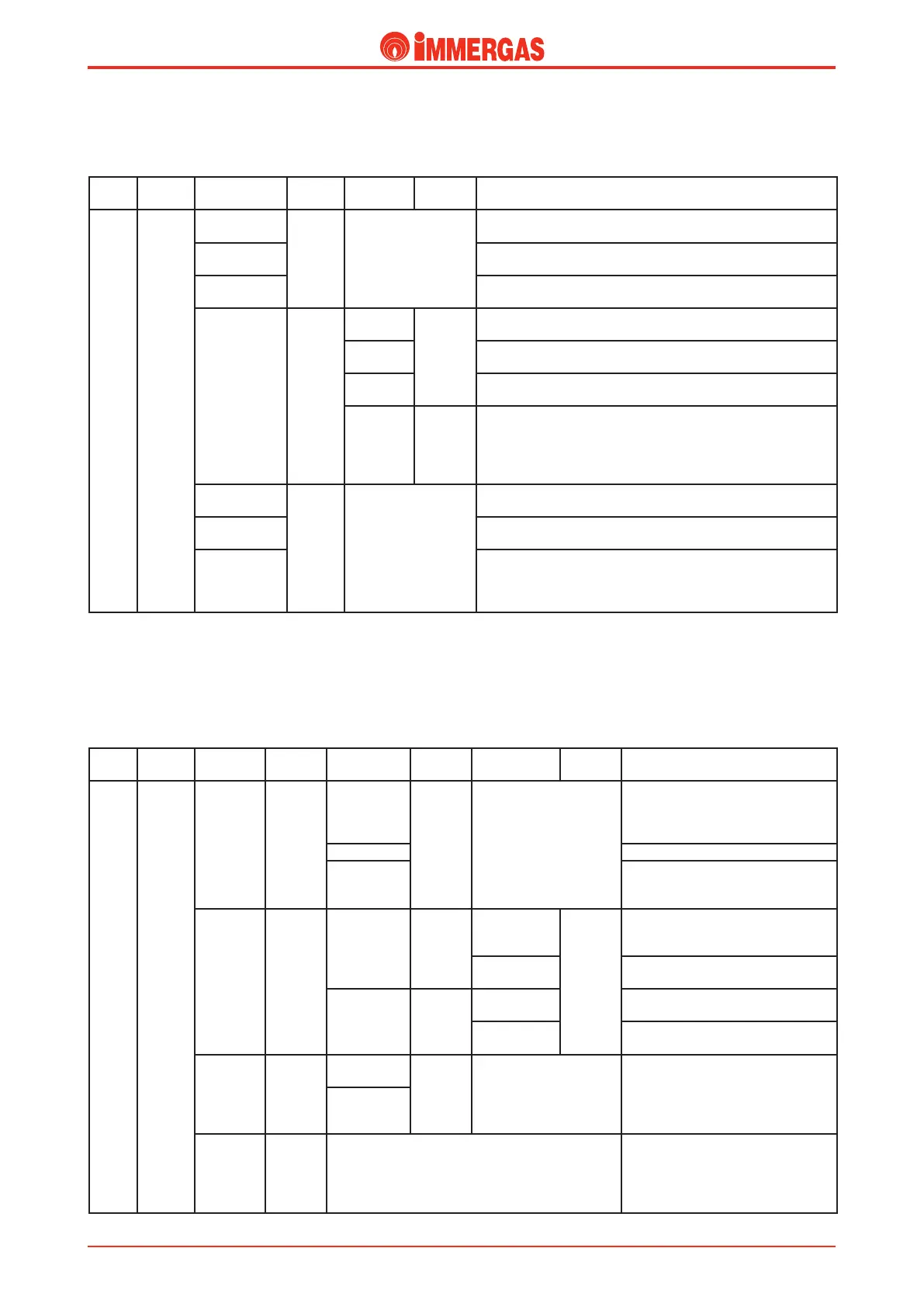
Button 2nd Level Button 3rd Level Button Description
M1 (INFO)
D
C
P11
(SOFTWARE)
D
C
Displays the management software version of the circuit board installed
in the boiler
P12
(HEAT.TIME)
Displays the total operating hours of the boiler
P13
(IGNIT.NR)
Displays the number of burner ignitions
P14
(OUTSIDET.)
(with optionall
external probe
present)
--
(NO EXT.P.)
(without optional
external probe
present)
D
C
P14/A
(CURRENT)
Displays the current external temperature (if external probe is present
Optional)
P14/B
(OUT T.MIN)
Displays the minimum external temperature recorded (if external probe is
present Optional)
P14/C
(OUT T.MAX)
Displays the maximum external temperature recorded (if external probe is
present Optional)
RESET
D
x
selection
C
By pressing button“D” the MIN and MAX temperatures measured are
reset
P15
(DHW FLOW)
D
C
No display for this model
P17
(FANSPEED)
Displays the percentage speed of instantaneous rotation of the fan (from
0 to 100%)
P19
(FAILURE)
Displays the last 5 events that have caused the boiler to shutdown. e
sequential number from 1 to 5 along with the relative error code.
By pressing button “D” repeatedly, it is possible to display opeating times
and the number of ignitions where the anomaly took place.
Information menu M1 (INFO). is menu contains the
various information relative to boiler operations:
1st
Level
Button 2nd Level Button 3rd Level Button 4th Level Button Description
M3 (PERS. MENU)
D
C
P31
(DISPLAY)
D
C
(LIGHT)
AUTO
(Default)
D
x
selection
C
e display lights up when the burner is
on and when the controls are accessed.
It remains on for 5 seconds after the last
operation performed.
(LIGHT) ON e display is always lit.
(LIGHT) OFF
e display only lights up when the
controls are accessed and remains on for 5
seconds after the last operation performed.
P32
(DISP.
DATA)
D
C
P32/A
(DISP.DESC.)
D
C
P32/A.1
(CH.TEMP.)
(Default)
D
x
selection
C
e indicator displays the output
temperature from the primary heat
exchanger
P32/A.2
(OUTSIDET.)
e indicator displays the current external
temperature (with external probe Optional)
P32/B
(LANGUAGE)
D
C
ITALIAN
(Default)
All descriptions are given in Italian.
A1
(ALPHANUM)
All descriptions are given in Alphanumeric
mode.
P33
(EMER-
GENCY)
D
C
OFF
(EMERG.)
D
x
selection
C
By activating this function in winter mode,
the room heating function can be activated
even if the Remote Control or TA are out
of order.
ON
(EMERG.)
RESET
(RESET
ALL)
D
x
selection
C
By pressing button “D” the customisations
made are reset, restoring the values set in
the factory
Customisations menu M3 (PERS.MENU). Ais menu
contains all operating options that can be customised. (e
rst entry of the various options that appears within the para-
meter is that selected by default).




 To Next Page