22
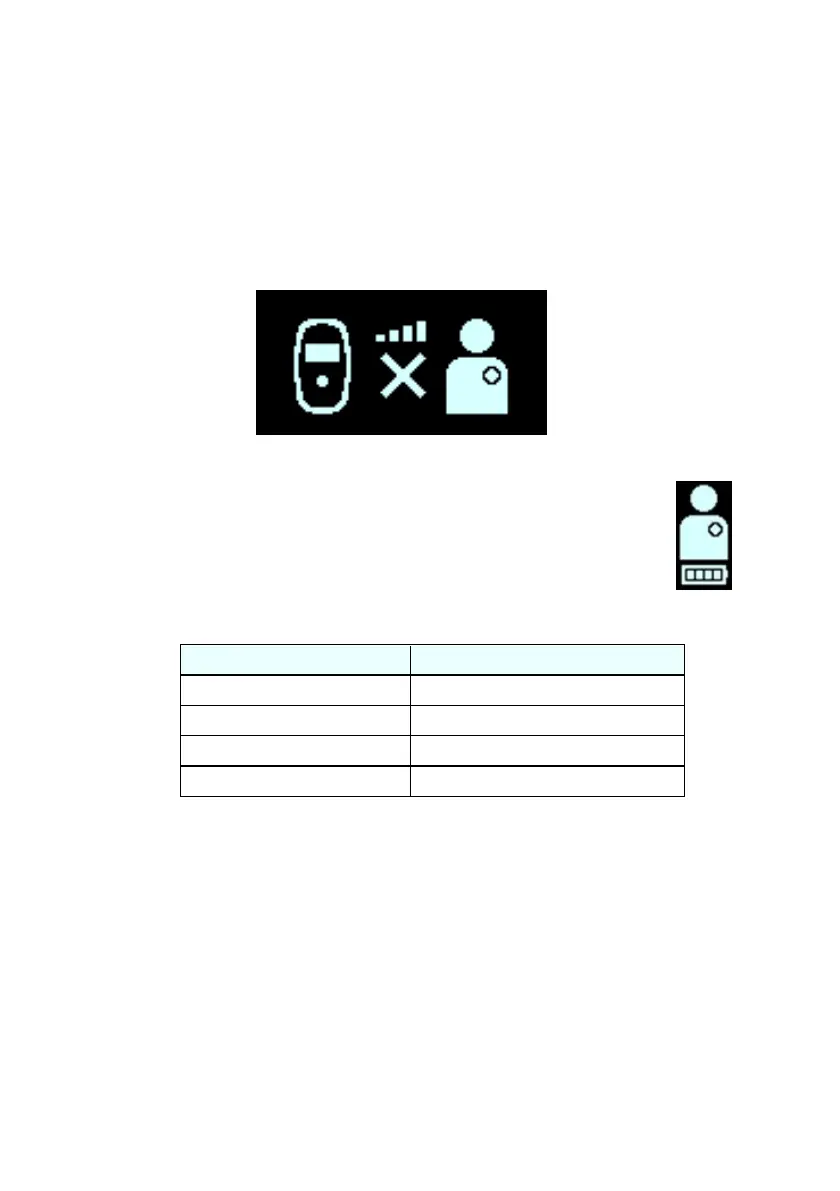
Note: Zero illuminated bars on the Coupling Level icon
accompanied by an audible beeping tone indicates poor
placement of the charging wand. If the charging wand is
not repositioned onto your implant site within 20 seconds,
your Guardio Charger will emit 3 long beeping tones,
display the Charging IPG Coupling Error screen (see
Figure 18), and then shut off. If this occurs, press the
Power Button again to initiate a new charging session.
Figure 18: Charging IPG Coupling Error Screen
7. The number of bars on the Charging IPG Battery
icon (see icon image on the right) depicts the
current charge level of the rechargeable battery in
your OPTIMIZER Integra CCM-D IPG. See Table
2.
Table 2: OPTIMIZER Integra CCM-D IPG Battery Charge Levels
2 bars, last one flashing
3 bars, last one flashing
4 bars, last one flashing
8. The Charging IPG Status screen (see Figure 17) will
continue to be displayed as your OPTIMIZER Integra
CCM-D IPG is being charged.
Caution: If any part of the charger becomes uncomfortably
warm at any time during the charging session, remove it from
your body and place it on a non-flammable surface. Then, if
possible, terminate the charging session by pressing the
Power Button for 1-2 seconds and then releasing it.
Note: It is recommended that you remain stationary during the
charging process. If the charging wand becomes significantly


 To Next Page