VGC
TM
SEQUENTIAL VALVE GATE CONTROL
INSTRUCTION MANUAL
©INCOE® CORPORATION 2/2009
Pg.
www.incoe.com
2.3 MANUAL MODE
The manual mode is to open or close the valve
gates manually in order to make sure that everything
is functioning before production.
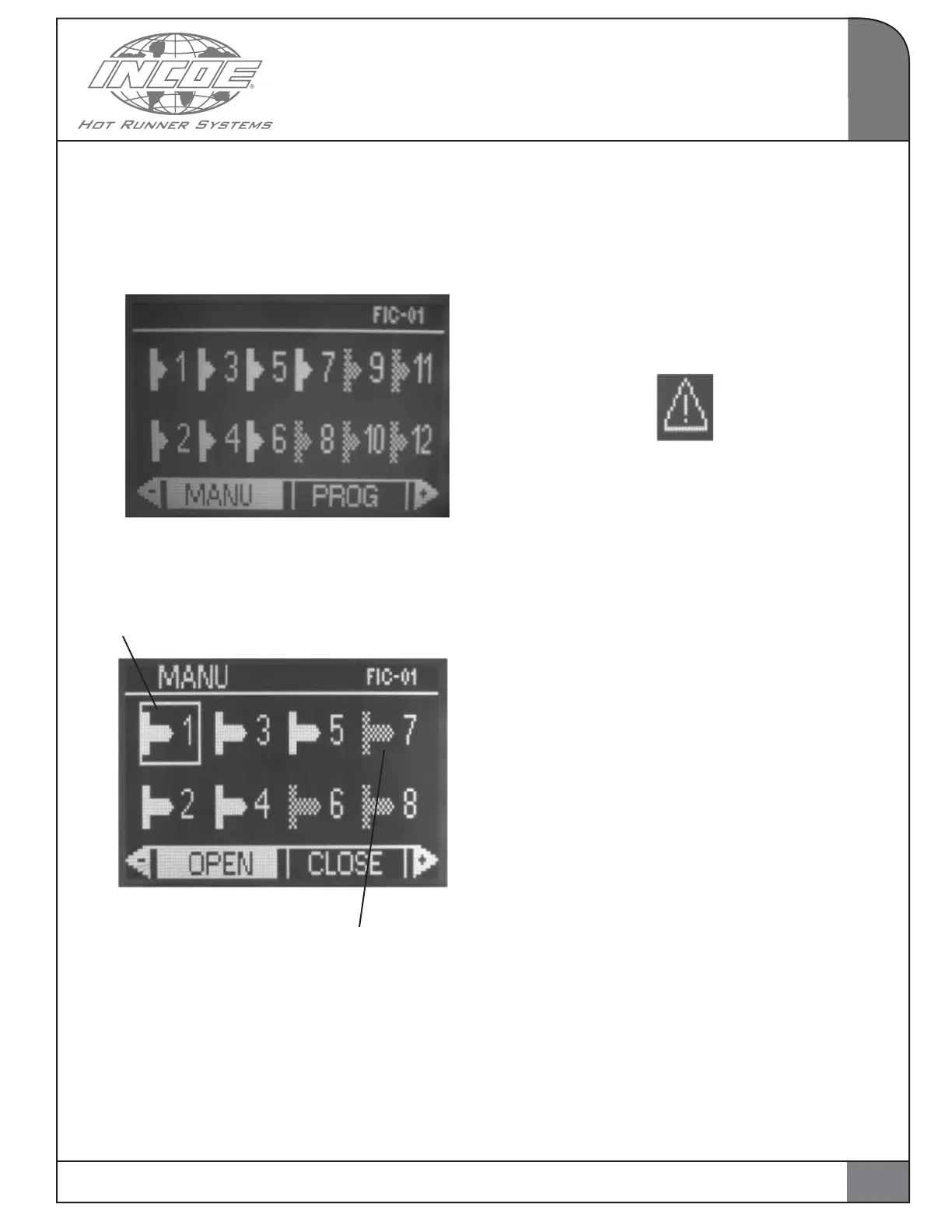
Select and validate the MANU function from the
main page. The page below is displayed.
Selection frame
Valve gate output is disabled (OFF)
OPERATION
2
* The shadowed icon means that the valve gate
output is disabled (not used).
* This valve gate output receives a command for
closing during the injection cycle.
* The white icon means that the valve gate output
is enabled.
* A valve gate output under alarm is displayed in
this way:
Important notice: Select a valve gate output us-
ing the arrows for moving up and down. Select
a command using the arrows for moving left or
right for opening (OPEN), for closing (CLOSE), or
for stopping the preceding command (STOP), for
selecting a single valve gate output (SELECT) or
all channels (ALL).
OPEN: Permanent command for opening a valve
gate.
CLOSE: Permanent command for closing a valve
gate.
STOP: For stopping previous commands for
opening or closing.
SELECT: To select or unselect a valve gate output.
ALL: To select or unselect all valve gate outputs in
the configuration.
Important Notice: No valve gate can be opened or
closed if the hydraulic power pack is switched off
and/or if the alarm contact is validated.
11


 To Next Page